Geekzone: technology news, blogs, forums
Guest
Welcome Guest.
You haven't logged in yet. If you don't have an account you can register now.


schnopp

31 posts

Geek
+1 received by user: 5


#319066 19-Mar-2025 11:56
Send private message

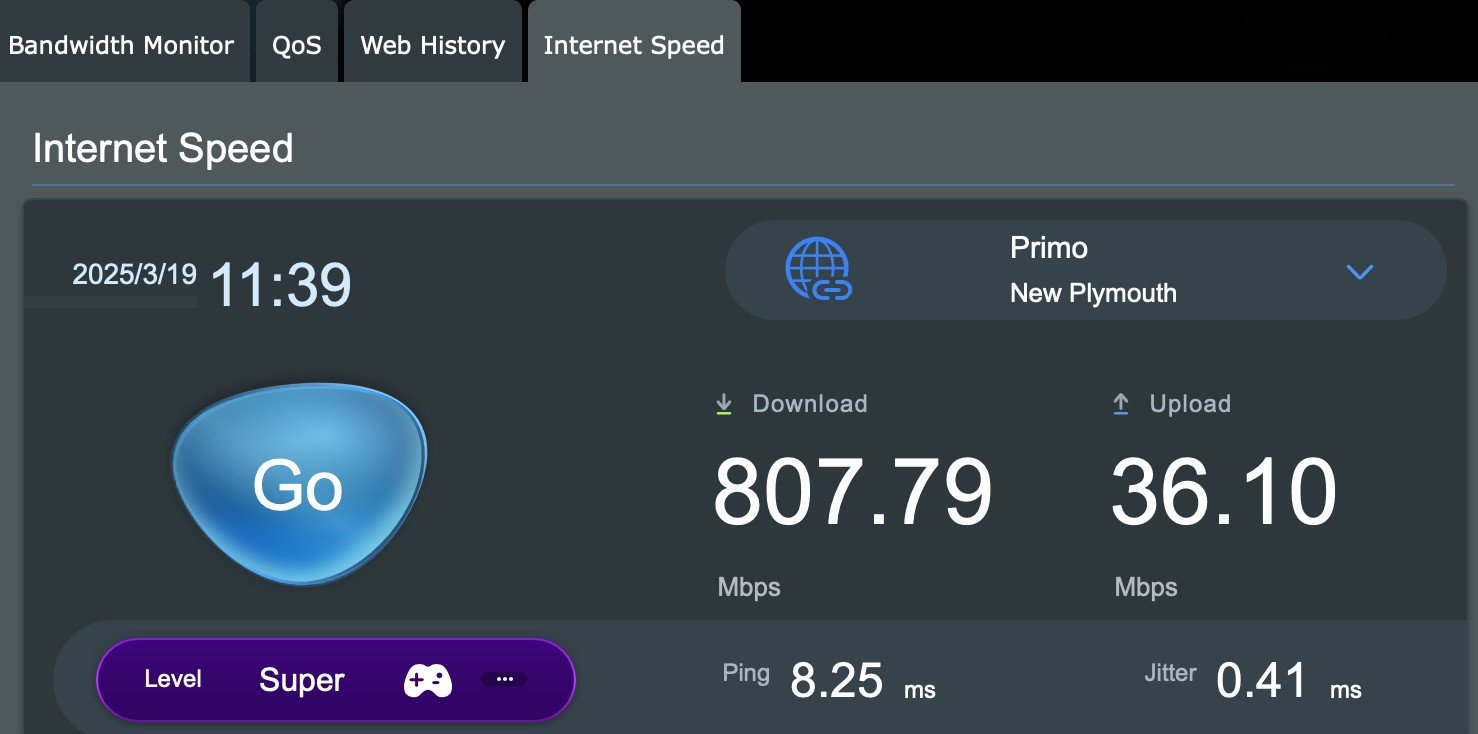
I have Spark Max Fibre broadband. I am using an ASUS XT8 router. The fastest upload speed I get from the router is 40 Mbps.To test this I used a factory reset router connected to the ONT and a single computer by wifi. The speed test is directly from the router. 


I recently had a problem sending 40 g diagnostic data to Apple, a couple of dropped connections and an interminable wait.


Download is 800-900 Mbps.


PBTech reviewed the router and said it works fine and showed me a printout of 250 Mbps upload speed.


I reported this problem to Spark and they said not our router, not our problem.


I would appreciate any help in resolving this issue please:


Could it be the ONT? Chorus don't seem to accept direct troubleshooting issues. 


Could it be the modem anyway?


Should Spark try harder?


Thank you


Guy


View this topic in a long page with up to 500 replies per page Create new topic
 1 | 2 | 3
Talkiet
4822 posts

Uber Geek
+1 received by user: 3941

Trusted

  #3355122 19-Mar-2025 12:02
Send private message

I see you tested using Wifi. What results do you get testing with an ethernet cable?


Cheers - N


Please note all comments are from my own brain and don't necessarily represent the position or opinions of my employer, previous employers, colleagues, friends or pets.


schnopp

31 posts

Geek
+1 received by user: 5


  #3355123 19-Mar-2025 12:06
Send private message

Sorry I didn't make it clear. Test was built in modem test, directly via cable to ONT. The wireless was only so I could tell the modem what to do.


Talkiet
4822 posts

Uber Geek
+1 received by user: 3941

Trusted

  #3355135 19-Mar-2025 12:08
Send private message

That's testing offnet. What do you get using speedtest.net to a Spark speedtest server from a wired device?


Cheers - N


Please note all comments are from my own brain and don't necessarily represent the position or opinions of my employer, previous employers, colleagues, friends or pets.


freitasm
BDFL - Memuneh
80948 posts

Uber Geek
+1 received by user: 41713

Administrator
ID Verified
Trusted
Geekzone
Lifetime subscriber

  #3355136 19-Mar-2025 12:09
Send private message

Talkiet:


I see you tested using Wifi. What results do you get testing with an ethernet cable?


The OP wrote "The speed test is directly from the router." so I assume it's an internal test tool, not from a LAN client.


To @schnopp:


  • Which server is the router using for testing?
  • Can you plug a computer directly to the ONT and test to the Chorus Lab instead?


Referral links: Quic Broadband (free setup code: R587125ERQ6VE) | Samsung | AliExpress | Wise | Sharesies 


Support Geekzone by subscribing (browse ads-free), or making a one-off or recurring donation through PressPatron.


freitasm
BDFL - Memuneh
80948 posts

Uber Geek
+1 received by user: 41713

Administrator
ID Verified
Trusted
Geekzone
Lifetime subscriber

  #3355137 19-Mar-2025 12:10
Send private message

@schnopp I see the screenshot posted before my reply was in.


Why use the Primo server? Why not use a Spark server for testing?


Referral links: Quic Broadband (free setup code: R587125ERQ6VE) | Samsung | AliExpress | Wise | Sharesies 


Support Geekzone by subscribing (browse ads-free), or making a one-off or recurring donation through PressPatron.


schnopp

31 posts

Geek
+1 received by user: 5


  #3355139 19-Mar-2025 12:14
Send private message

I assumed that modem would provide purest result. It chose the out of town server.


Testing from wired connected device via local servers only gives me 40Mbps upload which is what got me started.


Stream your favourite shows now on Apple TV (affiliate link).
freitasm
BDFL - Memuneh
80948 posts

Uber Geek
+1 received by user: 41713

Administrator
ID Verified
Trusted
Geekzone
Lifetime subscriber

  #3355143 19-Mar-2025 12:38
Send private message

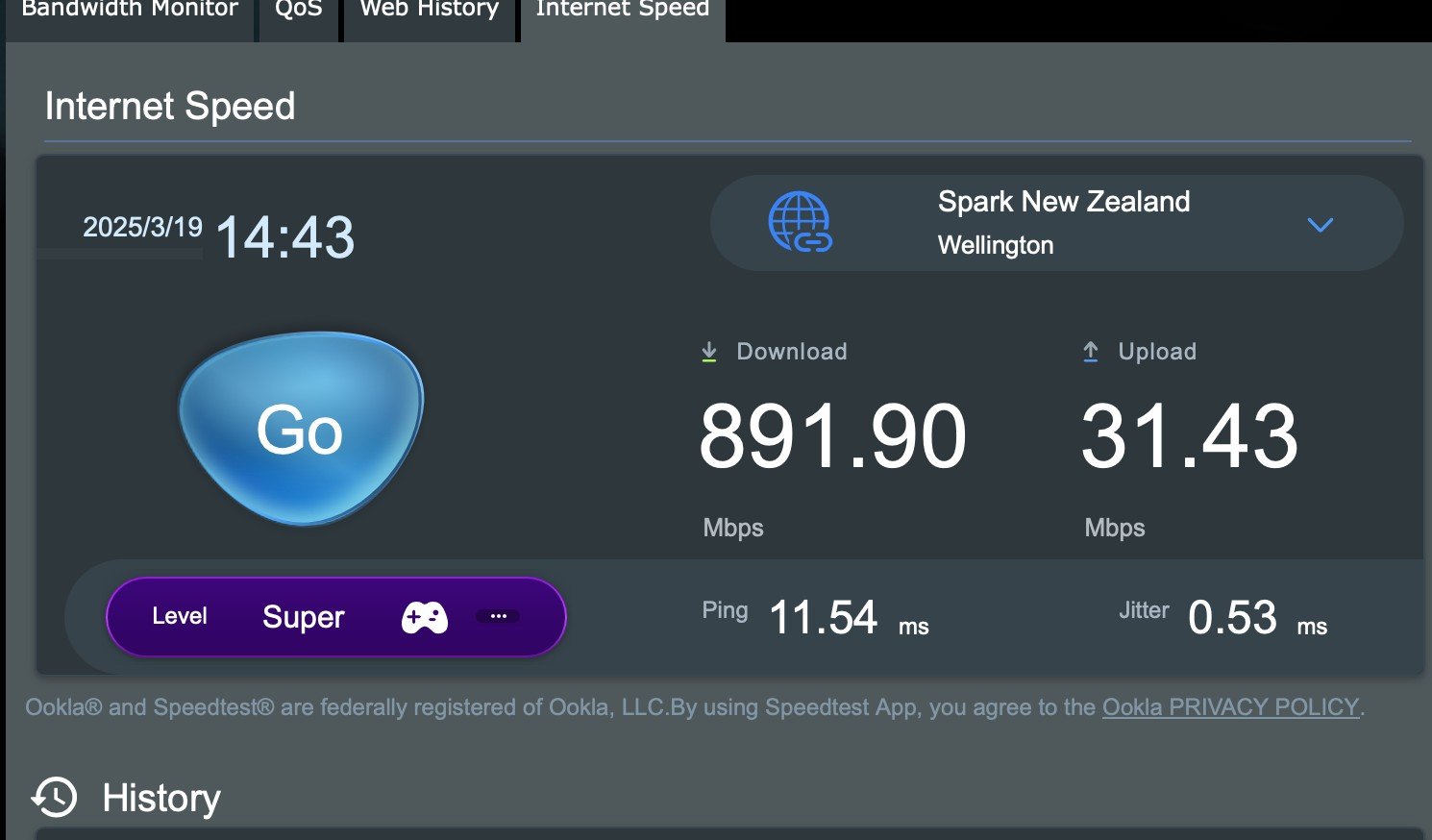
Try testing to a Spark server.


Referral links: Quic Broadband (free setup code: R587125ERQ6VE) | Samsung | AliExpress | Wise | Sharesies 


Support Geekzone by subscribing (browse ads-free), or making a one-off or recurring donation through PressPatron.


cbrpilot
965 posts

Ultimate Geek
+1 received by user: 563

Trusted
Spark NZ

  #3355147 19-Mar-2025 12:51
Send private message

Can you PM me your details and I will take a look.


Thanks.


My views are my own, and may not necessarily represent those of my employer.


schnopp

31 posts

Geek
+1 received by user: 5


  #3355206 19-Mar-2025 14:46
Send private message

Spark Server


freitasm
BDFL - Memuneh
80948 posts

Uber Geek
+1 received by user: 41713

Administrator
ID Verified
Trusted
Geekzone
Lifetime subscriber

  #3355225 19-Mar-2025 15:15
Send private message

Thanks. Certainly seems to be a connection problem.


Referral links: Quic Broadband (free setup code: R587125ERQ6VE) | Samsung | AliExpress | Wise | Sharesies 


Support Geekzone by subscribing (browse ads-free), or making a one-off or recurring donation through PressPatron.


nztim
4072 posts

Uber Geek
+1 received by user: 2783

ID Verified
Trusted
TEAMnetwork
Subscriber

  #3355226 19-Mar-2025 15:18
Send private message

Is this a limitation of the router?


What speed do you get if you simply plug a device into the LAN and run a speed test (no wifi)


Other than that, take up @cbrpilot offer


Any views expressed on these forums are my own and don't necessarily reflect those of my employer. 


Shop now at Mighty Ape (affiliate link).
schnopp

31 posts

Geek
+1 received by user: 5


  #3355227 19-Mar-2025 15:23
Send private message

The test is via wired. I only mentioned wifi because I had a single connection to allow me to control the router from my laptop.


freitasm
BDFL - Memuneh
80948 posts

Uber Geek
+1 received by user: 41713

Administrator
ID Verified
Trusted
Geekzone
Lifetime subscriber

  #3355228 19-Mar-2025 15:28
Send private message

schnopp:


The test is via wired. I only mentioned wifi because I had a single connection to allow me to control the router from my laptop.


Tim's suggestion is similar to my question before "Can you plug a computer directly to the ONT and test?"


This would eliminate the router as a problem.


Referral links: Quic Broadband (free setup code: R587125ERQ6VE) | Samsung | AliExpress | Wise | Sharesies 


Support Geekzone by subscribing (browse ads-free), or making a one-off or recurring donation through PressPatron.


nztim
4072 posts

Uber Geek
+1 received by user: 2783

ID Verified
Trusted
TEAMnetwork
Subscriber

  #3355231 19-Mar-2025 15:34
Send private message

schnopp:


The test is via wired. I only mentioned wifi because I had a single connection to allow me to control the router from my laptop.


Take your laptop, plug it in with an Ethernet cable into a LAN port on your router, fire up speedtest.net site and post results


if you laptop/pc does not have a ethernet port then this obviously isn't going to work


Any views expressed on these forums are my own and don't necessarily reflect those of my employer. 


nztim
4072 posts

Uber Geek
+1 received by user: 2783

ID Verified
Trusted
TEAMnetwork
Subscriber

  #3355232 19-Mar-2025 15:34
Send private message

freitasm:]


Tim's suggestion is similar to my question before "Can you plug a computer directly to the ONT and test?"


This would eliminate the router as a problem.


ahhh beat me to it!


Any views expressed on these forums are my own and don't necessarily reflect those of my employer. 


 1 | 2 | 3
View this topic in a long page with up to 500 replies per page Create new topic


Geekzone Live »

Try automatic live updates from Geekzone directly in your browser, without refreshing the page, with Geekzone Live now.


Are you subscribed to our RSS feed? You can download the latest headlines and summaries from our stories directly to your computer or smartphone by using a feed reader.