|
|
|
Goran: Hello nickb800,
Did you use any capital letters when you created your email account?
(Ex: Name@xtra.co.nz).
My understanding is that if you do so, an additional username is created
without any capital letters.
(Ex: name@xtra.co.nz).
Telecom has tonight begun cancelling the current passwords of around 60,000 Yahoo! Xtra email accounts it believes to have been compromised following a cyber attack last weekend.
These additional 60,000 customers, on top of the existing 15,000 that Telecom has been contacting over the past few days, will now be required to enter new password information when logging into their email account.
The move by Telecom is aimed at protecting its email customers and preventing information contained within their emails being accessed although to date there is no confirmed evidence, by Yahoo!, that this has occurred.
Telecom CEO Retail Chris Quin says 60,000 of the 450,000 Yahoo! Xtra customers have changed their password since last weekend but updated details on compromised accounts means the best way to protect customers is to cancel the current passwords of these additional 60,000 accounts.
“We’re taking this matter very seriously,” says Mr Quin, “and urge those whose passwords have been cancelled to create new passwords. However, it’s advisable for all others that have not changed their password, to do so immediately both on their computer but also on mobile devices and tablets. We continue to be sorry for any distress caused or inconvenience this has caused and reinforce that in today’s online world regular password changes are an important need.”
Telecom Yahoo! Xtra customers are encouraged to visit Telecom’s website, www.telecom.co.nz, as well as Yahoo! NZ’s, for updates regarding this issue.
Referral links: Quic Broadband (free setup code: R587125ERQ6VE) | Samsung | AliExpress | Wise | Sharesies
Support Geekzone by subscribing (browse ads-free), or making a one-off or recurring donation through PressPatron.

Telecom is asking Yahoo! Xtra customers to please be patient when contacting its customer service team with call volumes extraordinarily high.
Last night Telecom temporarily cancelled the current passwords of around 60,000 Yahoo! Xtra email customers in a bid to protect them from having their emails accessed following a cyber attack which began last Saturday (9th February).
Telecom has added additional customer service resourcing to assist customers with queries but call volumes have been increasing significantly over the past 12 hours along with wait times.
Telecom’s GM Customer Experience, Trish Keith says call centre staff across the country, and in Manila, are doing their best to assist as many customers with password change queries, as quickly as possible.
“Our staff are doing their very best to get to calls as quickly as possible but the volume is significantly high. The quickest and easiest way for customers to take corrective action themselves is by going online and changing their password on both their computers and mobile devices.
“We’re asking customers that do need to call us, to be please be patient given the magnitude of this issue and the resulting high call volume. We’re hugely sorry for the inconvenience this situation is causing our customers and trying our best to assist them both through our call centres but also through email information and social media.”
Referral links: Quic Broadband (free setup code: R587125ERQ6VE) | Samsung | AliExpress | Wise | Sharesies
Support Geekzone by subscribing (browse ads-free), or making a one-off or recurring donation through PressPatron.
freitasm: Received this today:
Telecom is asking Yahoo! Xtra customers to please be patient when contacting its customer service team with call volumes extraordinarily high.
pegi: I've got another issue.
Every morning when I turn my computer and Outlook on, message comes up that the Outlook can't connect to Xtra email server and it's suggesting to check my PW.
But I noticed the other day that when I go to my yahoo/xtra webmail account and use the same password (that is not working in Outlook) I can log in and see all my emails.
When I click on Send/Receive Emails button in my Outlook after I logged in my webmail I can download my emails and everything works fine until I turn my computer off and turn it back on next morning. I have to do it all over again.
I changed my password after the Saturday issue week ago.
Does anyone has an idea what can cause that?
Thanks

plambrechtsen:pegi: I've got another issue.
Every morning when I turn my computer and Outlook on, message comes up that the Outlook can't connect to Xtra email server and it's suggesting to check my PW.
But I noticed the other day that when I go to my yahoo/xtra webmail account and use the same password (that is not working in Outlook) I can log in and see all my emails.
When I click on Send/Receive Emails button in my Outlook after I logged in my webmail I can download my emails and everything works fine until I turn my computer off and turn it back on next morning. I have to do it all over again.
I changed my password after the Saturday issue week ago.
Does anyone has an idea what can cause that?
Thanks
Normally it should only happen once.
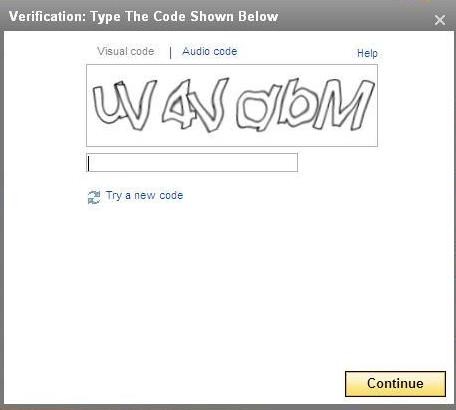
After you change your password via the changepassword URL, then you need to update your Outlook Password... Then you need to login to WebMail and make sure you complete any Captcha request on the Yahoo Web Site when accessing Yahoo Web Mail via http://nz.mail.yahoo.com and then you're away. The Captcha login should look like:
And if you don't get a code you can read, click "Try a new code" and you should be able to login, or click "Audio Code" and it should play through your computer.. However I have found that is really hard to understand the crazy voice. But that's just me :)
|
|
|