Geekzone: technology news, blogs, forums
Guest
Welcome Guest.
You haven't logged in yet. If you don't have an account you can register now.


View this topic in a long page with up to 500 replies per page Create new topic
1 | 2 | 3
akia

489 posts

Ultimate Geek
+1 received by user: 3

Trusted

  #468844 13-May-2011 16:59
Send private message

dazz1: Linux version???


I've raised that with the product team as we got a query through Twitter.


grant_k
3539 posts

Uber Geek
+1 received by user: 124

Trusted

  #468988 14-May-2011 08:50
Send private message

akia:
grant_k: I just tried out this new software and all went well for about 5 mins, then my connection froze.  The "Connect Me" dashboard said that I was still connected, but no websites would load, no matter how many I tried.  Then I disconnected and reconnected, and tried various websites again, but still no go.  Tried a total of 3 times before giving up.

Maybe Telecom's network had an outage upstream somewhere.  Connect Me showed 3 bars at all times, even though nothing was happening.

We are going away for the weekend, and I hope this doesn't mean that our Mobile Broadband is going to be flaky, just when I was counting on it.  Hopefully I've still got a copy of the old software on the T-Stick so I can reinstall it if necessary...

Running on Windows 7 Professional 32-bit SP1.


Can you give 123 a call and give them some details, flick me through a fault number and I"ll make sure the product managers are aware of this.

Once again the XT network is going like greased lightning this morning -- super fast!

But last night was a very different story; my connection kept freezing after just a few seconds or minutes at best, meaning that I needed to keep disconnecting and reconnecting.  I tried the same T-Stick on my wife's laptop as well (running the older Telecom software) with exactly the same result.  So it seems to be a fault with either the MF636 or the XT network.  3 bars of coverage where I am, so the network shouldn't be a problem.

Simply don't have time to phone 123, but can PM details if needed.


jmosen
551 posts

Ultimate Geek
+1 received by user: 134

Lifetime subscriber

  #468994 14-May-2011 09:13
Send private message

Sadly, the new Connect Me software is a huge step backward from my perspective.

I'm blind and use screen reading software. The previous software I had, which I'll now reinstall, was tolerable if not fully accessible. Connect Me on the other hand is 100% inaccessible with screen readers. It doesn't show a single thing to screen readers at all, it's as if the application doesn't exist. This makes it impossible for screen reader users to use XT for mobile broadband with this software.

All a bit of a sad contrast to Vodafone who's software is very screen reader friendly.

Telecom used to take accessibility seriously, but given this, and the CAPTCHA on XT just to get a password sent to your mobile, they've clearly lost that sense of commitment, at least in mobile.


Jonathan


akia

489 posts

Ultimate Geek
+1 received by user: 3

Trusted

  #469042 14-May-2011 12:19
Send private message

@jmosen - here is a response from Telecom's product manager for mobile broadband:

Hi Jonathan,

Sincere apologies that this has not been addressed by our first release of Connect Me. I am committed to making this product a great tool for all our Mobile Broadband customers and will seek to prioritise this in our roadmap. One of the advantages of this product is that we have a central server that can keep the clients up to date with improvements and new features. I will work towards addressing this in a future release.

Which software are you currently using, the ZTE or Sierra Wireless version?

Regarding the password module, I have been driving a change to this for some time now and already have a project underway to improve usability including removing the captcha. This is linked to the work that we've already done with Smartphone's and now being able to log in to Your Telecom without logging in: http://www.geekzone.co.nz/forums.asp?forumid=39&topicid=82678

Kind Regards
Jonathan Scott
Product Manager - Mobile Broadband

jmosen
551 posts

Ultimate Geek
+1 received by user: 134

Lifetime subscriber

  #469045 14-May-2011 12:33
Send private message

That's an excellent response, really heartened by that, thank you.

If I can assist in any way with testing or UI advice, I'm happy to.

I'm currently using the Sierra Wireless client. It's dodgy from an accessibility perspective, but I can make it work.


Jonathan


akia

489 posts

Ultimate Geek
+1 received by user: 3

Trusted

  #469472 16-May-2011 07:54
Send private message

jmosen: That's an excellent response, really heartened by that, thank you.

If I can assist in any way with testing or UI advice, I'm happy to.

I'm currently using the Sierra Wireless client. It's dodgy from an accessibility perspective, but I can make it work.


Thanks for that Jonathan, I'll make sure the team know that you're available to help if they need assistance.


Shop now for Dyson appliances (affiliate link).
mort
29 posts

Geek


  #469984 17-May-2011 09:39
Send private message

I'd be interested to see your review.

Also keen to hear from anyone using it to switch between WiFi and 3G connections. I've set up mine to automatically switch to my home and work WiFi networks when in range and then 3G anywhere else ? it?s working well. Just adjust the priority of your connection profiles up and down in the 'Profiles' section.

nate
6473 posts

Uber Geek
+1 received by user: 458

Retired Mod
Trusted
Lifetime subscriber

  #470017 17-May-2011 10:44
Send private message

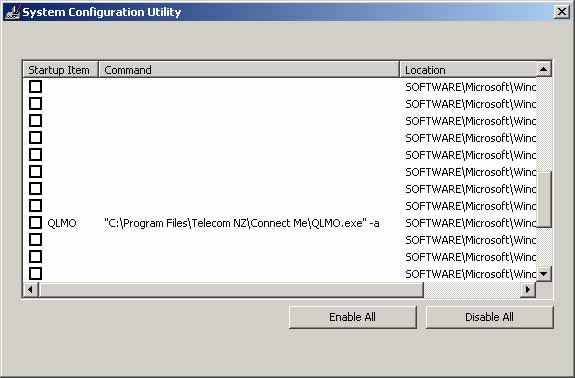
One small observation, if you disable the program booting up at startup (WinXP) it still adds itself to the startup options.

mort
29 posts

Geek


  #470037 17-May-2011 11:42
Send private message

Hi. this did not show up in our testing, I'll get the team to try and replicate this.

nate
6473 posts

Uber Geek
+1 received by user: 458

Retired Mod
Trusted
Lifetime subscriber

  #470070 17-May-2011 12:43
Send private message

mort: Hi. this did not show up in our testing, I'll get the team to try and replicate this.


Adds to the registry (I've disabled it in msconfig)


nakedmolerat
4631 posts

Uber Geek
+1 received by user: 874

Trusted
Lifetime subscriber

  #471690 20-May-2011 18:30
Send private message

installed the new connectme manager for my telecom mf626 today.

the software itself runs quite slow on my rig and somehow the connection become unstable with high ping. uninstalled, and reinstall the original telecom software that comes with the usb stick. it works way better now and ping has reduced significantly.

any thoughts why this happen to me?


Move to New Zealand's best fibre broadband service (affiliate link). Free setup code: R587125ERQ6VE. Note that to use Quic Broadband you must be comfortable with configuring your own router.
Ashka
139 posts

Master Geek


  #472217 22-May-2011 11:36
Send private message

I have a MacBook Pro on a XT T stick 24/7 with a 4 GB data plan and an iPad with a XT data sim on a 2 GB data plan.

The ZTE MF 636 software for Mac still doesn't work the way it should ~ still stating 'not configured' but still tries every time it is used. Two years now and still waiting for it to be fixed.
Latest software is still March'09 and it's still 32 bit.

So Please, please get the Mac and iPad versions out asap.
My two year contract is up next month...


MacBook Pro ~ OSX 10.7. Lion ~ XT 3G iPad 2 ~ XT 
Vodafone & CDMA mobile phones.


Kyanar
4089 posts

Uber Geek
+1 received by user: 1684

ID Verified
Trusted

  #472337 22-May-2011 14:10
Send private message

iPad version? That's literally impossible.

Still, that annoying "new connections have been found and have not been configured" is the exact reason why I mentioned Mac support. It's almost instinctive now - insert stick, click cancel, drop back to desktop, unmount T-Stick drive, wait for Connection Manager to connect...

mort
29 posts

Geek


  #474504 26-May-2011 17:57
Send private message

nate: One small observation, if you disable the program booting up at startup (WinXP) it still adds itself to the startup options.


We've not been able to replicate this on our XP or other OS test machines.  It must a special feature of your laptop :)

mort
29 posts

Geek


  #474505 26-May-2011 17:59
Send private message

nakedmolerat: installed the new connectme manager for my telecom mf626 today.

the software itself runs quite slow on my rig and somehow the connection become unstable with high ping. uninstalled, and reinstall the original telecom software that comes with the usb stick. it works way better now and ping has reduced significantly.

any thoughts why this happen to me?


Seems strange as CM uses all the latest drivers and SDK supplied by ZTE and SW.  please PM your hardware and OS specs. cheers

1 | 2 | 3
View this topic in a long page with up to 500 replies per page Create new topic


Geekzone Live »

Try automatic live updates from Geekzone directly in your browser, without refreshing the page, with Geekzone Live now.


Are you subscribed to our RSS feed? You can download the latest headlines and summaries from our stories directly to your computer or smartphone by using a feed reader.