|
|
|
Just checked and I now have a Satellite setting enabled on my Spark line. I am running dual-sim with One NZ being my primary line.
Using iPhone 17 Pro max
Just took a drive around Selwyn and did not have my signal drop-out even once but also did not see any satellite. I know there is a dead zone around Springston so will endeavour to head out there and try it out at some point.
johno1234:
I see nothing for Satellite under settings in 26.4
You need to go into Settings app > General > About, then you will be prompted to perform an update of your Carrier Settings. The update process is instantaneous and when you go back into Settings app > Mobile you will see that Satellite has been enabled automatically. It presumably didn't make the cut for iOS 26.4, but was released as a small OTA carrier bundle after the fact.
Is there a list of compatible handsets anywhere yet (or is it still pending)? I seem to recall Vodafone (now One) had a list ready to go before the service launched - could have my timing wrong on that one though.
Technically speaking it has not yet officially launched. All that's changed is that there is now support for it on iOS devices on Spark. Satellite Data support is also in there.
I have seen some similar satellite settings on a couple of Android phones with Spark connections too.
Rural IT and Broadband support.
Broadband troubleshooting and master filter installs.
Starlink installer - one month free: https://www.starlink.com/?referral=RC-32845-88860-71
Wi-Fi and networking
Cel-Fi supply and installer - boost your mobile phone coverage legally
Need help in Auckland, Waikato or BoP? Click my email button, or email me direct: [my user name] at geekzonemail dot com
boosacnoodle:
Just took a drive around Selwyn and did not have my signal drop-out even once but also did not see any satellite. I know there is a dead zone around Springston so will endeavour to head out there and try it out at some point.
johno1234:
I see nothing for Satellite under settings in 26.4
You need to go into Settings app > General > About, then you will be prompted to perform an update of your Carrier Settings. The update process is instantaneous and when you go back into Settings app > Mobile you will see that Satellite has been enabled automatically. It presumably didn't make the cut for iOS 26.4, but was released as a small OTA carrier bundle after the fact.
Turns out the setting was there. I had assumed that the search function in Settings always works alas not. I found “Satellite” toggle was under the SIM settings for the Spark SIM.
Also noticed there’s an option “Convert to eSIM” - does that work?
Of course convert to eSIM option works
Linux:
Of course convert to eSIM option works
Love your faith and optimism. I would never assume the "of course" position with Spark and cellphones. Too often things stop working if you fiddle with settings. Although Apple in my experience are more likely to "just work" than Android.
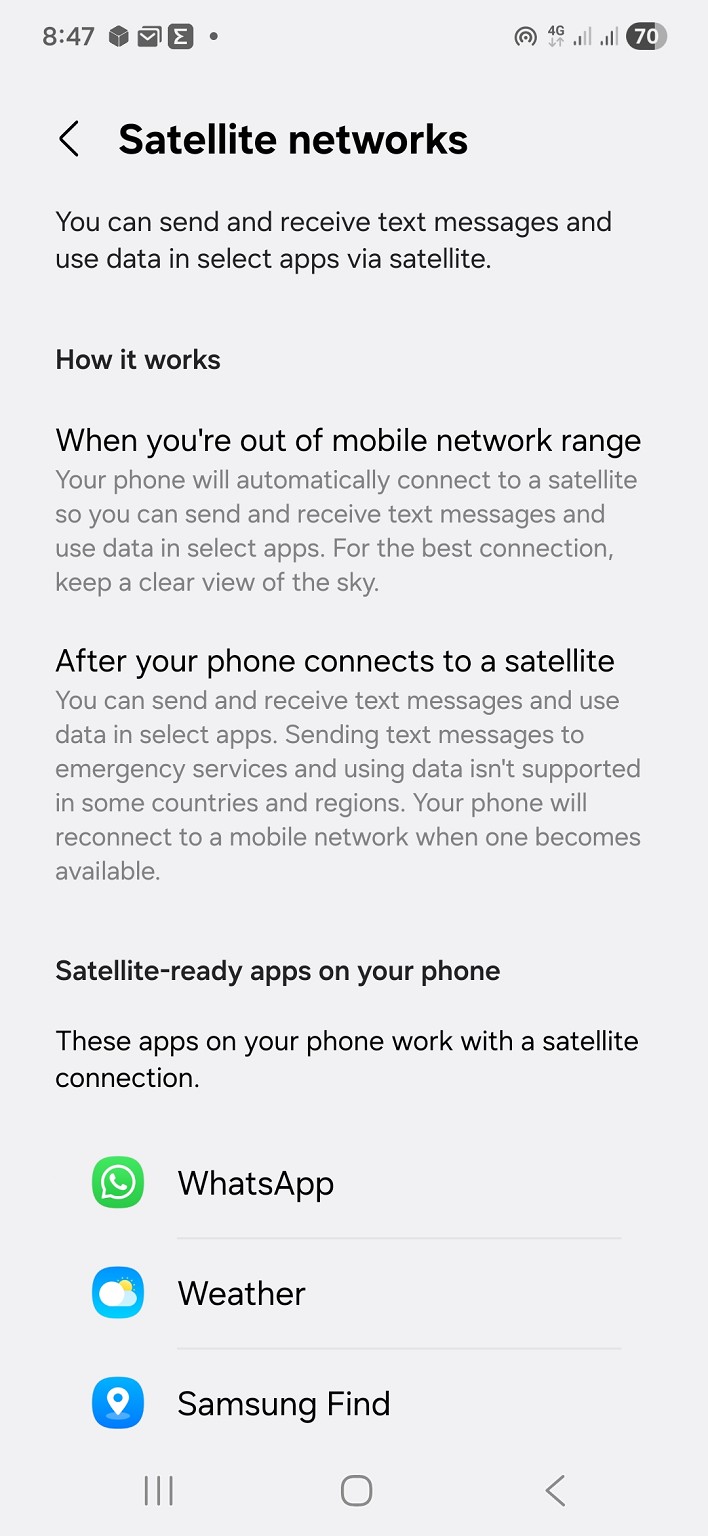
On my Spark connected S25

Plus another 6 apps not shown
Sony Xperia XA2 running Sailfish OS. https://sailfishos.org The true independent open source mobile OS
Samsung Galaxy Tab S6
Dell Inspiron 14z i5
Also showing on my work Samsung S23fe after the March 2026 update
Must be imminent now that both Apple and Samsung have their updates out. Still no licenses showing on RSM.
boosacnoodle:
Must be imminent now that both Apple and Samsung have their updates out. Still no licenses showing on RSM.
The way I read it from the info showing on my phone is that it's working now. Perhaps I'm reading more into it than I should.
Sony Xperia XA2 running Sailfish OS. https://sailfishos.org The true independent open source mobile OS
Samsung Galaxy Tab S6
Dell Inspiron 14z i5
@Technofreak I am reading it the same way I can test it tomorrow
Having the entitlements available/granted on your phone doesn't mean it is switched on from the satellite itself yet. I was not able to get this work when I went out just a day or two ago, despite having this on my phone.
The official launch: https://www.geekzone.co.nz/forums.asp?forumid=39&topicid=324380
Referral links: Quic Broadband (free setup code: R587125ERQ6VE) | Samsung | AliExpress | Wise | Sharesies
Support Geekzone by subscribing (browse ads-free), or making a one-off or recurring donation through PressPatron.

|
|
|