Geekzone: technology news, blogs, forums
Guest
Welcome Guest.
You haven't logged in yet. If you don't have an account you can register now.


View this topic in a long page with up to 500 replies per page Create new topic
1 | 2 | 3 | 4 
snnet
1413 posts

Uber Geek
+1 received by user: 556


  #815931 11-May-2013 20:10
Send private message

Odd- I'm on the $29 smart open plan and it tells me my data renews on the 9th.....

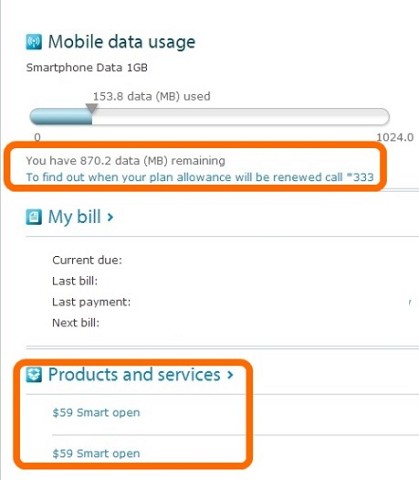
freitasm: Why do I have to call *333 to find out when my mobile data renews? Why can't it just show up with the chart showing my usage?

Why is my plan listed twice?


loceff13
1090 posts

Uber Geek
+1 received by user: 341


  #815994 11-May-2013 23:21
Send private message

Sorry, registration isn't available right now.

We'll get it fixed as soon as we can, so thanks for your patience.

Please try again later.


Ragnor
8279 posts

Uber Geek
+1 received by user: 585

Trusted

  #816010 11-May-2013 23:38
Send private message

loceff13: Sorry, registration isn't available right now.

We'll get it fixed as soon as we can, so thanks for your patience.

Please try again later.


Yep, would be handy if they put that at the start not the end!!


rumpty
66 posts

Master Geek
+1 received by user: 1


  #816516 13-May-2013 09:45
Send private message

plambrechtsen: MyTelecom replaces YourTelecom (which is now retired).  So if you want to check your bill etc you need to create a MyTelecom account.

It's all in there, just need to have an email address rather than a generic username & password to login from now on.

There was a number of alerts on the telecom.co.nz homepage about it.  But we didn't mass-spam everyone, since no one likes getting spammed these days.


No problems changing here. The broadband usage meter is my primary interest in my Telecom account, and as well there is other useful on the page when you are logged in.

plambrechtsen
1948 posts

Uber Geek
+1 received by user: 459
Inactive user


  #816751 13-May-2013 14:08
Send private message

Ragnor:
loceff13: Sorry, registration isn't available right now.

We'll get it fixed as soon as we can, so thanks for your patience.

Please try again later.


Yep, would be handy if they put that at the start not the end!!


They were having some issues when the primary customer management system was having an upgrade over the weekend.

Should be all back to normal now (well it came back to normal about 4am Sunday morning from my understanding)

pjamieson
441 posts

Ultimate Geek
+1 received by user: 90

Trusted
Chorus

  #829977 3-Jun-2013 11:45
Send private message

1080p:
Abo: Your password must be at least 8 characters long and will need to include both letters and numbers. No special characters are allowed. 
 
It's 2013 and Telecom won't allow special characters..

wtf

This is terrible. For a tech company I find this unacceptable.

Hi Peter, can you comment on this, I also find this quite bad.  Is it on an enhancement list or something?  Otherwise quite happy with the other changes.


Shop now for Lenovo laptops and other devices (affiliate link).
samdouglas
203 posts

Master Geek
+1 received by user: 18


  #831480 6-Jun-2013 10:05
Send private message

i generally like the new system and logging in with my main email address is much easier to remember.
but the restrictions on password have undone a lot of the good work for me :(

I have  a very set way of creating my passwords - based on a secure passphrase and slight changes to it based on the name of the website i am logging in to - that not being able to use extended characters really mucks up.

I can understand it being an issue on a legacy system but a new system should allow that and its a bit disappointing.

Everything else works well though and I appreciate the effort into improving the user experience - you're always going to get people complaining about change and there are those die hard Telecom haters who will complain no matter whatever you guys do.

Behodar
11117 posts

Uber Geek
+1 received by user: 6116

Trusted
Lifetime subscriber

  #838814 18-Jun-2013 17:43
Send private message

I just set this up today and have a question: How do you change the name that appears at the top of the page ("signed in as XYZ", and "Welcome XYZ")? It's definitely showing my own usage but the name doesn't match my account and I can't figure out how to change it.

snnet
1413 posts

Uber Geek
+1 received by user: 556


  #838818 18-Jun-2013 18:01
Send private message

Behodar: I just set this up today and have a question: How do you change the name that appears at the top of the page ("signed in as XYZ", and "Welcome XYZ")? It's definitely showing my own usage but the name doesn't match my account and I can't figure out how to change it.


It isn't listing the name of the person who opened the account?

Behodar
11117 posts

Uber Geek
+1 received by user: 6116

Trusted
Lifetime subscriber

  #838885 18-Jun-2013 19:39
Send private message

Sorry, after rereading my other post I definitely didn't word it well (I was in a bit of a hurry). The name showing up is my legal name, which isn't the same as the name on my account (I pulled out my old "Welcome to Telecom" letter to confirm). I'm a bit confused as to how it's ended up on the top of the My Telecom page, considering that it's not the account name and Telecom has to this point never used it in any documentation (and I don't even remember giving it to Telecom in the first place, although I guess I must have).

snnet
1413 posts

Uber Geek
+1 received by user: 556


  #838889 18-Jun-2013 19:45
Send private message

ah. It's similar for me, though I do know I would have given them it when I signed up (doesn't appear on the bill) 


Shop now for Lego sets and other gifts (affiliate link).
tdgeek
30048 posts

Uber Geek
+1 received by user: 9455

Trusted
Lifetime subscriber

  #838907 18-Jun-2013 20:14
Send private message

Behodar: Sorry, after rereading my other post I definitely didn't word it well (I was in a bit of a hurry). The name showing up is my legal name, which isn't the same as the name on my account (I pulled out my old "Welcome to Telecom" letter to confirm). I'm a bit confused as to how it's ended up on the top of the My Telecom page, considering that it's not the account name and Telecom has to this point never used it in any documentation (and I don't even remember giving it to Telecom in the first place, although I guess I must have).


That is odd. AFAIK the name on a residential account that shows in MT is the first name. For many, this is the first and middle names as these appear in the first name field in our billing system. Just checked mine, that's still how it is. I believe this is being fixed. If you wish to PM I can look into it, I have had some involvement in feedback and fixes.

The other scenario, is that you have more than one account. MT is based on the Customer Number, and this is why you can access other accounts on the one login as these sit under the Customer Number. This is likely to be the reason. Each account bills separately, hence each can have its own name. 

Behodar
11117 posts

Uber Geek
+1 received by user: 6116

Trusted
Lifetime subscriber

  #839039 19-Jun-2013 07:06
Send private message

It's not worth worrying about (even if my earlier rushed post made it out to be!), just more of a curiosity than anything :)

plambrechtsen
1948 posts

Uber Geek
+1 received by user: 459
Inactive user


  #839227 19-Jun-2013 12:05
Send private message

In regards to the password complexity (or lack thereof) there is an enhancement on the table to get that fixed.

And in regards to how your name is displayed.  It's directly taken from the customer account name, and for legacy reasons is always in upper case and cannot easily be changed (as it's your legal name).  There was talk about having the preferred name, but I am not sure where that sits on the list of enhancements.

I will however follow up on that.

1 | 2 | 3 | 4 
View this topic in a long page with up to 500 replies per page Create new topic


Geekzone Live »

Try automatic live updates from Geekzone directly in your browser, without refreshing the page, with Geekzone Live now.


Are you subscribed to our RSS feed? You can download the latest headlines and summaries from our stories directly to your computer or smartphone by using a feed reader.