Geekzone: technology news, blogs, forums
Guest
Welcome Guest.
You haven't logged in yet. If you don't have an account you can register now.


View this topic in a long page with up to 500 replies per page Create new topic
1 | 2 | 3 | 4 | 5 
unclepauleo
4 posts

Wannabe Geek
+1 received by user: 1


  #3309205 14-Nov-2024 21:44
Send private message quote this post

Hi guys,
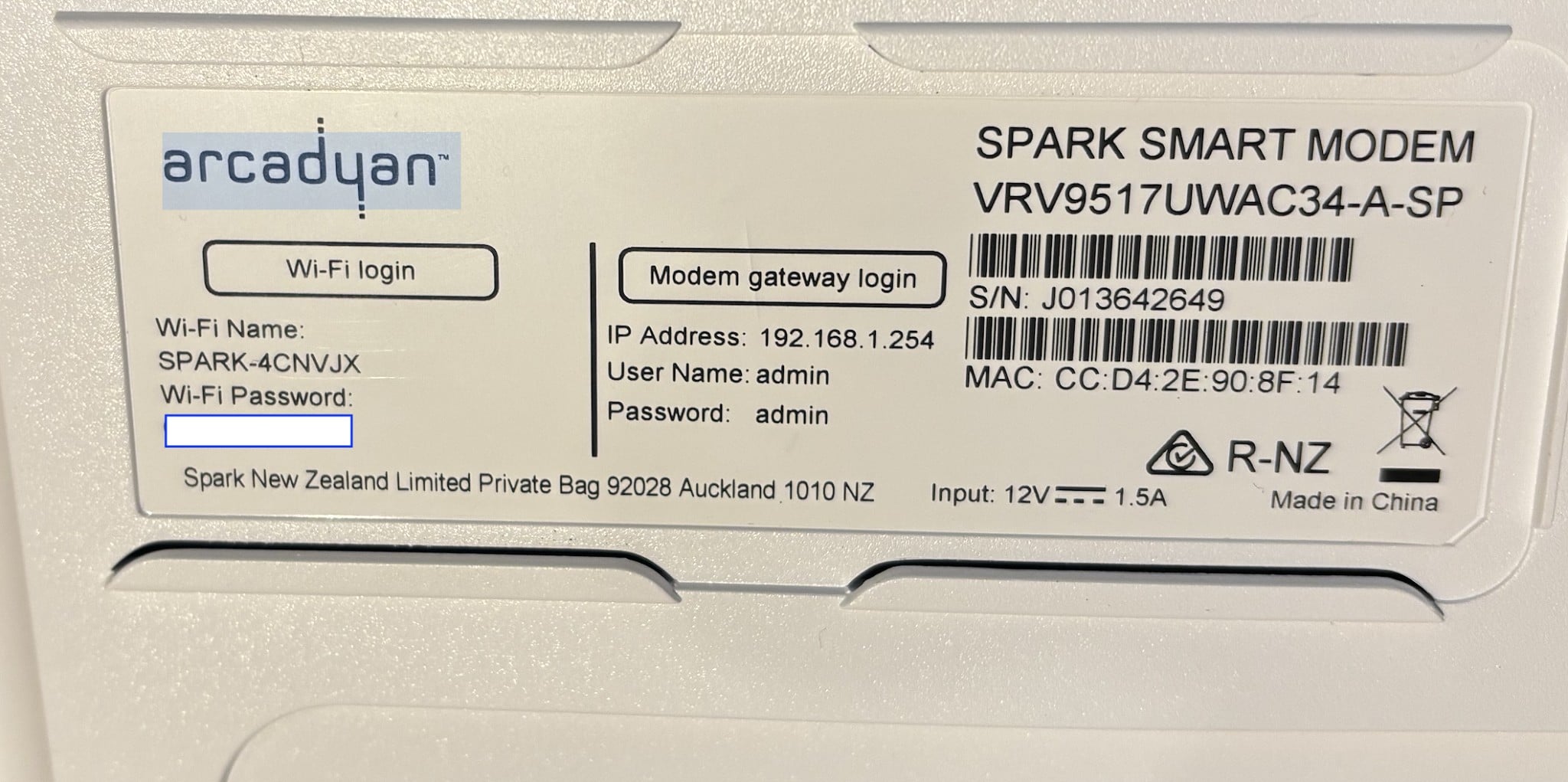
Does anyone know the part number of the Spark Smart Modem 3?
I would like to find the user manual from Arcadyan if possible because the Spark manuals are useless. I’d like to see what functionality and interface the modem has because I have one of the other Arcadian Spark modems and, great wireless but interface functionality is rubbish.


Gordy7
gordy7
2016 posts

Uber Geek
+1 received by user: 508

ID Verified
Lifetime subscriber

  #3309208 14-Nov-2024 21:55
Send private message quote this post

From the label on my SM3:


Gordy


My first ever AM radio network connection was with a 1MHz AM crystal(OA91) radio receiver.


unclepauleo
4 posts

Wannabe Geek
+1 received by user: 1


  #3309212 14-Nov-2024 22:07
Send private message quote this post

Brilliant, thank you Gordy


bfginger
1350 posts

Uber Geek
+1 received by user: 198


  #3487184 3-May-2026 22:56
Send private message quote this post

One SM3 specification I haven't seen stated anywhere is does it support 160MHz channel width on 5GHz? And if so, on both 160MHz channels 50 and 114?  The SM1 was missing support for some of the higher wifi channels so I wondered if they kept that lineup which would prohibit support for channel 114. 


Scotdownunder
237 posts

Master Geek
+1 received by user: 113

Subscriber

  #3487785 5-May-2026 16:58
Send private message quote this post

So which version is this smart modem ?


I inherited this in my new apartment.  Is it better than the 2 degrees Fritzbox 7530 VU from my old house ?


Gordy7
gordy7
2016 posts

Uber Geek
+1 received by user: 508

ID Verified
Lifetime subscriber

  #3487813 5-May-2026 17:36
Send private message quote this post

As far as I know:


SM1 VRV9517


SM3 V9527


Gordy


My first ever AM radio network connection was with a 1MHz AM crystal(OA91) radio receiver.


HP


Shop now for HP laptops and other devices (affiliate link).
bfginger
1350 posts

Uber Geek
+1 received by user: 198


  #3487909 5-May-2026 23:34
Send private message quote this post

The SM1 is unlikely to be better than the Fritz. It looks like some 7530s are wifi 5 units while others are wifi 6 units. The SM3 supports wifi 6 while the SM1 does not. The SM1 should be good enough for an apartment unless it's very large or has very congested airwaves or you're hoping to run very high speed wifi at distance. 


Scotdownunder
237 posts

Master Geek
+1 received by user: 113

Subscriber

  #3487972 6-May-2026 08:17
Send private message quote this post

Thanks for your comment.  I have a large apartment with lots of wifi signals but I used the internal telephone wiring to create an ethernet link to an AP in the lounge by my AV systems.  Since I am with 2 Degrees I will swap over to the Fritz.  The SM1 will be going spare.


Kris89
29 posts

Geek
+1 received by user: 8


  #3513518 22-Jul-2026 22:51
Send private message quote this post

FWIW, and I don't know if this is just a defective unit, or an inherent hardware or software bug, but my parents have a Smart Modem 3 (firmware 1.00.09, 60/20 VDSL connection), and every so often, it seems to start causing timeouts to (at least) certain TCP connections.


Today it was that microsoft.com would not load in a browser, and similarly, Teams calls could not be joined, and an online remote work platform (at least some of which runs off MS cloud services) wasn't working correctly either (but other users reported no issues).


I was able to remote into their PC to try and diagnose (over Chrome Remote Desktop), but the experience was a lot less smooth in terms of latency/framerate than usual.


A power cycle/reboot was not sufficient to fix it. Instead had to do a reset of the modem settings (via the web admin page was sufficient), in order to get MS sites/services etc working again (and remote session to be smooth). 


I subsequently recalled a similar thing happened back in Feb (which I had forgotten about until after I did the reset), and back then I was able to correct the problem by turning off 'Access Control' in the modem settings (despite there being no access control rules set).


So I can only assume there is some kind of bug in hardware or software that somehow results in the 'Access control' feature seeing a garbage invisible rule in NVRAM, and that this results in certain sites (whether by destination IP or something else Im not sure) being blocked, along with adverse performance effects on non-blocked traffic.


Their modem at least gets into this broken state without any manual intervention (ie no settings were changed in the modem in the leadup, at least not by us, although I guess its possible Spark pushed out something automatically).


If anyone from Spark is reading, if you can't identify or fix this bug, please at least consider defaulting 'Access Control' to Off after a reset (not much point having it on, if there aren't any rules present by default), to try and prevent reoccurrence after a reset.


tl;dr: If you have a Smart Modem 3, and out of the blue some websites/services no longer work, and others exhibit degraded performance, try a) turning of 'Access Control' in the modem UI, b) resetting the modem settings from the admin page.


shouhei
1 post

Wannabe Geek


  #3514144 24-Jul-2026 23:14
Send private message quote this post

Older SSM3 will have failing power adaptors, both of mine (I use one as a separate access point) started to fail and dropped wifi constantly. You can tell when it starts making chirping noises.


Easy to replace, take a look at the voltage and current specs and order a decent one off aliexpress, I got the power brick type and they work well with no more chirping.


1 | 2 | 3 | 4 | 5 
View this topic in a long page with up to 500 replies per page Create new topic


Geekzone Live »

Try automatic live updates from Geekzone directly in your browser, without refreshing the page, with Geekzone Live now.


Are you subscribed to our RSS feed? You can download the latest headlines and summaries from our stories directly to your computer or smartphone by using a feed reader.