Geekzone: technology news, blogs, forums
Guest
Welcome Guest.
You haven't logged in yet. If you don't have an account you can register now.


View this topic in a long page with up to 500 replies per page Create new topic
1 | ... | 55 | 56 | 57 | 58 | 59 | 60 | 61 | 62 | 63 | 64 | 65 | ... | 78
BuzzLightyear
416 posts

Ultimate Geek
+1 received by user: 106


  #2599410 7-Nov-2020 09:19
Send private message

thoreau:

Are people still experiencing problems with the mesh unit?


Mine disappears from the network about twice a day (though it still shows a blue light)  and only comes back when I reboot it.  I am on  v6.00.15 b05 for the skinny spark modem and on 1.008 for the mesh. Mesh signal  strength is -78dBm so I do not think that is the problem.  Is there anything I can do to address this issue. Sorry if this has been discussed before, it is a long thread.


Any help or suggestions would be much appreciated.


My mesh unit has been rock solid with the latest updates. Ethernet backhaul though.


grolschie
911 posts

Ultimate Geek
+1 received by user: 159


  #2599414 7-Nov-2020 09:42

hio77:


grolschie: Thanks. It's not really that unique. Other apps use SSDP to find UPnP devices, e.g. Panasonic's Viera app.


It's unique due to the share number of devices that's all...


I'm not sure where you get that idea from. I don't really have a large number of network devices in my house.


The SSDP broadcast UDP packets don't even make it through the Mesh unit - so the number of receiving devices is irrelevant.


JakobH
1 post

Wannabe Geek


  #2601515 11-Nov-2020 08:51
Send private message

hio77:
catspyjamas:


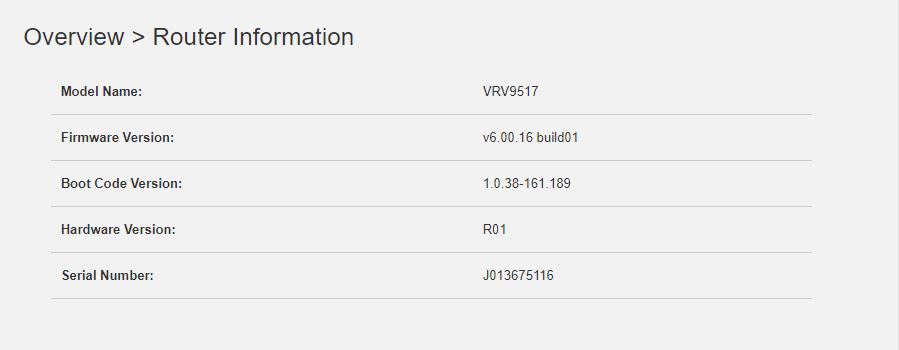
Nope @hio77 - I'm with Spark and the version as of this morning on my Smart modem is v6.00.16 build01. It was v6.00.15 build05 before the upgrade today.


Ahh sneeky, they already got another build in since I left!

It's likely a version bump is all.


Hi @hio77


I am having an issue with the new firmware that is not allowing an app to connect to our TCP server. It is being registered in the list of connected devices on the router and being assigned an IP address. This was not an issue with the previous firmware update and the app works on all other routers.


Do you have a copy of the previous firmware or any other firmware version for me to roll back to?


Any help would be greatly appreciated.


Thank you.


fabianz03
78 posts

Master Geek
+1 received by user: 5


  #2606238 18-Nov-2020 15:32
Send private message

Anyone managed to get their Pi-Hole working with their smart modem?


I've just got Skinny UFB connected and am very satisfied with the performance of the new smart modem however I could not get my Pi-Hole to work.


I'd like to believe I did the right thing by pointing my DNS servers in the smart modem to my Pi-Hole which is in 192.168.1.13 (I've also reserved the .13 specifically to the Pi) 


Websites wouldn't load and upon checking the query log it seems like requests are passing through but repeated many times; browser is not showing anything. 


Any help would be appreciated


-F 


Hemi88
194 posts

Master Geek
+1 received by user: 38


  #2607958 21-Nov-2020 13:08
Send private message

I just got a replacement modem on Wednesday I was having problems with the old one it was turning it’s self on/off like you were pushing the power button with the old one it happened once in oct then it was fine until a couple weeks ago then it was random could go two days fine then happen again then happen multiple times a day about the same time got the new modem set up it was fine since Wednesday but just went off about 40min ago it seems like you’re pushing the power button off/on so don’t know if got another faulty modem or something else

myopinion
939 posts

Ultimate Geek
+1 received by user: 112


  #2607961 21-Nov-2020 13:25
Send private message

Hemi88: I just got a replacement modem on Wednesday I was having problems with the old one it was turning it’s self on/off like you were pushing the power button with the old one it happened once in oct then it was fine until a couple weeks ago then it was random could go two days fine then happen again then happen multiple times a day about the same time got the new modem set up it was fine since Wednesday but just went off about 40min ago it seems like you’re pushing the power button off/on so don’t know if got another faulty modem or something else


Sounds like you might have a dodgy power supply...check your PowerPoint.


Shop on-line at New World now for your groceries (affiliate link).
Hemi88
194 posts

Master Geek
+1 received by user: 38


  #2607975 21-Nov-2020 14:01
Send private message

myopinion:

Hemi88: I just got a replacement modem on Wednesday I was having problems with the old one it was turning it’s self on/off like you were pushing the power button with the old one it happened once in oct then it was fine until a couple weeks ago then it was random could go two days fine then happen again then happen multiple times a day about the same time got the new modem set up it was fine since Wednesday but just went off about 40min ago it seems like you’re pushing the power button off/on so don’t know if got another faulty modem or something else


Sounds like you might have a dodgy power supply...check your PowerPoint.


I’ll change were it’s plugged in and see how it goes over the next couple days

youxie13
1 post

Wannabe Geek


#2608704 23-Nov-2020 00:09
Send private message

hio77:

steve98:


Shout out to your fulfilment team. After reading this entire 25-page thread yesterday I re-signed for another year to get the free modem and was told it would take 5 days to arrive but it arrived this morning. Very impressive given the current situation! 


Looking forward to setting this up. Could you confirm in a nutshell the process for hooking it up as an ethernet-connected AP to an existing router?


Cheers!


Steve


5 days shipping is the standard advice, but yeah it's quite often same day or 1 day if your in a main city. 


If you wanna use it as an AP, just disable dhcp, change the IP address and plugin to a LAN port.


I'd plug it into your normal connection  for 5 mins first and let it update though :)


Great since read through 25 page then found the way to make smart modem be a ap. Thanks lots

namirda
3 posts

Wannabe Geek


  #2610572 25-Nov-2020 14:49
Send private message

Hi Everybody


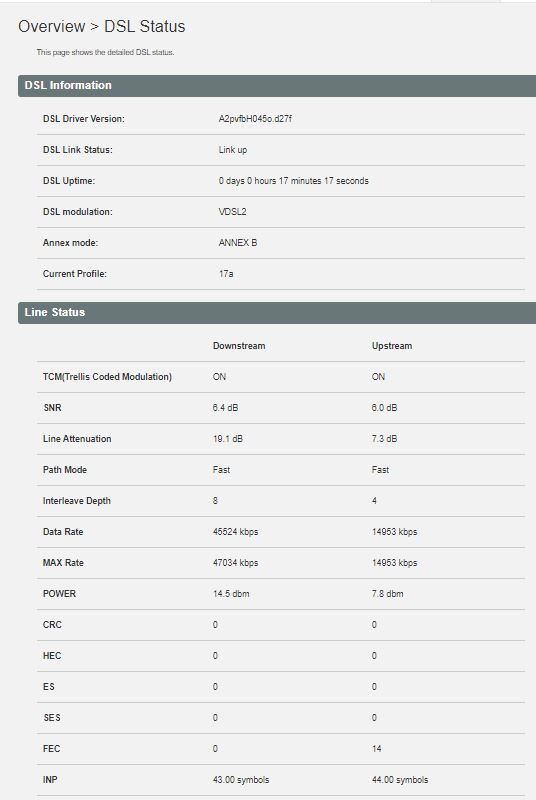
I'm having frequent DSL dropouts with my spark smart modem which also cause my single mesh unit to loose (wifi) backhaul - I suspect that the modem is actually restarting every time although not quite sure. Here are my DSL stats if anybody is willing/able to comment. The SNR is only about 6 which seems very low to me.


It's particularly annoying because the DSL dropouts also causes interruptions to internal LAN traffic from my NAS.


I have tried talking to spark about this but all they suggested I do was try another power outlet before they send out another modem. That seems a bit wasteful to me if the problem is with the line.


Anybody got any suggestions?


Thanks


Benji23
32 posts

Geek
+1 received by user: 3


  #2610587 25-Nov-2020 15:12
Send private message

Same as mine since the last upgrade never happened before but does it quite often now


Have you tried turning it off then on again

grolschie
911 posts

Ultimate Geek
+1 received by user: 159


  #2610606 25-Nov-2020 15:55

Hey @hio77 who can we report issues to please?


Shop now at Mighty Ape (affiliate link).
hio77

'That VDSL Cat'
13036 posts

Uber Geek
+1 received by user: 3896

ID Verified
Trusted
Lizard Networks
Subscriber

  #2610883 26-Nov-2020 07:57
Send private message

grolschie: Hey @hio77 who can we report issues to please?
help desk should be able to escalate through. Otherwise hopefully one of the helpful spark folk around here will reach out....

Sorry I can't really direct you to an exact person..


#include <std_disclaimer>


Any comments made are personal opinion and do not reflect directly on the position my current or past employers may have. 


grolschie
911 posts

Ultimate Geek
+1 received by user: 159


  #2610884 26-Nov-2020 07:59

hio77:
grolschie: Hey @hio77 who can we report issues to please?
help desk should be able to escalate through. Otherwise hopefully one of the helpful spark folk around here will reach out....

Sorry I can't really direct you to an exact person..


Ok. Thanks anyway. I'm not going to pull my hair out with the help desk.

namirda
3 posts

Wannabe Geek


  #2610948 26-Nov-2020 09:24
Send private message

Hey @hio77


You seem like the vdsl expert around here - would you be so kind as to pass comment on the status of my dsl link as posted above? Specifically the SNR seems low to me - shouldn't it be twice that or more?


Thanks


hio77

'That VDSL Cat'
13036 posts

Uber Geek
+1 received by user: 3896

ID Verified
Trusted
Lizard Networks
Subscriber

  #2610954 26-Nov-2020 09:35
Send private message

namirda:

Hey @hio77


You seem like the vdsl expert around here - would you be so kind as to pass comment on the status of my dsl link as posted above? Specifically the SNR seems low to me - shouldn't it be twice that or more?


Thanks


Snr is fine, you have a g.inp line. If it's dropping double check cables on your side thrn off to faults :)

Nothing immediately jumps out at me as faulty.


#include <std_disclaimer>


Any comments made are personal opinion and do not reflect directly on the position my current or past employers may have. 


1 | ... | 55 | 56 | 57 | 58 | 59 | 60 | 61 | 62 | 63 | 64 | 65 | ... | 78
View this topic in a long page with up to 500 replies per page Create new topic


Geekzone Live »

Try automatic live updates from Geekzone directly in your browser, without refreshing the page, with Geekzone Live now.


Are you subscribed to our RSS feed? You can download the latest headlines and summaries from our stories directly to your computer or smartphone by using a feed reader.