|
|
|
boosacnoodle:
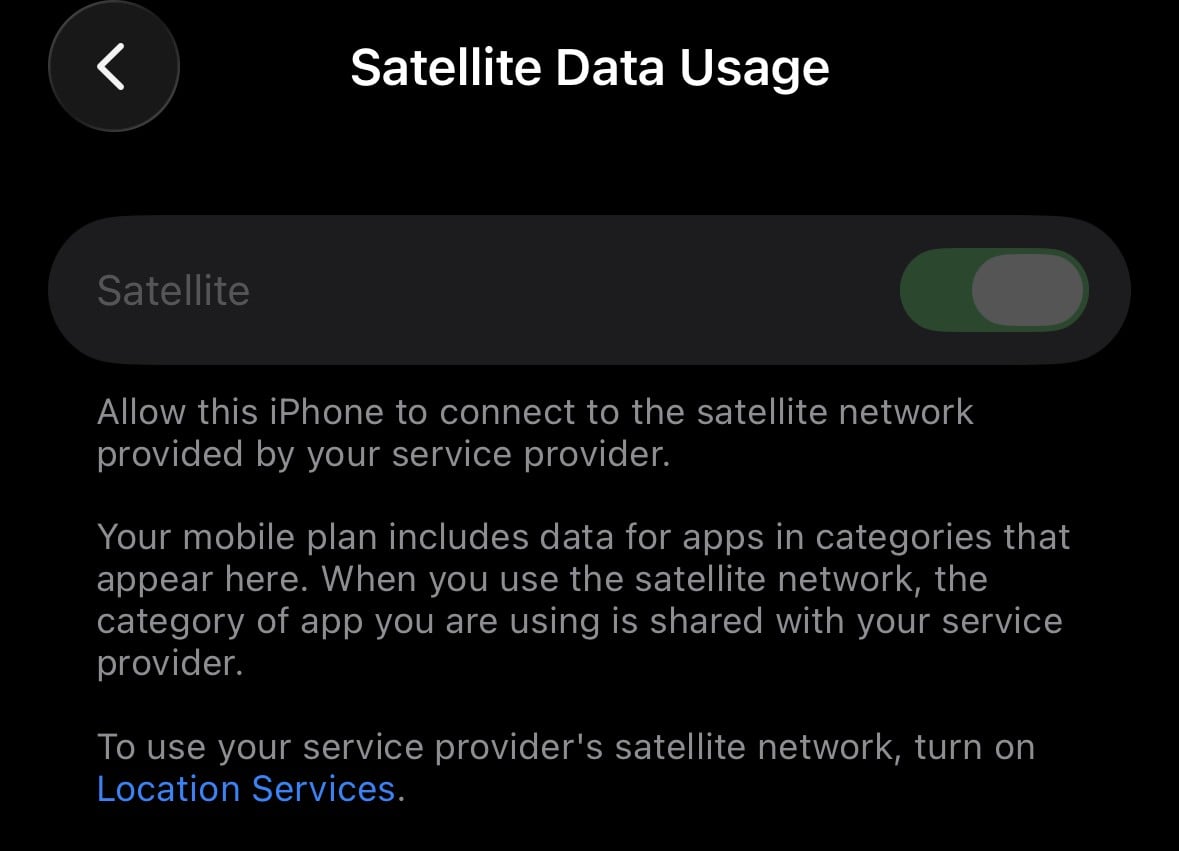
Last thing to check is Settings > Mobile > Satellite and see if that is enabled or not. If it is, log a fault with Spark.
Yep, can confirm it's on. Weirdly, it's greyed out on the on position - no option to turn off.

Aucklandjafa:
Yep, can confirm it's on. Weirdly, it's greyed out on the on position - no option to turn off
comparing the above to mine, the difference is the location services blurb. Are they enabled?
andyb
Huh, sure enough it’s no longer greyed out. Will check it out next time!
Aucklandjafa:
Huh, sure enough it’s no longer greyed out. Will check it out next time!
happy days!
andyb
That's so strange! Searching on Google for "To use your service provider's satellite network, turn on Location Services." returns no results. You are lucky customer #1 !
Can confirm enabling location services for mobile network search made it work (assume Starlink requires a handshake of the device’s location to ensure it’s within the geo-boundary).
what I noticed is that it didn’t switch over until there was zero coverage, even when the terrestrial 4g was unusable. But then once connected, it stayed connected well into good urban coverage even with the phone in my pocket.
Aucklandjafa:
what I noticed is that it didn’t switch over until there was zero coverage, even when the terrestrial 4g was unusable. But then once connected, it stayed connected well into good urban coverage even with the phone in my pocket.
I've observed the same. Would be helpful if it was both more aggressive to switch to satellite when the terrestrial signal is poor, and very eager to jump back to terrestrial when there's a good signal present. I don't want to spend the next ten minutes in the middle of a city on satellite, just because I drove through a 200 metre black spot during my commute.
Aucklandjafa:
what I noticed is that it didn’t switch over until there was zero coverage, even when the terrestrial 4g was unusable. But then once connected, it stayed connected well into good urban coverage even with the phone in my pocket.
My observation is that One NZ Starlink is very aggressive in switching back to terrestrial coverage. The last time I used it it would constantly switch to/from satellite as I walked up and down hills on a remote hiking track (top of hill getting good terrestrial servcie but walking down into valleys etc I'd lose service and pick up satellite instead). Could it be phone specific however -- this was on an iPhone so maybe different behaviour on Samsung phones?
Interesting you mention this. I also faced the issue of unusable 4G on a trip back from the West Coast to Christchurch around the Waikari area recently. The 4G data connection was totally unusable - literally could not even send an SMS - and yet my phone did not get offered Satellite, presumably because the logic is if you have a terrestrial connection it will be good enough. Not so.
I was also at Ruapuna recently. More than 60,000 people attended. Given that Spark has known about issues in the greater Hornby area for some time now, I was pleased to see that Spark had a CoW at the location. Not only that, I had full bars of 5G (usually would have little to nothing). The CoW I spotted appeared to be powered by two Starlink Enterprise dishys.
The actual use of the CoW was different, however. On a Speedtest you'd be getting around 30/10 Mbps with 300 ms latency - if the speedtest actually connected - but the data connection itself was completely and totally unusable for much of the day. A significant number of people were complaining that their phones were simply not working.
At different times, for no rhyme or reason at all, I had completely no service whatsoever from the CoW. My phone elected not to connect to Satellite in the scenario that the cell was overloaded, either, which was concerning as I understood that it was meant to work in overload situations (such as in natural disasters). Well, I can tell you that it did not.
This is all despite that my iPhone has previously worked with Satellite absolutely fine. It does not appear to work for marginal 4G connections, nor overloaded non-joinable cells either.
Note - One NZ's service at Ruapuna delivered a whopping 1 Mbps - but at least it actually worked. 2degrees was fine, also.
Interesting, I know in the past CoWs have usually been microwave backhauled or very occasionally a copper/fibre line set up just for the COW. Sounds like probably better off sticking with microwave if possible but perhaps the local geography is not conductive to this option.
boosacnoodle:
My phone elected not to connect to Satellite in the scenario that the cell was overloaded, either, which was concerning as I understood that it was meant to work in overload situations (such as in natural disasters). Well, I can tell you that it did not.
The current iteration of Starlink's direct-to-device service has *extremely* limited bandwidth. It cannot handle taking over the full load of a large number of highly dense subscribers. It's not ever been sold as a solution for terrestrial overload, and I'm unsure why you would expect that of it. Anything that can overload a terrestrial cell will easily overwhelm satellite capacity in the same location.
It is a solution to *geographic* gaps in coverage, with *very limited* bandwidth. The latter is the reason why data is so tightly restricted when roaming on satellite. This is why it's effectively set up as the "tower of last resort".
This is very different to Starlink's regular broadband service, which provides a *much* higher-speed service and has vastly more capacity available, but requires a dedicated ground terminal with a large phased antenna array in order to access.
|
|
|