Geekzone: technology news, blogs, forums
Guest
Welcome Guest.
You haven't logged in yet. If you don't have an account you can register now.


View this topic in a long page with up to 500 replies per page Create new topic
1 | ... | 3 | 4 | 5 | 6 | 7 | 8 | 9 | 10 | 11 | 12
Zeusssy
39 posts

Geek
+1 received by user: 24

ID Verified

  #2795495 14-Oct-2021 19:12
Send private message

catspyjamas:


Seems the Smart Modem 2 is only shipping for wireless 4G customers at this stage as per here:  https://www.geekzone.co.nz/forums.asp?forumid=39&topicid=289942&page_no=3#2793349


Unless something has changed since then...


Nothing changed, the V9517 is the SM not the SM2
CBR is probably trustworthy


My views aren't that of my employers and all the usual.


I know that I know nothing, so really, I know everything?


~~~~~~~~~~~~~~~~~~~~~~~~~~~~~~~~~~~~~~~~


catspyjamas
197 posts

Master Geek
+1 received by user: 34


  #2795524 14-Oct-2021 19:56
Send private message

Yep, hence why I linked MrSteel to his comment. :)


MrSteel
19 posts

Geek
+1 received by user: 2


  #2795561 14-Oct-2021 20:33
Send private message

Thank you guys for pointing that out. Completely missed CBR's post earlier about which modem you get. I'll just stick to my trusty old HG659b for now. 😀


jat80
245 posts

Master Geek
+1 received by user: 24


  #2795780 15-Oct-2021 09:39
Send private message


I’m with bigpipe gigabit plan and looking to change. I currently get 940/510 and have a static IP.

Would I notice anything different other than not having a static IP anymore switching to them. Just wondering if there is anything I should be aware of.

Using my own router - ASUS RT-AC68U


MaxineN
Max
2049 posts

Uber Geek
+1 received by user: 1663

ID Verified
Trusted
Subscriber

  #2795795 15-Oct-2021 09:53
Send private message

jat80:

I’m with bigpipe gigabit plan and looking to change. I currently get 940/510 and have a static IP.

Would I notice anything different other than not having a static IP anymore switching to them. Just wondering if there is anything I should be aware of.

Using my own router - ASUS RT-AC68U


The only difference should be is that CG-NAT wouldn't be a thing anymore(does bigpipe even do cg-nat anymore?) and you probably wouldn't need a static IP anyway(as long as you don't restart your hardware, the IP sticks mostly).


Ramblings from a mysterious lady who's into tech. Warning I may often create zingers.


Reanalyse
398 posts

Ultimate Geek
+1 received by user: 311


  #2795982 15-Oct-2021 16:45
Send private message

eracode:


Are people here who have Max Fibre seeing the full promised 850/500? I'm not, even with a brand new Spark Smart Modem I bought yesterday.


I'm getting around 270/400 on Ethernet and 500/400 on WiFi.


Make sure you have nothing between the router and the PC you are using for speedtest.


On one PC direct to the router showing full 900/500. But on other PC via old type switch only 100/100


Shop now for Dyson appliances (affiliate link).
dfnt
1553 posts

Uber Geek
+1 received by user: 1036

Trusted
Lifetime subscriber

  #2796018 15-Oct-2021 18:33
Send private message

dfnt:


Anyone that's done the transfer have a static IP with Spark?


Did the static IP get retained all good?


To answer my own question, it got retained


Shindig
1621 posts

Uber Geek
+1 received by user: 362

Trusted

  #2796077 16-Oct-2021 07:17
Send private message

dfnt:


dfnt:


Anyone that's done the transfer have a static IP with Spark?


Did the static IP get retained all good?


To answer my own question, it got retained


What transfer?


I asked if I could shift static IP from BigPipe to spark. Live chat said no and a static ip would cost me $15 a month.


The little things make the biggest difference.


Monza
299 posts

Ultimate Geek
+1 received by user: 30


  #2796081 16-Oct-2021 07:46
Send private message

Placed order moving from Unplan 100 to Fibre Max on the 14th, 2 days later still stuck on fibre tech needs to come to your home... 


I've seen a few LinkedIn posts from Spark recently talking about provisioning automation deployments, looks like they have a few bugs to sort out still....


Talkiet
4819 posts

Uber Geek
+1 received by user: 3934

Trusted

  #2796181 16-Oct-2021 11:19
Send private message

Shindig:


What transfer?


I asked if I could shift static IP from BigPipe to spark. Live chat said no and a static ip would cost me $15 a month.


I can see how it might temporarily happen. Do _NOT_ however, rely on a BP static being retained, even temporarily.


Cheers - N


Please note all comments are from my own brain and don't necessarily represent the position or opinions of my employer, previous employers, colleagues, friends or pets.


dfnt
1553 posts

Uber Geek
+1 received by user: 1036

Trusted
Lifetime subscriber

  #2796190 16-Oct-2021 11:50
Send private message

Shindig:


What transfer?


I asked if I could shift static IP from BigPipe to spark. Live chat said no and a static ip would cost me $15 a month.


As an existing Spark customer on unplan that has a static IP


There was no mention of the static IP during the transfer process, so I was wondering if it would drop off or if it would transfer over with the new plan (the latter occured)


Shop now for Lenovo laptops and other devices (affiliate link).
EviLClouD
305 posts

Ultimate Geek
+1 received by user: 65


  #2796910 18-Oct-2021 09:32
Send private message

My plan change to Fibre Max was completed this morning but my download speeds appear to max out around 300-320Mbps.


This is being tested over wifi standing next to the router (HG659b) using 5Ghz on my iphone 11 pro and macbook pro.


I understand i wont get full speeds over wifi, but would have thought i'd get closer to 800Mbps?


Is there a setting i need to change for the new speeds? I've restarted both the ONT and router.


Thanks


EDIT - just tested over ethernet on my macbook pro and still getting max speeds of ~320Mbps


eracode
Smpl Mnmlst
9333 posts

Uber Geek
+1 received by user: 6203

ID Verified
Trusted
Lifetime subscriber

  #2796916 18-Oct-2021 09:43
Send private message

EviLClouD:


My plan change to Fibre Max was completed this morning but my download speeds appear to max out around 300-320Mbps.


This is being tested over wifi standing next to the router (HG659b) using 5Ghz on my iphone 11 pro and macbook pro.


I understand i wont get full speeds over wifi, but would have thought i'd get closer to 800Mbps?


Is there a setting i need to change for the new speeds? I've restarted both the ONT and router.


Thanks


EDIT - just tested over ethernet on my macbook pro and still getting max speeds of ~320Mbps


Exactly my experience as reported above - but I got shouted down here. Same gear as you and similar speeds. I had an HG659g then went out and bought a new Spark Smart Modem. Made no difference - even on Ethernet.


Sometimes I just sit and think. Other times I just sit.


Talkiet
4819 posts

Uber Geek
+1 received by user: 3934

Trusted

  #2796918 18-Oct-2021 09:43
Send private message

It will be something in your local network, or in the speedtest server you are testing to. We're extremely confident in the network performance.


Cheers - N


Please note all comments are from my own brain and don't necessarily represent the position or opinions of my employer, previous employers, colleagues, friends or pets.


EviLClouD
305 posts

Ultimate Geek
+1 received by user: 65


  #2796925 18-Oct-2021 09:55
Send private message

Talkiet:

It will be something in your local network, or in the speedtest server you are testing to. We're extremely confident in the network performance.


Cheers - N


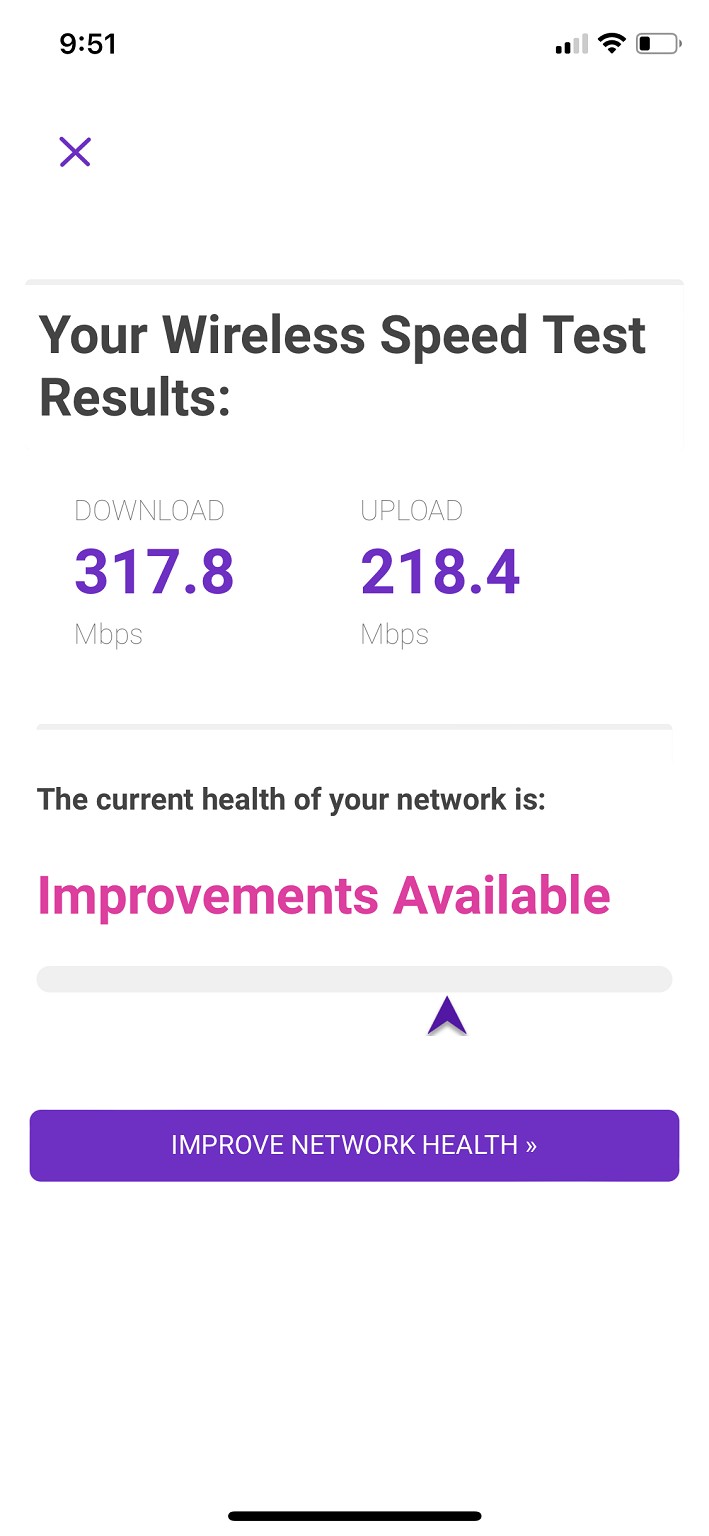
I just ran the Spark check home network via the Spark App.
Is that speed result through speedtest?
It gave me the same result.


1 | ... | 3 | 4 | 5 | 6 | 7 | 8 | 9 | 10 | 11 | 12
View this topic in a long page with up to 500 replies per page Create new topic


Geekzone Live »

Try automatic live updates from Geekzone directly in your browser, without refreshing the page, with Geekzone Live now.


Are you subscribed to our RSS feed? You can download the latest headlines and summaries from our stories directly to your computer or smartphone by using a feed reader.