Geekzone: technology news, blogs, forums
Guest
Welcome Guest.
You haven't logged in yet. If you don't have an account you can register now.


nzcloud9

52 posts

Master Geek
+1 received by user: 1


#123492 9-Jul-2013 17:54
Send private message

Hello

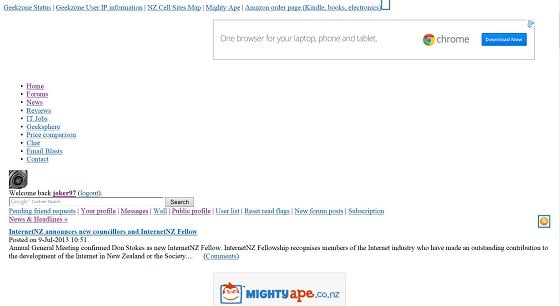
Can someone please help why when i load geekzone web page in
firefox or internet explorer, the page doen't load correctly.
All other web pages are ok.

Please see attached pic

Thank you

Peter


Filter this topic showing only the reply marked as answer View this topic in a long page with up to 500 replies per page Create new topic
 1 | 2 | 3
qwerty7
434 posts

Ultimate Geek
+1 received by user: 12
Inactive user


  #851785 9-Jul-2013 17:58
Send private message

+1 both under chrome in windows 7 and firefox in linux


mattwnz
20520 posts

Uber Geek
+1 received by user: 4797


  #851790 9-Jul-2013 18:08
Send private message

I was having this problem yesterday, but seems to be fine today. Possibily to do with caching.

michaelmurfy
meow
13581 posts

Uber Geek
+1 received by user: 10914

Moderator
ID Verified
Trusted
Lifetime subscriber

  #851797 9-Jul-2013 18:11
Send private message

For some reason some Telecom customers are getting this and the issue is with connecting with cdn.geekzone.co.nz, I've personally noticed some other Cloudflare sites playing up too since last night. We are investigating this on our side now.


Michael Murphy | https://murfy.nz
Referral Links: Quic Broadband (use R122101E7CV7Q for free setup)

Are you happy with what you get from Geekzone? Please consider supporting us by subscribing.
Opinions are my own and not the views of my employer.


freitasm
BDFL - Memuneh
80659 posts

Uber Geek
+1 received by user: 41073

Administrator
ID Verified
Trusted
Geekzone
Lifetime subscriber

  #851798 9-Jul-2013 18:12
Send private message

Fine for me on Vodafone but it seems it affects Telecom New Zealand fixed line broadband customers only.

I think this is a problem with Telecom New Zealand and how it caches pages or how the DNS resolver is working.


Referral links: Quic Broadband (free setup code: R587125ERQ6VE) | Samsung | AliExpress | Wise | Sharesies 


Support Geekzone by subscribing (browse ads-free), or making a one-off or recurring donation through PressPatron.



quebec
851 posts

Ultimate Geek
+1 received by user: 35


  #851802 9-Jul-2013 18:13
Send private message

Same for me on Telecom Fixed Line Broadband

freitasm
BDFL - Memuneh
80659 posts

Uber Geek
+1 received by user: 41073

Administrator
ID Verified
Trusted
Geekzone
Lifetime subscriber

  #851809 9-Jul-2013 18:20
Send private message

Moved this to the Telecom sub-forum as this seems to be a specific issue.


Referral links: Quic Broadband (free setup code: R587125ERQ6VE) | Samsung | AliExpress | Wise | Sharesies 


Support Geekzone by subscribing (browse ads-free), or making a one-off or recurring donation through PressPatron.


Shop now for Lego sets and other gifts (affiliate link).
alikat
405 posts

Ultimate Geek
+1 received by user: 40

Trusted

  #851923 9-Jul-2013 20:20
Send private message

b0rked for me too. (telecom fixed line)

AKLWestie
650 posts

Ultimate Geek
+1 received by user: 115

Trusted
Lifetime subscriber

  #851927 9-Jul-2013 20:22
Send private message

I am on Telecom ADSL2+ and having the same problem when I use firefox.  But it is ok when I use Opera on the same machine.

morrisk
367 posts

Ultimate Geek
+1 received by user: 161

Lifetime subscriber

  #851928 9-Jul-2013 20:26
Send private message

Same problem.

Using Safari on OSX
Telecom fixed line broadband

nzcloud9

52 posts

Master Geek
+1 received by user: 1


  #851929 9-Jul-2013 20:26
Send private message

Just been checking my other computers

ipad no problems
desktops win xp 32 bit no problem

Only my laptop with the problem win 7 64bit

geekzone home, news, forums, reviews, geeksphere, chat, email blasts all have problem.

geekzone it jobs, price comparsion, contact pages ok

every other web site good

Also i am on telecom fixed line broadband

plambrechtsen
1948 posts

Uber Geek
+1 received by user: 459
Inactive user


  #851931 9-Jul-2013 20:27
Send private message

I've sent Mauricio an email about it.

I think it's a combo of broken links in the page missing a "http:"


<!DOCTYPE html PUBLIC "-//W3C//DTD XHTML 1.0 Transitional//EN" "http://www.w3.org/TR/xhtml1/DTD/xhtml1-transitional.dtd" >
<html xmlns="http://www.w3.org/1999/xhtml" lang="en" xml:lang="en">
<head>
<link href="//cdn.geekzone.co.nz" rel="dns-prefetch" />
<link href="//images.geekzone.co.nz" rel="dns-prefetch" />
<link href="//avatar.geekzone.co.nz" rel="dns-prefetch" />
<link href="//header.geekzone.co.nz" rel="dns-prefetch" />


Those links are missing a prefix href="http://...

And the transparent proxy not liking it much.


Move to New Zealand's best fibre broadband service (affiliate link). Free setup code: R587125ERQ6VE. Note that to use Quic Broadband you must be comfortable with configuring your own router.
Batman
Mad Scientist
30014 posts

Uber Geek
+1 received by user: 6217

Trusted
Lifetime subscriber

  #851933 9-Jul-2013 20:28
Send private message

this is my GZ since 8-7-13


SumnerBoy
2079 posts

Uber Geek
+1 received by user: 306

ID Verified
Lifetime subscriber

  #851935 9-Jul-2013 20:31
Send private message

Yep here too. Telecom fixed broadband. Fine on my iPad and Android chrome browser, but no good on my Win 64 desktop.

GregV
932 posts

Ultimate Geek
+1 received by user: 304


  #851936 9-Jul-2013 20:32
Send private message

Win7 64bit Telecom fixed-line broadband
IE10 and FF22

No issues here - pages display as expected

nicks
126 posts

Master Geek
+1 received by user: 16


  #851938 9-Jul-2013 20:38
Send private message

Telecom UFB. Doesn't display correctly using Safari on an iPad. Turn off wifi and it loads fine over Vodafone 3G.

(Fixed typos)

 1 | 2 | 3
Filter this topic showing only the reply marked as answer View this topic in a long page with up to 500 replies per page Create new topic


Geekzone Live »

Try automatic live updates from Geekzone directly in your browser, without refreshing the page, with Geekzone Live now.


Are you subscribed to our RSS feed? You can download the latest headlines and summaries from our stories directly to your computer or smartphone by using a feed reader.