Geekzone: technology news, blogs, forums
Guest
Welcome Guest.
You haven't logged in yet. If you don't have an account you can register now.


hobsonlea

313 posts

Ultimate Geek
+1 received by user: 51


#166103 2-Mar-2015 21:38
Send private message

Hi
I am trying to connect to spark broadband having made the switch from fyx to spark today.
The Linksys Wag200G worked fine on Orcon and Fyx - but havent managed to get a successful connection to Spark. I tried the spark helpdesk this evening but this wasnt able to resolve the issue. We appear to have a successful connection on the setup / status screens on the modem admin panel - but cant access broadband from her Ethernet connected devices or her wireless devices.
Just thought I try the forums I have looked at http://www.spark.co.nz/help/internet/getting-started/broadband-settings-third-party-modems/ for modem config.
I do recall in the fyx setup that they had me make one changed to the setup - that at the time fyx said - try changing this... it shouldnt be set this way - but seems to work...

Apart from waiting for a spark modem, any suggestions. I can cut and paste the status connection info tomorrrow morning.

Peter

Create new topic
michaelmurfy
meow
13579 posts

Uber Geek
+1 received by user: 10910

Moderator
ID Verified
Trusted
Lifetime subscriber

  #1249877 2-Mar-2015 21:46
Send private message

Username: user@xtrabb.co.nz
Password can be anything but blank.
Service name: blank

Should be all there is to it. You do however need to let go of your WAG200G as it is a little old now :)


Michael Murphy | https://murfy.nz
Referral Links: Quic Broadband (use R122101E7CV7Q for free setup)

Are you happy with what you get from Geekzone? Please consider supporting us by subscribing.
Opinions are my own and not the views of my employer.


yitz
2238 posts

Uber Geek
+1 received by user: 594


  #1249881 2-Mar-2015 21:53
Send private message

Under PPP authentication, try making it so it only tries PAP authentication (as required by Spark), not Auto or CHAP only.

Near the start of BBA there was an issue with some modems including Linksys which got stuck attempting CHAP and would never complete authentication process (even though Xtra accepts almost anything for user/pass the authentication process must still run)

Note: On the WAG200G also be aware of the interleaving bug on some firmware versions which limits downstream. sync rate to 7547 kbps under ADSL2+.

hobsonlea

313 posts

Ultimate Geek
+1 received by user: 51


  #1250055 3-Mar-2015 09:58
Send private message

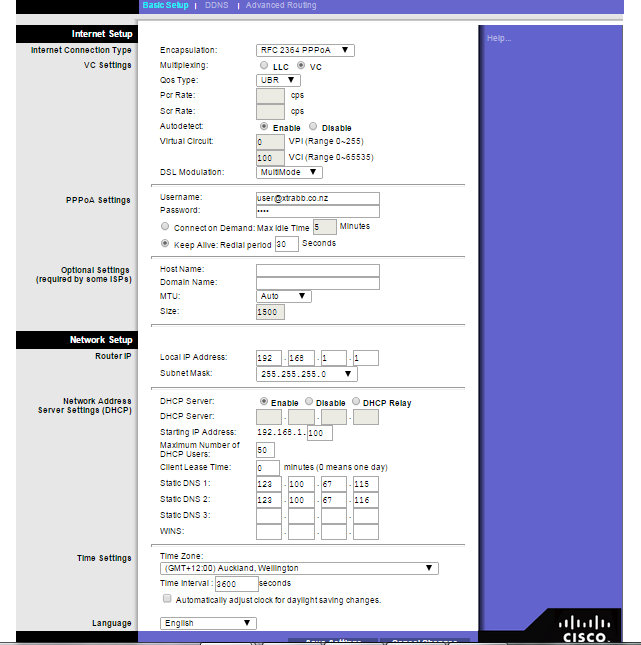
Here are the settings - cant see an option on PPP authentication

Click to see full size


hobsonlea

313 posts

Ultimate Geek
+1 received by user: 51


  #1250058 3-Mar-2015 10:01
Send private message

Here is the Gateway Status and the DSL Status

Click to see full size

Click to see full size

BarTender
3629 posts

Uber Geek
+1 received by user: 2572

ID Verified
Trusted
Lifetime subscriber

  #1250061 3-Mar-2015 10:12
Send private message

hobsonlea: Here are the settings - cant see an option on PPP authentication

Click to see full size


You'll be fine.

If it doesn't come up then you know you have an issue, but with a username and password field filled in. The router will do PADI then PAP auth. The other end will tell you to go away if you have set it up wrong. But what you have in there is fine.

hobsonlea

313 posts

Ultimate Geek
+1 received by user: 51


  #1250073 3-Mar-2015 10:27
Send private message

Thx - alas - but while connection appears fine - I couldnt get to the internet... cant ping spark..
so decided the try manually entering the dns servers into the Linksys... and works now... !

Thx for help and suggestions..


Peter


Support Geekzone with one-off or recurring donations Donate via PressPatron.
BarTender
3629 posts

Uber Geek
+1 received by user: 2572

ID Verified
Trusted
Lifetime subscriber

  #1250156 3-Mar-2015 11:46
Send private message

hobsonlea: Thx - alas - but while connection appears fine - I couldnt get to the internet... cant ping spark..
so decided the try manually entering the dns servers into the Linksys... and works now... !

Thx for help and suggestions..
Peter


If you don't set anything in theory you should learn them from the network.


ServerIP Address*


Primary


122.56.237.1


Secondary


210.55.111.1


http://help.spark.co.nz/app/answers/detail/a_id/12736/

hobsonlea

313 posts

Ultimate Geek
+1 received by user: 51


  #1250585 3-Mar-2015 21:40
Send private message

BarTender:
hobsonlea: Thx - alas - but while connection appears fine - I couldnt get to the internet... cant ping spark..
so decided the try manually entering the dns servers into the Linksys... and works now... !

Thx for help and suggestions..
Peter


If you don't set anything in theory you should learn them from the network.


ServerIP Address*

Primary
122.56.237.1


Secondary
210.55.111.1


http://help.spark.co.nz/app/answers/detail/a_id/12736/


I presume because the modem had been used on fyx that the DNS ip addresses in the modem were used, so I think you are saying I could have deleted the old fyx DNS ip addresses and it would have picked up the spark ones ?

insane
3324 posts

Uber Geek
+1 received by user: 1006

ID Verified
Trusted
2degrees
Subscriber

  #1250601 3-Mar-2015 21:56
Send private message

hobsonlea:
BarTender:
hobsonlea: Thx - alas - but while connection appears fine - I couldnt get to the internet... cant ping spark..
so decided the try manually entering the dns servers into the Linksys... and works now... !

Thx for help and suggestions..
Peter


If you don't set anything in theory you should learn them from the network.


ServerIP Address*

Primary
122.56.237.1


Secondary
210.55.111.1


http://help.spark.co.nz/app/answers/detail/a_id/12736/


I presume because the modem had been used on fyx that the DNS ip addresses in the modem were used, so I think you are saying I could have deleted the old fyx DNS ip addresses and it would have picked up the spark ones ?


Sounds like remnants from a radius issue FYX had temporarily years ago when DNS servers settings weren't being pushed out properly during authentication. HD guy probably got you to hard code in the FYX DNS servers in the modem.

BarTender
3629 posts

Uber Geek
+1 received by user: 2572

ID Verified
Trusted
Lifetime subscriber

  #1250608 3-Mar-2015 22:04
Send private message

hobsonlea: I presume because the modem had been used on fyx that the DNS ip addresses in the modem were used, so I think you are saying I could have deleted the old fyx DNS ip addresses and it would have picked up the spark ones ?


Yes... the PPP session negotiation also gives you the default DNS servers automagically. So leaving it blank will be fine.

hobsonlea

313 posts

Ultimate Geek
+1 received by user: 51


  #1250616 3-Mar-2015 22:16
Send private message

Thx, I would have configured the linksys via fyx ph support and so may have been the original author of the DNS servers in the modem a few years back. I Am more chuffed that I figured it out, and saddened that spark wasn't able to help me at all.. A broadband customer switching from a competitor I would have thought be valued with better onboarding... And as the bill payer of other spark accounts as well as this one, they don't seem to be able to track "who the customer is" they focus on the account holder.. And so it's back to square one each time.
I did get a call back from a technician very polite, when I explained how I fixed it, he said "I'd have never got that" .....


Want to support Geekzone and browse the site without the ads? Subscribe to Geekzone now (monthly, annual and lifetime options).
BarTender
3629 posts

Uber Geek
+1 received by user: 2572

ID Verified
Trusted
Lifetime subscriber

  #1250624 3-Mar-2015 22:43
Send private message

hobsonlea: Thx, I would have configured the linksys via fyx ph support and so may have been the original author of the DNS servers in the modem a few years back. I Am more chuffed that I figured it out, and saddened that spark wasn't able to help me at all.. A broadband customer switching from a competitor I would have thought be valued with better onboarding... And as the bill payer of other spark accounts as well as this one, they don't seem to be able to track "who the customer is" they focus on the account holder.. And so it's back to square one each time.
I did get a call back from a technician very polite, when I explained how I fixed it, he said "I'd have never got that" .....


Any reason why you didn't take the free router when you joined as that would have worked fine.
Supporting stuff you never supplied is always going to be a case of google may be the answer otherwise cross your fingers.

hobsonlea

313 posts

Ultimate Geek
+1 received by user: 51


  #1250659 4-Mar-2015 00:03
Send private message

BarTender:
hobsonlea: Thx, I would have configured the linksys via fyx ph support and so may have been the original author of the DNS servers in the modem a few years back. I Am more chuffed that I figured it out, and saddened that spark wasn't able to help me at all.. A broadband customer switching from a competitor I would have thought be valued with better onboarding... And as the bill payer of other spark accounts as well as this one, they don't seem to be able to track "who the customer is" they focus on the account holder.. And so it's back to square one each time.
I did get a call back from a technician very polite, when I explained how I fixed it, he said "I'd have never got that" .....


Any reason why you didn't take the free router when you joined as that would have worked fine.
Supporting stuff you never supplied is always going to be a case of google may be the answer otherwise cross your fingers.

I thought it would be quicker, extended family all have the wifi ssid / passwords, I didn't want to contribute to waste with a working modem. But next time I will take the modem.

Ragnor
8279 posts

Uber Geek
+1 received by user: 585

Trusted

  #1256432 11-Mar-2015 16:35
Send private message

The WAG200G is a really old model that uses a chipset (TNETD7200 - TI AR7, TNETW1350A) that doesn't work very well with the dsl line cards (ikanos or broadcom) in use in most cabinets and exchanges in NZ.

In fact that 7.5Mbit sync in your screenshot looks suspiciously like the bug some older modems have where it doesn't sync higher than 8Mbit on the modern line cards.

Might be wrong as 31db downstream attenuation is fairly high but I'd be tempted to try a different modem myself.

Create new topic


Geekzone Live »

Try automatic live updates from Geekzone directly in your browser, without refreshing the page, with Geekzone Live now.


Are you subscribed to our RSS feed? You can download the latest headlines and summaries from our stories directly to your computer or smartphone by using a feed reader.