Geekzone: technology news, blogs, forums
Guest
Welcome Guest.
You haven't logged in yet. If you don't have an account you can register now.


Swemoph

44 posts

Geek
+1 received by user: 7


#223738 15-Oct-2017 17:06
Send private message

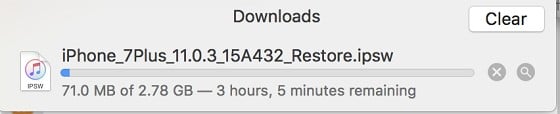
Has anyone else been having issues with speed on Apple services as of late? App Store downloads, developer portal and software updates all take an extremely long amount of time to complete, and this is an issue on both Spark Fiber and Spark 4G. I have not been able to test on any other providers. Currently trying to download an iOS firmware file and it's downloading at ~192kb/s. 


This has been going on for the past few weeks. Can confirm it is not a connection issue on my end as all my speed test results are absolutely fine (100mb/s over WiFi and ~50-60mb/s over cellular). I'm certain it isn't Apple as in the past their services are usually very fast. That leaves me thinking there's something wrong with the way Spark is dealing with Apple-bound traffic.


Download in Safari:


WiFi Speed test (Spark 100 fiber):


Are there any other debugging steps I can take here to try and isolate the cause of this issue? 


Thanks!


View this topic in a long page with up to 500 replies per page Create new topic
 1 | 2
Jase2985
13730 posts

Uber Geek
+1 received by user: 6202

ID Verified
Lifetime subscriber

  #1883861 15-Oct-2017 17:47
Send private message

provide a download link to the files you are having issues with (if you can) so others can see if they have the same problems.


the few apples downloads ive tried have all been line speed. on spark VDSL


Linux
12173 posts

Uber Geek
+1 received by user: 8469

Trusted
Lifetime subscriber

  #1883862 15-Oct-2017 17:49
Send private message

Are you using the Spark DNS or 3rd party?


Linux


dfnt
1553 posts

Uber Geek
+1 received by user: 1036

Trusted
Lifetime subscriber

  #1883870 15-Oct-2017 17:58
Send private message

I did have slowness a few weeks ago but haven't noticed anything since. I couldn't even update apps on either Spark VDSL and 4G as they'd just hang trying to download.


Edit: Yeah, it's happening again. Trying to update an app and its going slower than usual


Quic referral link https://account.quic.nz/refer/276294 free setup code R276294EBWOBK


zocster
1994 posts

Uber Geek
+1 received by user: 105

ID Verified
Trusted
Lifetime subscriber

  #1883887 15-Oct-2017 18:32
Send private message

I'm having issues on Vodafone... I think it's apple.. Maybe I'm running beta but I doubt it...

coffeebaron
6304 posts

Uber Geek
+1 received by user: 3566

Trusted
Lifetime subscriber

  #1883894 15-Oct-2017 18:45
Send private message

People doing their iOS11 updates?


Rural IT and Broadband support.


Broadband troubleshooting and master filter installs.
Starlink installer - one month free: https://www.starlink.com/?referral=RC-32845-88860-71 
Wi-Fi and networking
Cel-Fi supply and installer - boost your mobile phone coverage legally


Need help in Auckland, Waikato or BoP? Click my email button, or email me direct: [my user name] at geekzonemail dot com


michaelmurfy
meow
13579 posts

Uber Geek
+1 received by user: 10910

Moderator
ID Verified
Trusted
Lifetime subscriber

  #1883913 15-Oct-2017 18:55
Send private message

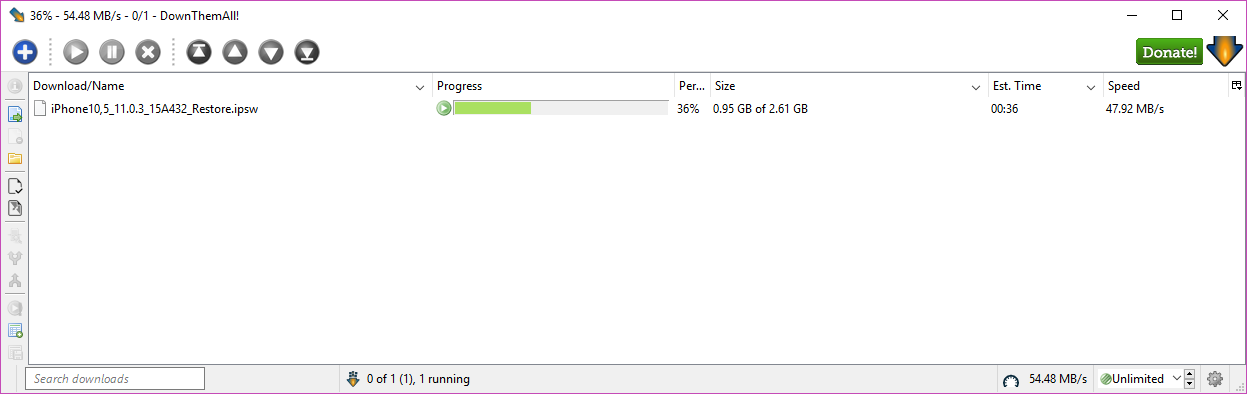
Just tested this with an iPhone 8 IPSW image:


Confirm you're not running a third party DNS service.


Michael Murphy | https://murfy.nz
Referral Links: Quic Broadband (use R122101E7CV7Q for free setup)

Are you happy with what you get from Geekzone? Please consider supporting us by subscribing.
Opinions are my own and not the views of my employer.


HP


Shop now for HP laptops and other devices (affiliate link).
dfnt
1553 posts

Uber Geek
+1 received by user: 1036

Trusted
Lifetime subscriber

  #1883916 15-Oct-2017 18:59
Send private message

Getting full line speed too


Click to see full size


Quic referral link https://account.quic.nz/refer/276294 free setup code R276294EBWOBK


Talkiet
4819 posts

Uber Geek
+1 received by user: 3934

Trusted

  #1883918 15-Oct-2017 19:01
Send private message

Over the last few months, Apple have decreased their reliance on local CDNs to basically zero, and as yet there's no local option for ISPs to pick up Apple traffic in NZ. That said, your speeds suck.


Apple do a good job of scheduling and pacing their IOS upgrades - spreading the load over the 24 hours of the day and across several weeks but if there's an issue with any of the upstreams we don't have direct visibility anymore given their decision to withdraw from using local CDNs.


There's obviously nothing wrong with your actual connection at least :-) I'll speak to someone upstream in the morning and see if we have any idea of any upstream Apple issues...


Cheers - N


Please note all comments are from my own brain and don't necessarily represent the position or opinions of my employer, previous employers, colleagues, friends or pets.


zocster
1994 posts

Uber Geek
+1 received by user: 105

ID Verified
Trusted
Lifetime subscriber

  #1883944 15-Oct-2017 19:06
Send private message

OS updates seem fine, just app updates, newsfeed widget missing thumbnails etc...

Again I'm on fibre X... So feeling is its apple

Swemoph

44 posts

Geek
+1 received by user: 7


  #1883955 15-Oct-2017 19:36
Send private message

Thanks for the responses! This is a direct link to the IPSW that I'm downloading from the dev portal. Currently using Google's DNS servers (8.8.8.8 and 8.8.4.4), not too sure what DNS is used by my phone on cellular though. Looks like this issue is affecting a few people. Do you think that changing my DNS to Spark's servers would have any effect? 


@Talkiet - Hmmm, that's an interesting decision from Apple. Thanks for that smile


michaelmurfy
meow
13579 posts

Uber Geek
+1 received by user: 10910

Moderator
ID Verified
Trusted
Lifetime subscriber

  #1883959 15-Oct-2017 20:06
Send private message

That is not an official Apple URL and looks to be coming from a questionable source (the IP address is from China). Download it from here instead and it should max out your line.


A good place to grab Apple firmware is from https://ipsw.me which links you to the official Apple download URL.


Michael Murphy | https://murfy.nz
Referral Links: Quic Broadband (use R122101E7CV7Q for free setup)

Are you happy with what you get from Geekzone? Please consider supporting us by subscribing.
Opinions are my own and not the views of my employer.


HP


Shop now for HP laptops and other devices (affiliate link).
LennonNZ
2459 posts

Uber Geek
+1 received by user: 411

ID Verified
Trusted

  #1883960 15-Oct-2017 20:06
Send private message

Using a third party DNS Server can affect where you are directed towards for caching servers. Unless there is a specific reason you are using third party DNS Servers I suggest people use the one supplied to them.


The link you have given say http://220.243.193.33/.. (This is in China and comes down at 250KB/s but when I go the developer site the download link is: http://appldnld.apple.com/..... and comes down at 10MB/s


220.243.193.33 is NOT an apple server so you must have an incorrect Link (You are not downloading from the APple developer site), Your machine has a virus/infected or you are purposely proxying your traffic via a machine in China.


Edit: changed japan -> china


Jase2985
13730 posts

Uber Geek
+1 received by user: 6202

ID Verified
Lifetime subscriber

  #1883962 15-Oct-2017 20:08
Send private message

im getting about 220KB/s with that link you provided, on spark VDSL


The link MM provided im getting line speed


Swemoph

44 posts

Geek
+1 received by user: 7


  #1883967 15-Oct-2017 20:26
Send private message

Trying the links provided here, as well as https://ipsw.me still had speed issues for me. That being said I just flicked over to Spark's DNS servers as recommended (122.56.237.1 and 210.55.111.1) and my speeds are back up as they should be.


The address I provided did come after I started the download from https://developer.apple.com so I'm not totally sure why I was redirected to that weird IP address, however after the DNS server change it's downloading from official Apple servers instead. Possible Google is having an issue with their dns servers? I'll also run a virus scan to be totally sure that's not a problem.


Thanks everyone!


yitz
2238 posts

Uber Geek
+1 received by user: 594


  #1883968 15-Oct-2017 20:28
Send private message

The previous URL http://220.243.193.33/appldnld.apple.com/... looks fine it belongs to some federated CDN node somewhere in Europe and looks perfectly legit to me. Apple will most likely be using a variety of CDNs to distribute these files.

 1 | 2
View this topic in a long page with up to 500 replies per page Create new topic


Geekzone Live »

Try automatic live updates from Geekzone directly in your browser, without refreshing the page, with Geekzone Live now.


Are you subscribed to our RSS feed? You can download the latest headlines and summaries from our stories directly to your computer or smartphone by using a feed reader.