Geekzone: technology news, blogs, forums
Guest
Welcome Guest.
You haven't logged in yet. If you don't have an account you can register now.


Foiler

220 posts

Master Geek
+1 received by user: 10


#230682 8-Mar-2018 12:25
Send private message

Transitioned from VDSL to UFB and installed a Draytek 2862 router 3 days ago 5th March.


There have been a couple of disconnections, and talking to Spark faults just now their RADIUS logs show disconnections on the 7th 4.28am and today 8th March 7.51am.


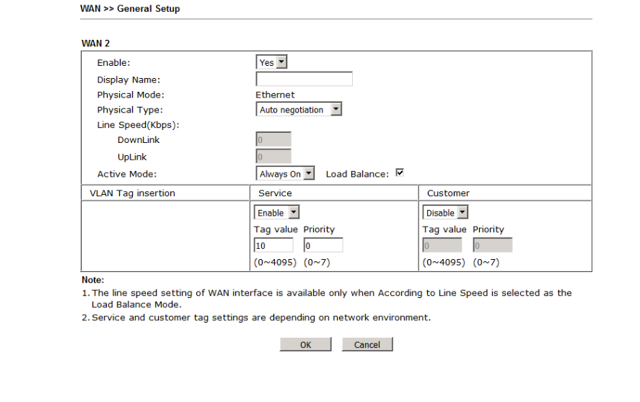
VLAN tag insertion is set to 10 but on the Service side, perhaps this should be the Customer side?  The router does not connect if both are set to zero.


Hoping someone can assist here .. is it perhaps normal to have a UFB disconnect once a day?  The disconnection this morning may have lasted for 10 minutes or so ..



Create new topic
Foiler

220 posts

Master Geek
+1 received by user: 10


  #1971168 8-Mar-2018 12:30
Send private message

Draytek 2862 VLAN tag settings ..


Chorusnz
436 posts

Ultimate Geek
+1 received by user: 603

Trusted
Chorus

  #1971169 8-Mar-2018 12:31
Send private message

Hey Foiler, I would say that's not a normal UFB experiences.


If you're on the chorus network I can check the physical side of the network for you Just PM your address.


^Mike


Chorusnz
436 posts

Ultimate Geek
+1 received by user: 603

Trusted
Chorus

  #1971173 8-Mar-2018 12:37
Send private message

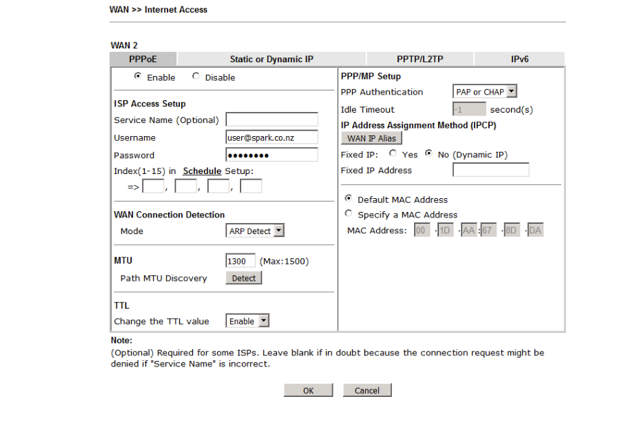
Hey Foiler, What settings do you have plugged in under the Internet Access Tab?


^Mike


Foiler

220 posts

Master Geek
+1 received by user: 10


  #1971178 8-Mar-2018 12:53
Send private message


Chorusnz
436 posts

Ultimate Geek
+1 received by user: 603

Trusted
Chorus

  #1971184 8-Mar-2018 12:57
Send private message

Hey, on the physical side it looks fine. There's no errors or drops.


MTU should be set to 1500 Though.


^Mike


Foiler

220 posts

Master Geek
+1 received by user: 10


  #1971189 8-Mar-2018 13:02
Send private message

Does that mean the VLAN tag setting is ok? or does that relate to the PPPoE session?


Shop now for Lego sets and other gifts (affiliate link).
Chorusnz
436 posts

Ultimate Geek
+1 received by user: 603

Trusted
Chorus

  #1971202 8-Mar-2018 13:14
Send private message

Yup your Vlan tag settings looks good to me 10/0 is correct.


PPPoE MTU should be set to 1500 or Auto for best services.


^Mike


hio77
'That VDSL Cat'
13036 posts

Uber Geek
+1 received by user: 3896

ID Verified
Trusted
Lizard Networks
Subscriber

  #1971210 8-Mar-2018 13:34
Send private message

@foiler


want to DM me details? i'll have a dig on this end.


being Mike has checked over it, i expect chorus end should be all good... we will see though ;)


#include <std_disclaimer>


Any comments made are personal opinion and do not reflect directly on the position my current or past employers may have. 


Chorusnz
436 posts

Ultimate Geek
+1 received by user: 603

Trusted
Chorus

  #1971218 8-Mar-2018 14:00
Send private message

Hey Hio77, always open to having my mind change by fact based evidence :p Let us now if you need anything.


^Mike


hio77
'That VDSL Cat'
13036 posts

Uber Geek
+1 received by user: 3896

ID Verified
Trusted
Lizard Networks
Subscriber

  #1971219 8-Mar-2018 14:04
Send private message

Chorusnz:


Hey Hio77, always open to having my mind change by fact based evidence :p Let us now if you need anything.


^Mike


fact based? nahhh I'm all about speculating :P


#include <std_disclaimer>


Any comments made are personal opinion and do not reflect directly on the position my current or past employers may have. 


Foiler

220 posts

Master Geek
+1 received by user: 10


  #1971339 8-Mar-2018 17:29
Send private message

ok many thanks for the various assistance with this .. resolved that the UFB is in fact stable, except for a couple of managed outages which are now explained as pushing out plan changes.


Throughput question also came up, and that was resolved by changing the defined bandwidth in the Draytek QoS setup .. bit of a trap there where the bandwidth was (for historic reasons) "declared" at 100/20.


HP


Shop now for HP laptops and other devices (affiliate link).
Foiler

220 posts

Master Geek
+1 received by user: 10


  #1971340 8-Mar-2018 17:36
Send private message

The question of MTU came up in the above discussions .. but the Draytek has a tool for determining the highest possible (nearest 8 increment) ..


.. which is 1468.


hio77
'That VDSL Cat'
13036 posts

Uber Geek
+1 received by user: 3896

ID Verified
Trusted
Lizard Networks
Subscriber

  #1971347 8-Mar-2018 17:50
Send private message

Foiler:


The question of MTU came up in the above discussions .. but the Draytek has a tool for determining the highest possible (nearest 8 increment) ..


.. which is 1468.


Does the Draytek support mini jumbo frames?


#include <std_disclaimer>


Any comments made are personal opinion and do not reflect directly on the position my current or past employers may have. 


Foiler

220 posts

Master Geek
+1 received by user: 10


  #1971349 8-Mar-2018 17:53
Send private message

apparently so .. http://kb.networksystemssolutions.info/index.php/Draytek_Jumbo_Frames


Create new topic


Geekzone Live »

Try automatic live updates from Geekzone directly in your browser, without refreshing the page, with Geekzone Live now.


Are you subscribed to our RSS feed? You can download the latest headlines and summaries from our stories directly to your computer or smartphone by using a feed reader.