Geekzone: technology news, blogs, forums
Guest
Welcome Guest.
You haven't logged in yet. If you don't have an account you can register now.


grb67

63 posts

Master Geek
+1 received by user: 2


#24163 16-Jul-2008 18:59
Send private message

Anyone worked these out yet?
Can't seem to find a user manual, had someone come in who couldn't connect. Found their LAN port disabled and static IP set to 10.1.1.2 (would have worked on a DLink but Thomson is 192.168.1.254) got it to connect and manually set user name and password (the CD wizard kept saying no LAN connection on the Acer laptop)
Couldn't for the life of me find the DHCP settings.
Is there no way to control the LAN settings or DHCP?
Couldnt get it to connect via wireless- kept searching for IP address, had thought I would set a static range and just static it but couldnt find it.
Good modem.router from the point of view that unique wireless SSID and unique WPA passkey with wireless off by default.


Create new topic
PenultimateHop
637 posts

Ultimate Geek
+1 received by user: 2

Trusted

  #148604 16-Jul-2008 19:12
Send private message

I can't figure out what you are trying to ask - can you explain a little more clearly?


coffeebaron
6304 posts

Uber Geek
+1 received by user: 3566

Trusted
Lifetime subscriber

  #148624 16-Jul-2008 20:27
Send private message

YUK!! Horrible devices - had the privilege experience of trying to customise the config on one of these. Definitely not geared for the advanced user to tweak. Google thomson CLI commands if you are familiar with using Telnet.


Rural IT and Broadband support.


Broadband troubleshooting and master filter installs.
Starlink installer - one month free: https://www.starlink.com/?referral=RC-32845-88860-71 
Wi-Fi and networking
Cel-Fi supply and installer - boost your mobile phone coverage legally


Need help in Auckland, Waikato or BoP? Click my email button, or email me direct: [my user name] at geekzonemail dot com


cokemaster
Exited
4937 posts

Uber Geek
+1 received by user: 1089

Retired Mod
Trusted
Lifetime subscriber

  #148626 16-Jul-2008 20:33
Send private message

I've just got one on Tuesday. Defintely a step up from the Linksys or Dlink routers that I've played with.

Interface is a bit different to routers that I've used previously, but no more difficult - if anything much easier to run through.

To change the IP, you need to:
Log in on the admin panel.
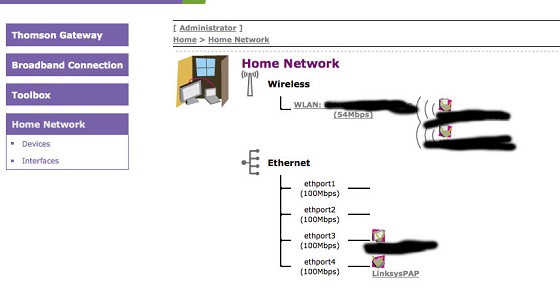
Click Home Network
Click Interfaces
Click Local Network
Click Configure


You can then change the IP's of the router and the DCHP address pools. My one by default had 10.0.0.138 and 192.168.1.254 as an IP address set up by default and 192.168.1.64 - 192.168.1.253 as the DCHP ranges.

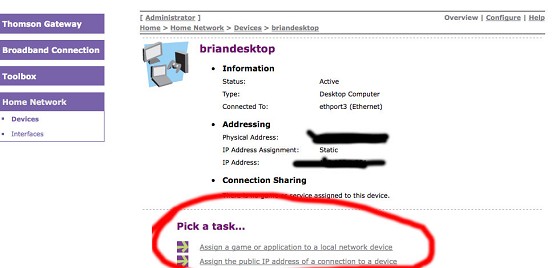
PS. An easy way to set up port forwarding is to click home network and then the device (it will list all devices connecting via wireless or via each port!). You'll then have the choice on whether you want to assign an application port or even give it the public internet IP!


webhosting

Loose lips may sink ships - Be smart - Don't post internal/commercially sensitive or confidential information!


coffeebaron
6304 posts

Uber Geek
+1 received by user: 3566

Trusted
Lifetime subscriber

  #148628 16-Jul-2008 20:36
Send private message

cokemaster: PS. An easy way to set up port forwarding is to click home network and then the device (it will list all devices connecting via wireless or via each port!). You'll then have the choice on whether you want to assign an application port or even give it the public internet IP!


Yea, that was nice in theory, but I could not get the Public IP working into a WRP400 :(


Rural IT and Broadband support.


Broadband troubleshooting and master filter installs.
Starlink installer - one month free: https://www.starlink.com/?referral=RC-32845-88860-71 
Wi-Fi and networking
Cel-Fi supply and installer - boost your mobile phone coverage legally


Need help in Auckland, Waikato or BoP? Click my email button, or email me direct: [my user name] at geekzonemail dot com


cokemaster
Exited
4937 posts

Uber Geek
+1 received by user: 1089

Retired Mod
Trusted
Lifetime subscriber

  #148638 16-Jul-2008 20:48
Send private message

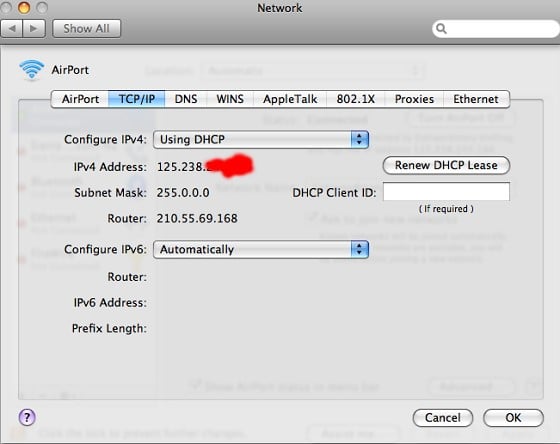
Works fine here. Just needed to release and renew the IP address.


webhosting

Loose lips may sink ships - Be smart - Don't post internal/commercially sensitive or confidential information!


manhinli
2483 posts

Uber Geek
+1 received by user: 4

Trusted

  #148689 16-Jul-2008 23:07
Send private message

Just to ask - are they Telecom branded in anyway?

I'm interested in getting one...


Find me on Twitter!

I posted 1, 2 x 10^3 times!


Shop now on Samsung phones, tablets, TVs and more (affiliate link).
cokemaster
Exited
4937 posts

Uber Geek
+1 received by user: 1089

Retired Mod
Trusted
Lifetime subscriber

  #148730 17-Jul-2008 07:23
Send private message

The only branding I see is the box, the Telecom set up CD, and the default Telecom username/password. The modem itself is very clean and so is the interface.


webhosting

Loose lips may sink ships - Be smart - Don't post internal/commercially sensitive or confidential information!


Bung
6733 posts

Uber Geek
+1 received by user: 2926

Subscriber

  #148736 17-Jul-2008 07:59
Send private message

If you get a Thomson, check it's throughput against your previous modem. I've got a ST536 and so far Flash based speed tests show OK results but the Telecom, Epitero Isposure tests and ordinary downloading are all much slower than D-Link 502T despite the much improved sync rate. Fishing for answers.

Create new topic


Geekzone Live »

Try automatic live updates from Geekzone directly in your browser, without refreshing the page, with Geekzone Live now.


Are you subscribed to our RSS feed? You can download the latest headlines and summaries from our stories directly to your computer or smartphone by using a feed reader.