Geekzone: technology news, blogs, forums
Guest
Welcome Guest.
You haven't logged in yet. If you don't have an account you can register now.


FineWine

3111 posts

Uber Geek
+1 received by user: 2440

Trusted
Nurse (R)
Lifetime subscriber

#290063 18-Oct-2021 21:58
Send private message

OK so I have started a spin off thread from here: New Spark broadband offerings


From previous thread:


@ eracode - https://www.geekzone.co.nz/forums.asp?forumid=39&topicid=289942&page_no=7#2795049
and https://www.geekzone.co.nz/forums.asp?forumid=39&topicid=289942&page_no=9#2797058


@EviLClouD - https://www.geekzone.co.nz/forums.asp?forumid=39&topicid=289942&page_no=8#2796925


@Inphinity - https://www.geekzone.co.nz/forums.asp?forumid=39&topicid=289942&page_no=9#2796939


@cbrpilot 


This all came to the fore when I upgraded to the latest Spark plan Max Fibre + Landline plan from my previous Unplan Netflix Fibre 100 + Landline 120GB+. Previously it was not an issue.


Myself and others are getting poor speed test results on our home WiFi networks via Spark Smart Modem 1st & 2nd gen whilst the Ethernet test results are all within acceptable tolerances.


In my own case the modem is virtually in the centre of my ground storey only 140sqm wooden frame fibre board house on a 5Ghz home network. Whether I connect our iPhones or iPads via iMac 5Ghz AirPort Time Capsule or I connect via the Spark Smart Modem I get poor speeds. My iMac is connected directly to the modem via 6 metre run Ethernet.


But now that I and others have all this great Mbps speed I would expect that the Spark Smart Modem 1st or 2nd gen would pump out at least close to that speed. If you compare the two Spark Smart Modems spec's -


Smart Modem 1st Generation


Quad-Stream AC2350 WiFi – up to 2.33Gbps (600 + 1733 Mbps)*
WIFI TECHNOLOGY
802.11n: up to 450Mbps
802.11ac: up to 1733Mbps
WiFi 4 256QAM (2.4GHz): up to 600Mbps
WiFi 5 1024QAM (5GHz) : up to 2167Mbps


Smart Modem 2nd Generation

Quad-Stream AX3500 WiFi – up to 3500Mbps (1147 + 2400 Mbps)*
WIFI SPEED
802.11n: up to 600Mbps
802.11ac: up to 1733Mbps
802.11ac (1024QAM): up to 2400Mbps
802.11ax 2.4Ghz: up to 1200Mbps
802.11ax 5GHz: up to 2400Mbps


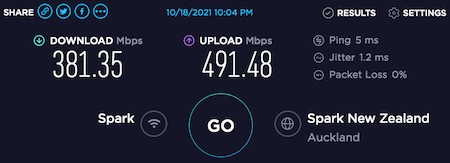
WiFi result from iPad 6 speed app


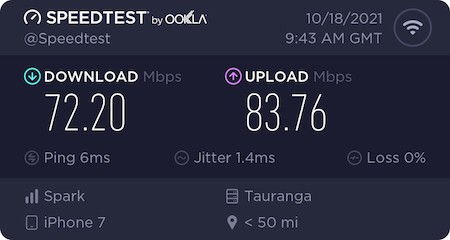
WiFi result from iPhone 7 speed app


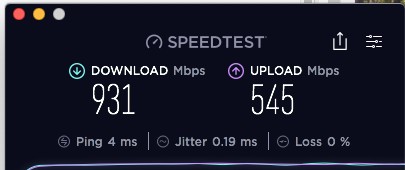
Ethernet result from iMac speed app


NOTE: My iPhone 7, iPad 6 & iPad mini 5 all have Wi‑Fi (802.11a/b/g/n/ac); dual band (2.4GHz and 5GHz); HT80 with MIMO


So Huston do we have a problem with the WiFi side of Sparks Smart Modems or am I just expecting too much from this technology❓



Whilst the difficult we can do immediately, the impossible takes a bit longer. However, miracles you will have to wait for.


Create new topic
lxsw20
3689 posts

Uber Geek
+1 received by user: 2174

Subscriber

  #2797412 18-Oct-2021 22:31
Send private message

You're very likley being limited by your devices here, rather than the smart modem.


What are you testing WiFi from? The iMac? The iPhone 7 for example maxs out at 450Mbit in absolute perfect conditions.


If the iMac - hold option and press on the Wifi fan by the clock. What is the TX rate? Where it says channel what does that line say?


FineWine

3111 posts

Uber Geek
+1 received by user: 2440

Trusted
Nurse (R)
Lifetime subscriber

  #2797415 18-Oct-2021 22:38
Send private message

lxsw20:


You're very likley being limited by your devices here, rather than the smart modem.


What are you testing WiFi from? The iMac? The iPhone 7 for example maxs out at 450Mbit in absolute perfect conditions.


If the iMac - hold option and press on the Wifi fan by the clock. What is the TX rate? Where it says channel what does that line say?


iPad 6 - have edited above to indicate this


thanks


Whilst the difficult we can do immediately, the impossible takes a bit longer. However, miracles you will have to wait for.


michaelmurfy
meow
13579 posts

Uber Geek
+1 received by user: 10910

Moderator
ID Verified
Trusted
Lifetime subscriber

  #2797418 18-Oct-2021 22:42
Send private message

The WiFi performance is limited by your end device - read this: https://www.duckware.com/tech/wifi-in-the-us.html


You're not going to get Gigabit over WiFi and I would consider your result to be actually very good.


Michael Murphy | https://murfy.nz
Referral Links: Quic Broadband (use R122101E7CV7Q for free setup)

Are you happy with what you get from Geekzone? Please consider supporting us by subscribing.
Opinions are my own and not the views of my employer.


cyril7
9073 posts

Uber Geek
+1 received by user: 2499

ID Verified
Trusted
Subscriber

  #2797450 19-Oct-2021 07:24
Send private message

Hi, yes your speeds are totally normal, and be aware with WiFi it will vary based on a million minor details that change as you and your device move and you have no meaningfull control over that you could be bothered with.


Next question, you say you are experiencing poor speeds, is this just based on the speedtest results or is it really reallly hampering your use of the device, if its the former, simply stop doing speedtests, problem solved.


Also can you explain to me how a portable device such as a phone or ipad can consume data at such a rate that you need more than 70-80Mb/s, which without you watching in minute detail may actually be 300Mb/s a few seconds latter. But please please tell me what app on these devices you are using that demands and crimps your experience by only having 70-80Mb/s available to the device.


Cheers Cyril


sbiddle
30853 posts

Uber Geek
+1 received by user: 9996

Retired Mod
Trusted
Biddle Corp
Lifetime subscriber

  #2797454 19-Oct-2021 07:36
Send private message

Running 80MHz channels is also going to be very problematic in a house that size. Every time you increase channel width you decease coverage, so if you only have a single AP / router you should be looking at 20MHz channels to give optimum coverage. 80MHz should only ever be used if you require optimal performance for devices that are only in the same room.


You're also ignoring the fact Wi-Fi can only deliver around 50% of PHY in the real world (all those speeds are PHY), and that to get these PHY rates you need a device with a similar number of chains as the AP (ie 3x3:3 or 4x4:4).


In the real world if you are needing consistent speeds above ~300-400Mbps you should be using Ethernet. If your requirements for speed are beyond that you'll almost certainly be wanting Ethernet anyway as the half duplex limitations of Wi-Fi will have an impact as well.


Jase2985
13730 posts

Uber Geek
+1 received by user: 6202

ID Verified
Lifetime subscriber

  #2797459 19-Oct-2021 07:50
Send private message

400 down 500 up, what you are seeing on the ipad is a great speed.


what do you need faster wifi speeds for?


Stream your favourite shows now on Apple TV (affiliate link).
wratterus
1687 posts

Uber Geek
+1 received by user: 678


  #2797477 19-Oct-2021 09:15
Send private message

I suspect the iPhone was on 2.4GHz with the result you posted there. Maybe disconnect & reconnect while standing near the modem & re-try. Outside of that result, all those speeds look fantastic & as expected. 


Ignore the 'top speed' specs on the modem. It's basically meaningless. Look at the specs of the card in your device - what are it's capabilities. As has been mentioned, most are 2x2 AC, so with an 80MHz channel, your negotiation rate (PHY) maxes out at 866Mbps. The most you could expect to get in perfect circumstances is about half that speed, which is bang on what you are seeing. 


Linux
12173 posts

Uber Geek
+1 received by user: 8468

Trusted
Lifetime subscriber

  #2797485 19-Oct-2021 09:21
Send private message

Jase2985:


400 down 500 up, what you are seeing on the ipad is a great speed.


what do you need faster wifi speeds for?


@Jase2985 I reckon they are awesome speeds over WiFi


RunningMan
9184 posts

Uber Geek
+1 received by user: 4833


  #2797696 19-Oct-2021 15:25
Send private message

I thought I saw in the other thread a screenshot of your wifi settings. Try changing the guard interval from long to short - particularly Apple devices should have no problem with that, and get a bit more throughput as a result.


kyhwana2
2572 posts

Uber Geek
+1 received by user: 233


  #2797740 19-Oct-2021 16:38
Send private message

The ipad 6 speeds look fine. tl;dr is, if you want faster than that use a wire.


Jase2985
13730 posts

Uber Geek
+1 received by user: 6202

ID Verified
Lifetime subscriber

  #2797868 19-Oct-2021 21:39
Send private message

@FineWine anything to add?


Shop now for Lego sets and other gifts (affiliate link).
FineWine

3111 posts

Uber Geek
+1 received by user: 2440

Trusted
Nurse (R)
Lifetime subscriber

  #2798127 20-Oct-2021 12:06
Send private message

Jase2985:


@FineWine anything to add?


Sorry for the tardy reply but I do have a retired life outside of these forums 😷


In response to everyone's very helpful and informative replies - A big thanks.


Apart from not understanding some of the terminology and technical teams, it appears that my WiFi setup and situation is normal and maybe even better than normal.


So I will stick with my 1st gen Spark Smart Modem. I don't plan on upgrading my iPhone 7's or iPad's soon. I have an Apple TV 4k 64Gb (2nd gen) since it's not long ago release.


This is my Ethernet output setup off my Spark Smart Modem 1st gen with latest automatic update v6.00.18 build02


Ethernet port 1 > Airport Time Capsule 5th gen > iMac
Ethernet port 2 > Powered 5 port Ethernet splitter > TV, PVR, AVR & TV 4k
Ethernet port 3 > Solar system hub


But I think I will upgrade Edimax EX-3305P fast Ethernet Desktop Switch as it is a 100Mb limiting factoring in the home entertainment area and just because I want to. I am looking at either this:


https://www.pbtech.co.nz/product/SWHTPL1007/TP-Link-TL-SG1005D-5-Port-Gigabit-Unmanaged-Switch#product-specs-anchor


or this


https://www.jaycar.co.nz/5-port-10-100-1000mbps-ethernet-switch/p/YN8395


Anyway thanks guys


Whilst the difficult we can do immediately, the impossible takes a bit longer. However, miracles you will have to wait for.


michaelmurfy
meow
13579 posts

Uber Geek
+1 received by user: 10910

Moderator
ID Verified
Trusted
Lifetime subscriber

  #2798155 20-Oct-2021 13:25
Send private message


Michael Murphy | https://murfy.nz
Referral Links: Quic Broadband (use R122101E7CV7Q for free setup)

Are you happy with what you get from Geekzone? Please consider supporting us by subscribing.
Opinions are my own and not the views of my employer.


FineWine

3111 posts

Uber Geek
+1 received by user: 2440

Trusted
Nurse (R)
Lifetime subscriber

  #2798263 20-Oct-2021 17:31
Send private message

michaelmurfy:


Switches are cheap as chips:

https://www.pbtech.co.nz/product/SWHTPL1010/TP-Link-TL-SG1008D-8-Port-Gigabit-Unmanaged-Switch


I went out and bought the above Ethernet switch and wow I am now getting the same speeds as I do on my iMac


It is just a pity SpeedTest does not have a Share & History facility on their TV app as they do on their other App's ☹️


Whilst the difficult we can do immediately, the impossible takes a bit longer. However, miracles you will have to wait for.


Create new topic


Geekzone Live »

Try automatic live updates from Geekzone directly in your browser, without refreshing the page, with Geekzone Live now.


Are you subscribed to our RSS feed? You can download the latest headlines and summaries from our stories directly to your computer or smartphone by using a feed reader.