Geekzone: technology news, blogs, forums
Guest
Welcome Guest.
You haven't logged in yet. If you don't have an account you can register now.


quickymart

14940 posts

Uber Geek
+1 received by user: 13953

ID Verified

#293184 4-Jan-2022 21:59
Send private message

Evening,


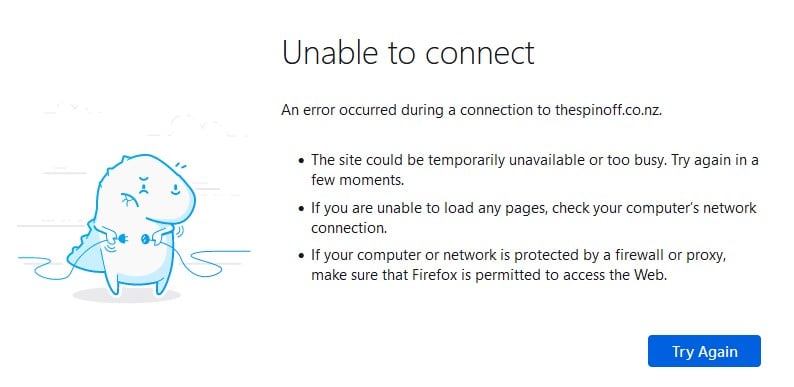
Tried to go to The Spinoff before on my Spark fibre connection (Windows 10 desktop PC, ethernet connection), no go. Ditto for the Lego Ideas site. Happening from Firefox, Chrome and Edge.


Restarted the router and the PC, still no go. Tried from my mobile over the wifi using the same router and that works fine.


Is there some weird DNS setting I should be checking on my Windows 10 PC? Note that everything was working fine yesterday and I have changed anything. I'm a bit out of touch with checking DNS these days.


Create new topic
zocster
1994 posts

Uber Geek
+1 received by user: 105

ID Verified
Trusted
Lifetime subscriber

  #2843248 4-Jan-2022 22:24
Send private message

https://developers.cloudflare.com/1.1.1.1/setup-1.1.1.1/windows

I been using this...


Behodar
11094 posts

Uber Geek
+1 received by user: 6070

Trusted
Lifetime subscriber

  #2843272 4-Jan-2022 23:00
Send private message

Have you been using 1.1.1.1 because you've been having problems, or have you just 'randomly' been using it?


rscole86
4999 posts

Uber Geek
+1 received by user: 462

Moderator
Trusted
Lifetime subscriber

  #2843340 5-Jan-2022 07:28
Send private message

No issues here.

Have you tried a DNS flush?
Have you checked your network adapter settings to confirm what DNS you're using?


quickymart

14940 posts

Uber Geek
+1 received by user: 13953

ID Verified

  #2843345 5-Jan-2022 08:04
Send private message

rscole86: No issues here.

Have you tried a DNS flush?
Have you checked your network adapter settings to confirm what DNS you're using?


Thanks, just tried the first idea, no change after running the command.


Checked the second, set to automatic.


rscole86
4999 posts

Uber Geek
+1 received by user: 462

Moderator
Trusted
Lifetime subscriber

  #2843348 5-Jan-2022 08:09
Send private message

Have you checked the browsers in incognito, or private modes?

Do you have a VPN running?

Any new software installed? Overly aggressive internet security package?

quickymart

14940 posts

Uber Geek
+1 received by user: 13953

ID Verified

  #2843354 5-Jan-2022 08:31
Send private message

rscole86: Have you checked the browsers in incognito, or private modes?


Do you have a VPN running?


Any new software installed? Overly aggressive internet security package?


First one: Firefox in private mode: no change


Second one: no


Third one: no, no new software; no internet security that I'm aware of.


Not sure if this is relevant or not, but if the site has a www in front instead of just the domain it seems it work - although I still can't get to some, like The Spinoff (even using www.thespinoff.co.nz).


HP


Shop now for HP laptops and other devices (affiliate link).
zocster
1994 posts

Uber Geek
+1 received by user: 105

ID Verified
Trusted
Lifetime subscriber

  #2843355 5-Jan-2022 08:37
Send private message

you may have blocked the website by accident?


quickymart

14940 posts

Uber Geek
+1 received by user: 13953

ID Verified

  #2843359 5-Jan-2022 08:45
Send private message

It's two different ones though (that I know of so far, at least):


https://thespinoff.co.nz/


https://ideas.lego.com/


liquidcore
187 posts

Master Geek
+1 received by user: 71

ID Verified

  #2843362 5-Jan-2022 09:01
Send private message

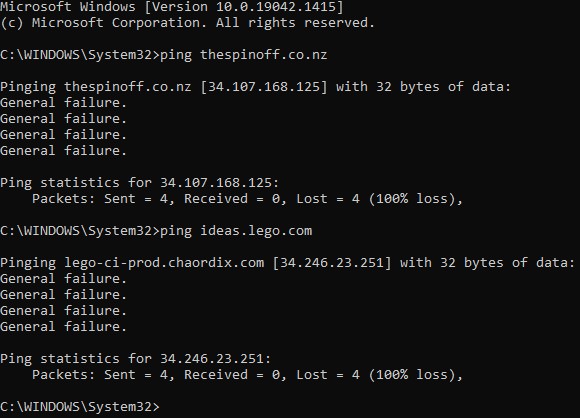
What happens when you ping/nslookup those addresses?

quickymart

14940 posts

Uber Geek
+1 received by user: 13953

ID Verified

  #2843365 5-Jan-2022 09:21
Send private message


I tried pinging Stuff to check and that was fine - nslookup for The Spinoff below too:


I know something ain't right somewhere on my machine, but am wracking my brains trying to figure out where it might be.


liquidcore
187 posts

Master Geek
+1 received by user: 71

ID Verified

  #2843372 5-Jan-2022 09:35
Send private message

So it looks like it’s resolving properly - try performing a network reset on the device


Move to New Zealand's best fibre broadband service (affiliate link). Free setup code: R587125ERQ6VE. Note that to use Quic Broadband you must be comfortable with configuring your own router.
quickymart

14940 posts

Uber Geek
+1 received by user: 13953

ID Verified

  #2843475 5-Jan-2022 10:18
Send private message

Sorry to trouble you all with this - problem solved. An app I hardly use had updated and this was stopping some HTTP traffic. I've corrected the relevant setting and it's all working normally again now.


My apologies, and thank you for all the assistance provided.


Create new topic


Geekzone Live »

Try automatic live updates from Geekzone directly in your browser, without refreshing the page, with Geekzone Live now.


Are you subscribed to our RSS feed? You can download the latest headlines and summaries from our stories directly to your computer or smartphone by using a feed reader.