Geekzone: technology news, blogs, forums
Guest
Welcome Guest.
You haven't logged in yet. If you don't have an account you can register now.


stuartmac

67 posts

Master Geek
+1 received by user: 20


#293647 4-Feb-2022 15:03
Send private message

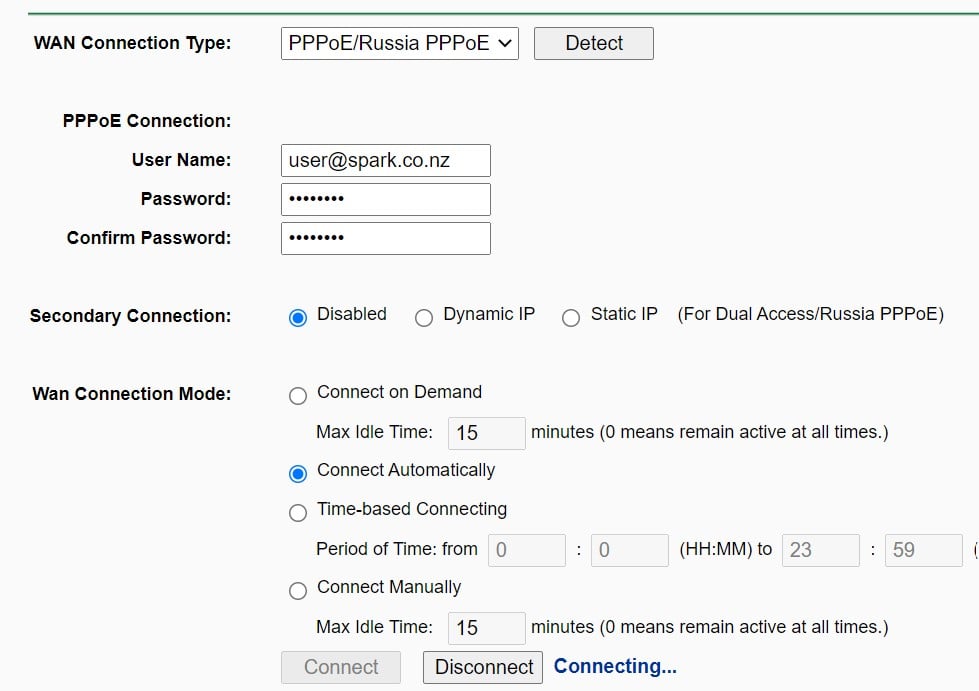
My ISP for my fibre connection was changed from Bigpipe to Spark this morning - no Internet access since. Spark are reporting the change-over has been made, and no faults. Can someone run their eye over my TP-Link router WAN connection details (attached) and confirm they are correct or not. I believe they are correct sourced from the Spark web site (PPPoE). If I run a "detect" connection type it reports "Static IP".


View this topic in a long page with up to 500 replies per page Create new topic
 1 | 2
wellygary
8810 posts

Uber Geek
+1 received by user: 5287


  #2861781 4-Feb-2022 15:07
Send private message


stuartmac

67 posts

Master Geek
+1 received by user: 20


  #2861783 4-Feb-2022 15:21
Send private message

wellygary:


Did you check the VLAN tagging?


https://www.geekzone.co.nz/forums.asp?forumid=39&topicid=236364


Nope. Is that a router setting, or something Spark do on their end?


Spark have now just told me to ring the TP-Link help support. So looks like I am on my own now FFS.


Jase2985
13730 posts

Uber Geek
+1 received by user: 6202

ID Verified
Lifetime subscriber

  #2861784 4-Feb-2022 15:23
Send private message

router setting, should be set to 10, the manual should help you find where to set that


if you use your own router that is normally the case. you cant expect them to helpdesk support all routers can you?


wratterus
1687 posts

Uber Geek
+1 received by user: 678


  #2861788 4-Feb-2022 15:28
Send private message

You just need to enable VLAN 10 on the WAN in your router and you'll be away. Sometimes this can be a little tricky on some older TP-Links, and some don't support it at all. What model router do you have?


This is not Spark's fault at all, and you can't expect them to support every model of router. They provide the settings you need, if you want to use your own router, it's up to you to be able to configure your router with those settings. 


robjg63
4161 posts

Uber Geek
+1 received by user: 1425

Subscriber

  #2861790 4-Feb-2022 15:29
Send private message

Bigpipe do not use VLAN 10 - Spark do.


You set that on the router.


What model TP-Link router (and version) - Hint - sticker on the router?


EDIT: VLAN settings are normally located under IPTV on TP-Link routers.


Nothing is impossible for the man who doesn't have to do it himself - A. H. Weiler


robjg63
4161 posts

Uber Geek
+1 received by user: 1425

Subscriber

  #2861791 4-Feb-2022 15:38
Send private message


Nothing is impossible for the man who doesn't have to do it himself - A. H. Weiler


Want to support Geekzone and browse the site without the ads? Subscribe to Geekzone now (monthly, annual and lifetime options).
djtOtago
1181 posts

Uber Geek
+1 received by user: 605


  #2861811 4-Feb-2022 16:27
Send private message

What router model do you have?
There are some older TP-Link routers that don't support VLAN tag settings.


stuartmac

67 posts

Master Geek
+1 received by user: 20


  #2861862 4-Feb-2022 19:36
Send private message

djtOtago:

What router model do you have?
There are some older TP-Link routers that don't support VLAN tag settings.


WR841N. Old but not ancient. I can't see any VLAN tag settings 😬.

I'll confirm with Spark first..
But might be new router or flash with OpenWRT (which always intended to do but never have)

MaxineN
Max
2049 posts

Uber Geek
+1 received by user: 1662

ID Verified
Trusted
Subscriber

  #2861866 4-Feb-2022 19:49
Send private message

So that particular model(unless you have the V14 model and not the V1) does not have VLAN tagging support(also known as 802.11Q). You will absolutely need a new router. Also you'd never see more than 100mbps from that thing anyway because all of the ports are 10/100.


Go ask Spark for the Smart Modem. It's pretty decent.


Ramblings from a mysterious lady who's into tech. Warning I may often create zingers.


stuartmac

67 posts

Master Geek
+1 received by user: 20


  #2861874 4-Feb-2022 20:56
Send private message

MaxineN:

So that particular model(unless you have the V14 model and not the V1) does not have VLAN tagging support(also known as 802.11Q). You will absolutely need a new router. Also you'd never see more than 100mbps from that thing anyway because all of the ports are 10/100.


Go ask Spark for the Smart Modem. It's pretty decent.


Agreed, new router required. Expensive switch from Bigpipe, who had actually been great. At least buying a new router coincides with long weekend sales.

farcus
1626 posts

Uber Geek
+1 received by user: 437


  #2861877 4-Feb-2022 21:24
Send private message

stuartmac:
MaxineN:


So that particular model(unless you have the V14 model and not the V1) does not have VLAN tagging support(also known as 802.11Q). You will absolutely need a new router. Also you'd never see more than 100mbps from that thing anyway because all of the ports are 10/100.


Go ask Spark for the Smart Modem. It's pretty decent.


Agreed, new router required. Expensive switch from Bigpipe, who had actually been great. At least buying a new router coincides with long weekend sales.


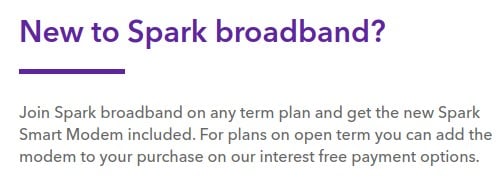
Spark will give you one of their very good modem/routers for free if you sign up for a term.
Otherwise, you can pick up the first gen of the spark smart modem on trademe pretty cheap.


Shop now for Lego sets and other gifts (affiliate link).
Bung
6733 posts

Uber Geek
+1 received by user: 2926

Subscriber

  #2861884 4-Feb-2022 22:04
Send private message

Do Spark even do Fibre terms? Haven’t they gone open term since Unplan days & $106.20 or BYO modem?

MaxineN
Max
2049 posts

Uber Geek
+1 received by user: 1662

ID Verified
Trusted
Subscriber

  #2861888 4-Feb-2022 22:35
Send private message

Bung: Do Spark even do Fibre terms? Haven’t they gone open term since Unplan days & $106.20 or BYO modem?


Open term it seems.


You can do the modem interest free over 12, 24 or 36 months but it's also just $106.20. It's kind of a no brainer for something that can not only route 1 gig but will get you support from Spark directly if anything goes wrong, plus I imagine they'd replace it for free if it was a dud or died within a year.


Ramblings from a mysterious lady who's into tech. Warning I may often create zingers.


quickymart
14940 posts

Uber Geek
+1 received by user: 13953

ID Verified

  #2861892 4-Feb-2022 22:38
Send private message

farcus:


Spark will give you one of their very good modem/routers for free if you sign up for a term.


Not anymore, I asked them about this recently (happy to sign up for 12 months, etc) and they said no, they don't do free routers anymore.


farcus
1626 posts

Uber Geek
+1 received by user: 437


  #2861893 4-Feb-2022 22:46
Send private message

quickymart:


farcus:


Spark will give you one of their very good modem/routers for free if you sign up for a term.


Not anymore, I asked them about this recently (happy to sign up for 12 months, etc) and they said no, they don't do free routers anymore.


they seem to indicate here that you can sign up for a term and get it for free . . .


 1 | 2
View this topic in a long page with up to 500 replies per page Create new topic


Geekzone Live »

Try automatic live updates from Geekzone directly in your browser, without refreshing the page, with Geekzone Live now.


Are you subscribed to our RSS feed? You can download the latest headlines and summaries from our stories directly to your computer or smartphone by using a feed reader.