Geekzone: technology news, blogs, forums
Guest
Welcome Guest.
You haven't logged in yet. If you don't have an account you can register now.


Rebound

17 posts

Geek
+1 received by user: 4


#295444 29-Mar-2022 19:35
Send private message

Hi Everyone,


I have been trawling the forums reading other threats on setting up ASUS routers on spark, and having seen the other threads on settings as well as following the guide here https://www.spark.co.nz/help/internet/set-up/non-spark-modem/ I still cannot seem to get decent speeds.


Firstly, I have both a pair of ASUS Zenwifi xd6 but also an ASUS RTAC86U.


Both have been reset and are both having the same speed issues of somewhere between 30-90mpbs, where as my spark modem is getting >700mbps plugged in.


Both have been setup a PPPoE and also the Lan setting as 10 - one has 'Spark' as a preset and i've overwritten this as manual to try, same result.  Both also take a long time to get any internet connected, if at all -  any tips appreciated what I have be doing wrong.  We just moved in and the internet was connected last week, FIBRE was already installed at the house, so no chorus tech has come out.  Spark tech support say 'its working'


Create new topic
MaxineN
Max
2049 posts

Uber Geek
+1 received by user: 1662

ID Verified
Trusted
Subscriber

  #2893761 29-Mar-2022 20:01
Send private message

Yeah previous generation of ASUS routers have not been great with PPPoE although that's some of the worst results I've seen, they usually hold up in the 300-400. They're way better on IPoE(Vocus branded, Vodafone etc etc.)


If you really want to use the ASUS Zen mesh, you can disable DHCP on the Spark Modem and just use the Zen Wifi to handle DHCP.


I do have a RT AX 3000 running PPPoE currently and that can easily pull a gig. Surprised but also not surprised the Zen Wifi can't handle PPPoE.


So Spark are right in saying that it's working as intended. 


Ramblings from a mysterious lady who's into tech. Warning I may often create zingers.


Rebound

17 posts

Geek
+1 received by user: 4


  #2893773 29-Mar-2022 20:18
Send private message

Thanks - the strange thing is right when it was connected the original RT86 modem was running at >700 but a few days later when my billing cycle flicked over, that's when it dropped off - I have just done a full reset on that router yet again tonight and plugged it in, and it still is the same issue of <90mbps.


Thanks RE the option for the ZEN - I may try that next for house coverage and see how it works.


Rebound

17 posts

Geek
+1 received by user: 4


  #2893780 29-Mar-2022 21:03
Send private message

Have once again plugged the Spark Smart modem, pulling 600ish mbps download


Still doesn't explain why the ASUS one was working fine and getting >700 and now magically it isn't.   


nztim
4012 posts

Uber Geek
+1 received by user: 2710

ID Verified
Trusted
TEAMnetwork
Subscriber

  #2893979 29-Mar-2022 22:39
Send private message

Asus routers are a POS


Any views expressed on these forums are my own and don't necessarily reflect those of my employer. 


Delorean
673 posts

Ultimate Geek
+1 received by user: 343

ID Verified
Trusted
Lifetime subscriber

  #2894094 30-Mar-2022 09:43
Send private message

This is "case in point" to why the ISP supplied router are generally the best option for the majority of users. 


1) The ISP will support you to resolve connection / speed issues


2) Things "just work"


In my experience, an IPoE ISP is the best option if you are wanting a third party router to work as designed.


Agree with @nztim - ASUS are just bling and lights and you will get something way better for a fraction of the price. (MikroTik would be the best bang for buck)


Why do you just get the newer Spark modem and the mesh unit?


Referral Link: | Quic Broadband (use R142206E0L2CR for free setup)


michaelmurfy
meow
13579 posts

Uber Geek
+1 received by user: 10910

Moderator
ID Verified
Trusted
Lifetime subscriber

  #2894097 30-Mar-2022 09:46
Send private message

As I say to everyone. You should be these days using your ISP's router unless if you've got a very, very good reason not to.


For Spark - just purchase a Smart Mesh addon and job done. It has great WiFi. And use Ethernet where possible too given Ethernet is always better than WiFi.


Michael Murphy | https://murfy.nz
Referral Links: Quic Broadband (use R122101E7CV7Q for free setup)

Are you happy with what you get from Geekzone? Please consider supporting us by subscribing.
Opinions are my own and not the views of my employer.


Shop on-line at New World now for your groceries (affiliate link).
Rebound

17 posts

Geek
+1 received by user: 4


  #2894109 30-Mar-2022 10:14
Send private message

I have the Spark Smart Modem 1 - it isn't the best and wireless coverage is patchy, hence why third party options.  It barely gets 200mbps wired (stronger via wireless, doesn't make sense....)


MaxineN
Max
2049 posts

Uber Geek
+1 received by user: 1662

ID Verified
Trusted
Subscriber

  #2894110 30-Mar-2022 10:24
Send private message

Spark Smart Modem 1 will do 1 gig on PPPoE.


If you're having issues achieving that on wired then you've got another problem.


Ramblings from a mysterious lady who's into tech. Warning I may often create zingers.


Rebound

17 posts

Geek
+1 received by user: 4


  #2894113 30-Mar-2022 10:33
Send private message

Worth completely resetting the Spark modem back to factory default?


MaxineN
Max
2049 posts

Uber Geek
+1 received by user: 1662

ID Verified
Trusted
Subscriber

  #2894120 30-Mar-2022 10:45
Send private message

Rebound:


Worth completely resetting the Spark modem back to factory default?


Yep.


Also would check to see if Window Auto tuning is turned on and is set to normal(this is a Windows thing only and affects some wired NICs).


netsh interface tcp show global in a administrative command prompt see if it's even turned on.


netsh int tcp set global autotuninglevel=normal if it's set to disabled, this command will enable it.


You will need to restart.


Credits to Michael for pointing this one out a while ago when this was disabled on a Realtek NIC.


Ramblings from a mysterious lady who's into tech. Warning I may often create zingers.


Rebound

17 posts

Geek
+1 received by user: 4


  #2894404 30-Mar-2022 20:54
Send private message

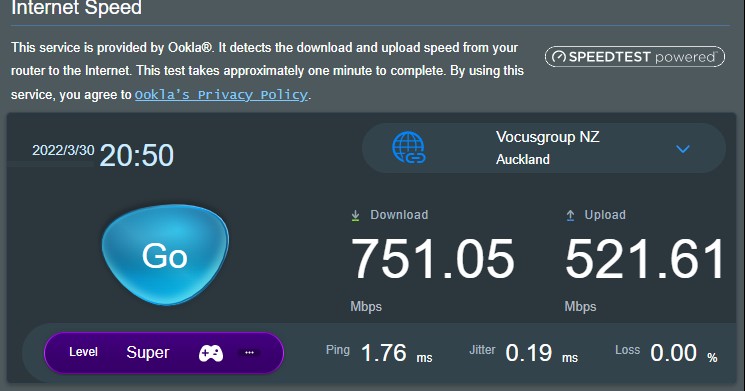
Internet speed on the ASUS router, so ONT isn't the issue.  its the ASUS routing it to my devices both wired and wireless.


Support Geekzone with one-off or recurring donations Donate via PressPatron.
quebec
851 posts

Ultimate Geek
+1 received by user: 35


  #2902057 13-Apr-2022 17:45
Send private message

@Rebound  Can you trying disabling NAT Acceleration? Should be in Switch Control under LAN Settings. 


Create new topic


Geekzone Live »

Try automatic live updates from Geekzone directly in your browser, without refreshing the page, with Geekzone Live now.


Are you subscribed to our RSS feed? You can download the latest headlines and summaries from our stories directly to your computer or smartphone by using a feed reader.