Geekzone: technology news, blogs, forums
Guest
Welcome Guest.
You haven't logged in yet. If you don't have an account you can register now.


quickymart

14940 posts

Uber Geek
+1 received by user: 13953

ID Verified

#295965 9-May-2022 21:19
Send private message

Evening,


Given we've been stuck at home for some time now I've taken to watching some of those "drive around town from the viewpoint of the driver" videos to get out and about virtually. I've been trying to watch a few tonight. Some are really good quality however whenever I try to switch to 4K I'm getting stuttering/jerkiness on videos and a LOT of buffering. Is anyone else experiencing this, or is it possibly my setup?
I'm on Spark fibre, 300/100 connection, via ethernet, and this happens in both Firefox and Chrome.
Note that lower quality (ie, 1440p) is fine - but I would have thought this connection could handle 4K video?


Edit; here's the "stats for nerds" thing (from Chrome):
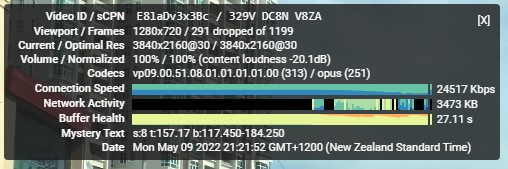


It's even showing the buffering/loading circle when there's clearly time ahead it hasn't played yet.


Example video:


View this topic in a long page with up to 500 replies per page Create new topic
 1 | 2 | 3
Talkiet
4819 posts

Uber Geek
+1 received by user: 3934

Trusted

  #2912014 9-May-2022 21:22
Send private message

The connection can definitely handle 4K video. It'll likely be your display device (laptop/TV?)


Cheers - N


Please note all comments are from my own brain and don't necessarily represent the position or opinions of my employer, previous employers, colleagues, friends or pets.


quickymart

14940 posts

Uber Geek
+1 received by user: 13953

ID Verified

  #2912017 9-May-2022 21:28
Send private message

Thanks for that. Any information I can provide from my PC's setup/configuration to narrow down where the issue might be?


Talkiet
4819 posts

Uber Geek
+1 received by user: 3934

Trusted

  #2912019 9-May-2022 21:31
Send private message

Have a look at your CPU use... If you hit a resolution/framerate/codec that isn't hardware accelerated then things go south quickly. I tried an 8K/60 New York at night video and it chugged badly on my 24 core Xeon with all Cores pegged. At 4k/60 it was still doing it in CPU, but at only about 60%CPU.


Cheers - N


Please note all comments are from my own brain and don't necessarily represent the position or opinions of my employer, previous employers, colleagues, friends or pets.


quickymart

14940 posts

Uber Geek
+1 received by user: 13953

ID Verified

  #2912067 9-May-2022 21:42
Send private message

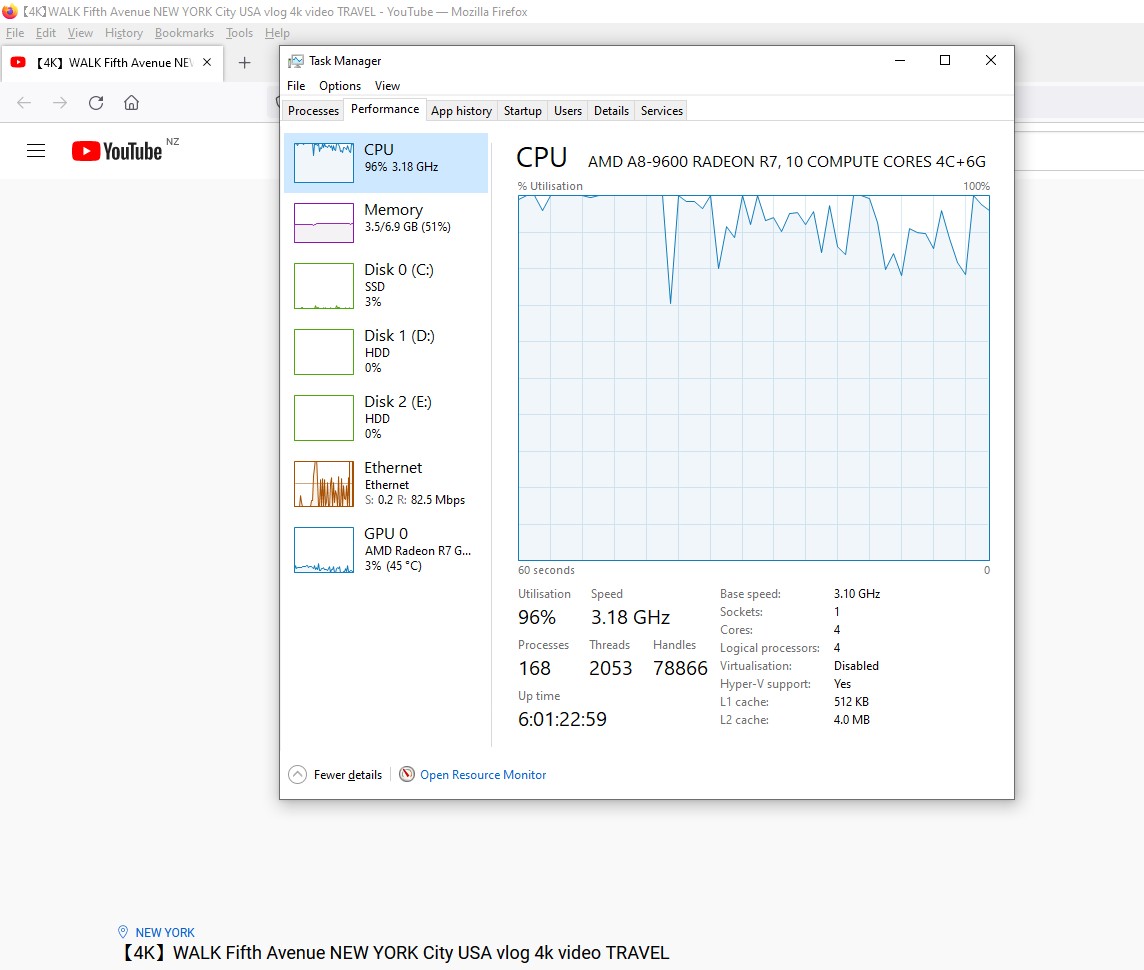
Using the example New York video above in 4K, this is the CPU usage (note that the video was not playing behind it, just a white screen):


richms
29098 posts

Uber Geek
+1 received by user: 10208

Trusted
Lifetime subscriber

  #2912068 9-May-2022 21:43
Send private message

If you have an old s..tbox computer like so many people persist with, then it may pay to install one of the chrome addons to force youtube to use h264 and not vp9 as that is seldom accelerated on older stuff. Will limit you to low FPS stuff, but a stable 30 is better than a cant play it 60.


Also dont use firefox if you want good video playback. Its one of the many shortcomings with it. Chrome or edge will play perfect 60FPS for me on things that firefox will just jam up and start counting dropped frames as all of them for 5+ seconds at a time.


Richard rich.ms

Talkiet
4819 posts

Uber Geek
+1 received by user: 3934

Trusted

  #2912069 9-May-2022 21:45
Send private message

Yep - it's definitely your computer that's running out of horsepower here, not the fibre connection... As above, you're going to have to manage the resolution/framerate/codec to make sure it's smooth.


Cheers - N


Please note all comments are from my own brain and don't necessarily represent the position or opinions of my employer, previous employers, colleagues, friends or pets.


Want to support Geekzone and browse the site without the ads? Subscribe to Geekzone now (monthly, annual and lifetime options).
richms
29098 posts

Uber Geek
+1 received by user: 10208

Trusted
Lifetime subscriber

  #2912070 9-May-2022 21:50
Send private message

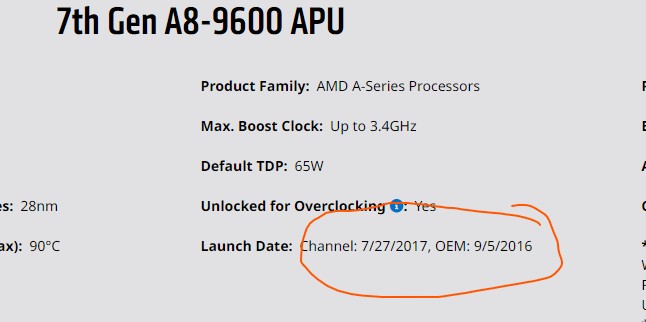
I have just googled what that CPU is and yeah....


Under powered then so you can give up on 4k outside of GPU accelerated h264 if you're lucky.


Richard rich.ms

quickymart

14940 posts

Uber Geek
+1 received by user: 13953

ID Verified

  #2912073 9-May-2022 21:54
Send private message

Thanks gents. I got this machine in 2018 and it's served me very well. Might be time to start looking at an upgrade then. I just don't want Windows 11! 😃


gzt

gzt
18679 posts

Uber Geek
+1 received by user: 7809

Lifetime subscriber

  #2912075 9-May-2022 21:58
Send private message
linw
2893 posts

Uber Geek
+1 received by user: 1205


  #2912093 10-May-2022 05:21
Send private message

This is interesting. I am not really very aerated by 4K playback but gave it a try on my Intel(R) Core(TM) i5-8500 CPU @ 3.00GHz   3.00 GHz. Yep, blew the cpu usage off the scale and paused every 2 sec!


I installed the vp9 add-on and told Edge to use hardware acceleration where available and after a restart the 4K vid played fine. The vp9 ext certainly dropped the cpu usage. It went from 'off the scale' to a max of 25% but mostly well below that.


Thanks guys for the enlightenment. 


quickymart

14940 posts

Uber Geek
+1 received by user: 13953

ID Verified

  #2912111 10-May-2022 07:58
Send private message

gzt: Just to be sure check this is installed and up to date:

https://www.microsoft.com/en-us/p/vp9-video-extensions/9n4d0msmp0pt?activetab=pivot:overviewtab


How can I tell if this is already installed? I tried to install it but it didn't give me an option to, leading me to believe it's already there.


I tested a Youtube 4K video in Edge but it wouldn't even play, just scrolling around with a white screen.


Shop now for Lenovo laptops and other devices (affiliate link).
Jase2985
13730 posts

Uber Geek
+1 received by user: 6202

ID Verified
Lifetime subscriber

  #2912135 10-May-2022 09:01
Send private message

if the video isn't playing in that screenshot of the CPU above whats causing the CPU to be at 100%


gzt

gzt
18679 posts

Uber Geek
+1 received by user: 7809

Lifetime subscriber

  #2912278 10-May-2022 12:57
Send private message

quickymart: How can I tell if this is already installed? I tried to install it but it didn't give me an option to, leading me to believe it's already there

It will show as "Installed". Perhaps it is unsupported for your system and cannot be installed.

elpenguino
3576 posts

Uber Geek
+1 received by user: 2938


  #2912300 10-May-2022 13:52
Send private message

I was also getting stuttering/buffering on YT last night (Orcon fibre).


That's normally very unusual to experience on my gear and network.


Most of the posters in this thread are just like chimpanzees on MDMA, full of feelings of bonhomie, joy, and optimism. Fred99 8/4/21


Kiwifan
181 posts

Master Geek
+1 received by user: 127

Lifetime subscriber

  #2912367 10-May-2022 16:20
Send private message

We have recently had Spark fibre installed 300/100 and on our 2018 pc and iPads etc it is amazing with no hiccups but this last week YouTube has been buffering through our Appletv, wired. Not often but several times my wife has mentioned “I thought fibre was supposed to be fast and stable?” Can’t honestly say we had buffering on our previous VDSL from Spark. 


Possibly a different cause than the original posters issue  but it has been noticed. 😀


 1 | 2 | 3
View this topic in a long page with up to 500 replies per page Create new topic


Geekzone Live »

Try automatic live updates from Geekzone directly in your browser, without refreshing the page, with Geekzone Live now.


Are you subscribed to our RSS feed? You can download the latest headlines and summaries from our stories directly to your computer or smartphone by using a feed reader.