Geekzone: technology news, blogs, forums
Guest
Welcome Guest.
You haven't logged in yet. If you don't have an account you can register now.


nexus415

5 posts

Wannabe Geek
+1 received by user: 1


#318566 30-Jan-2025 12:31
Send private message

I just had Spark Fiber installed. 


The ONT is connected to the Spark smart modem 2 which is connected to my Google Nest Wifi Pro router mesh. The all works - so I have a working system.


But I want to remove the Spark smart modem 2 from this setup and use the Google Nest Wifi Pro as the router.


I tried to setup the Google Nest Wifi Pro router on PPPoE as described here: https://www.spark.co.nz/help/internet/set-up/broadband-settings-for-third-party-modems.html but it does not work - I am getting an error during the Google Nest Wifi Pro router setup (which I factory reset before trying to do this) stating that there is no internet. The only PPPoE option I have to adjust during setup is Username and password (In am using PPP username: user@spark.co.nz and PPP password: password)


Any ideas what I could be doing wrong? I also rebooted the ONT during this process.


View this topic in a long page with up to 500 replies per page Create new topic
 1 | 2
Spyware
3818 posts

Uber Geek
+1 received by user: 1366

Lifetime subscriber

  #3337370 30-Jan-2025 12:36
Send private message

You have to had a vlan tag, id=10.


Spark Max Fibre using Mikrotik CCR1009-8G-1S-1S+, CRS125-24G-1S, Unifi UAP, U6-Pro, UAP-AC-M-Pro, Apple TV 4K (2022), Apple TV 4K (2017), iPad Air 1st gen, iPad Air 4th gen, iPhone 13, SkyNZ3151 (the white box). If it doesn't move then it's data cabled.


nexus415

5 posts

Wannabe Geek
+1 received by user: 1


  #3337376 30-Jan-2025 12:46
Send private message

Is that a setting that is inside the Google Nest Wifi Pro router? If so, google states it does support this setting.


It seems that globally vlan tagging is typically not needed when dealing with consumer level fiber.  Is there a way around it or I must get a different router/wesh/wifi if I want to remove the Spark router?


Spyware
3818 posts

Uber Geek
+1 received by user: 1366

Lifetime subscriber

  #3337377 30-Jan-2025 12:47
Send private message

You can strip the tag with a managed switch.


Spark Max Fibre using Mikrotik CCR1009-8G-1S-1S+, CRS125-24G-1S, Unifi UAP, U6-Pro, UAP-AC-M-Pro, Apple TV 4K (2022), Apple TV 4K (2017), iPad Air 1st gen, iPad Air 4th gen, iPhone 13, SkyNZ3151 (the white box). If it doesn't move then it's data cabled.


Spyware
3818 posts

Uber Geek
+1 received by user: 1366

Lifetime subscriber

  #3337378 30-Jan-2025 12:49
Send private message

P.S. Or change to Skinny.


Spark Max Fibre using Mikrotik CCR1009-8G-1S-1S+, CRS125-24G-1S, Unifi UAP, U6-Pro, UAP-AC-M-Pro, Apple TV 4K (2022), Apple TV 4K (2017), iPad Air 1st gen, iPad Air 4th gen, iPhone 13, SkyNZ3151 (the white box). If it doesn't move then it's data cabled.


nexus415

5 posts

Wannabe Geek
+1 received by user: 1


  #3337382 30-Jan-2025 12:53
Send private message

So, same fiber connection, same ONT, just setup a skinny account and dump spark?. Everything stays the same except who I pay my bill to and I get rid of the stupid unnecessary box in the middle


Spyware
3818 posts

Uber Geek
+1 received by user: 1366

Lifetime subscriber

  #3337383 30-Jan-2025 12:55
Send private message

Yes, Skinny use Spark network with no vlan tag. Spark may insist on a disconnection fee though.


Spark Max Fibre using Mikrotik CCR1009-8G-1S-1S+, CRS125-24G-1S, Unifi UAP, U6-Pro, UAP-AC-M-Pro, Apple TV 4K (2022), Apple TV 4K (2017), iPad Air 1st gen, iPad Air 4th gen, iPhone 13, SkyNZ3151 (the white box). If it doesn't move then it's data cabled.


Support Geekzone with one-off or recurring donations Donate via PressPatron.
nitro
760 posts

Ultimate Geek
+1 received by user: 337


  #3337442 30-Jan-2025 15:12
Send private message

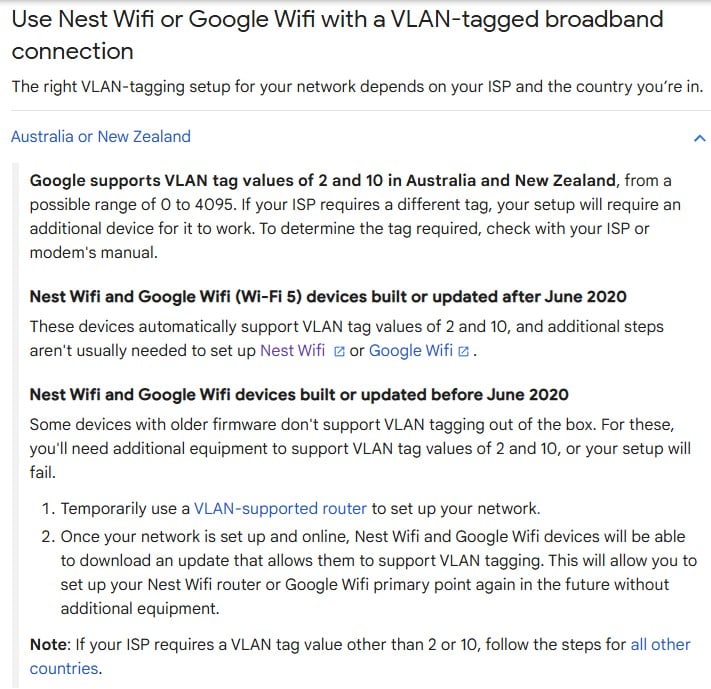
I thought there has been a fw update for the Nest Wifi to support VLAN 2 and 10?


https://support.google.com/googlenest/answer/9798157?hl=en#zippy=%2Caustralia-or-new-zealand


epr

epr
267 posts

Ultimate Geek
+1 received by user: 132

Lifetime subscriber

  #3343410 16-Feb-2025 16:04
Send private message

Just wondering if you got this to work I have a set of Google Nest WiFi  Pro routers that do not support vlan 10 tagging out of the box but I'm not sure how i can update them to do this but I would love to use them as they seem like a great device if you can it them to work. I'm on 2Degrees so was going to pay a question in the 2Degrees forum but thought i would search for this problem first and find this thread. 


Here is my Quic referral https://account.quic.nz/refer/39513 if you are keen to change ISP and to get free setup (save $29). I will get a $50 credit if you use this.  Thank you very much if you use my link but I'm sure there are quite a few others who could share the same on here, no hard feelings if you use a different link. 


nexus415

5 posts

Wannabe Geek
+1 received by user: 1


  #3343420 16-Feb-2025 17:09
Send private message

I stopped trying and ap I'm using the spark "modem" inbetween. and will follow spywares advice and I will  change providers. It's an archaic requirement


nztim
4013 posts

Uber Geek
+1 received by user: 2711

ID Verified
Trusted
TEAMnetwork
Subscriber

  #3343433 16-Feb-2025 19:06
Send private message

nexus415:


I stopped trying and ap I'm using the spark "modem" inbetween. and will follow spywares advice and I will  change providers. It's an archaic requirement


VLAN tags have their purpose to allow for priority traffic to be given guaranteed bandwidth for mission critical applications


it's definitely not an archaic requirement just not required for home use


Any views expressed on these forums are my own and don't necessarily reflect those of my employer. 


freitasm
BDFL - Memuneh
80655 posts

Uber Geek
+1 received by user: 41053

Administrator
ID Verified
Trusted
Geekzone
Lifetime subscriber

  #3343435 16-Feb-2025 19:30
Send private message

The Google Nest routers would try to connect first without VLAN tags, and then again with tags 2 and 10, automatically.


Or you can get a cheap managed switch and use it to remove the tag, between the ONT and the router.


Referral links: Quic Broadband (free setup code: R587125ERQ6VE) | Samsung | AliExpress | Wise | Sharesies 


Support Geekzone by subscribing (browse ads-free), or making a one-off or recurring donation through PressPatron.


Want to support Geekzone and browse the site without the ads? Subscribe to Geekzone now (monthly, annual and lifetime options).

epr

epr
267 posts

Ultimate Geek
+1 received by user: 132

Lifetime subscriber

  #3344984 20-Feb-2025 15:59
Send private message

Can you suggest one that is suitable please. 


Here is my Quic referral https://account.quic.nz/refer/39513 if you are keen to change ISP and to get free setup (save $29). I will get a $50 credit if you use this.  Thank you very much if you use my link but I'm sure there are quite a few others who could share the same on here, no hard feelings if you use a different link. 


epr

epr
267 posts

Ultimate Geek
+1 received by user: 132

Lifetime subscriber

  #3345361 21-Feb-2025 18:04
Send private message

Ubiquiti UniFi Switch USW-Flex-Mini 5-Port Managed Gigabit Ethernet Switch with USB-C Power Adapter


This seems like a good device for the cost but i don't know if it would do the job also I have zero idea of how to set it up. 


Here is my Quic referral https://account.quic.nz/refer/39513 if you are keen to change ISP and to get free setup (save $29). I will get a $50 credit if you use this.  Thank you very much if you use my link but I'm sure there are quite a few others who could share the same on here, no hard feelings if you use a different link. 


nitro
760 posts

Ultimate Geek
+1 received by user: 337


  #3345419 21-Feb-2025 19:40
Send private message

epr:


Just wondering if you got this to work I have a set of Google Nest WiFi  Pro routers that do not support vlan 10 tagging out of the box but I'm not sure how i can update them to do this but I would love to use them as they seem like a great device if you can it them to work. I'm on 2Degrees so was going to pay a question in the 2Degrees forum but thought i would search for this problem first and find this thread. 


have you tried the suggestion in the image i posted previously? the part specifically "for units built or updated before june 2020".


in case your unit needs a f/w update, you should piggy-back it on to a working router (the one from your RSP) to allow your nest wifi pro access to the internet and download the update.


nexus415

5 posts

Wannabe Geek
+1 received by user: 1


  #3345420 21-Feb-2025 19:43
Send private message

Nope. I just changed service providers. Problem solved.


 1 | 2
View this topic in a long page with up to 500 replies per page Create new topic


Geekzone Live »

Try automatic live updates from Geekzone directly in your browser, without refreshing the page, with Geekzone Live now.


Are you subscribed to our RSS feed? You can download the latest headlines and summaries from our stories directly to your computer or smartphone by using a feed reader.