Geekzone: technology news, blogs, forums
Guest
Welcome Guest.
You haven't logged in yet. If you don't have an account you can register now.


FineWine

3111 posts

Uber Geek
+1 received by user: 2440

Trusted
Nurse (R)
Lifetime subscriber

#324214 13-Mar-2026 12:26
Send private message quote this post

I am in the wind to buy the latest iPad Air or soon to be released iPad 12th gen (vs my current iPad 6th gen), which supports Wi-Fi 7 (802.11be) standard. On further research I noticed that 2degrees and One NZ are now starting to support this standard.


I see that Spark is still only Wi-Fi 6 (802.11ax) with their Smart Modem 3 Any news when Spark will start supporting this standard ??


PS: I just noticed that my Mac mini M4 only supports Wi-Fi 6E (802.11ax)


Whilst the difficult we can do immediately, the impossible takes a bit longer. However, miracles you will have to wait for.


View this topic in a long page with up to 500 replies per page Create new topic
 1 | 2
ShaneKNZ
31 posts

Geek
+1 received by user: 45

Trusted
Spark

  #3469678 13-Mar-2026 13:27
Send private message quote this post

Your ISP doesn't need to 'support this standard', you just need a router that supports it. Spark currently sell the Nokia FastMile 5G Gateway 7 for Wireless Broadband which supports WiFi 7.


FineWine

3111 posts

Uber Geek
+1 received by user: 2440

Trusted
Nurse (R)
Lifetime subscriber

  #3469738 13-Mar-2026 14:34
Send private message quote this post

ShaneKNZ:


Your ISP doesn't need to 'support this standard', you just need a router that supports it. Spark currently sell the Nokia FastMile 5G Gateway 7 for Wireless Broadband which supports WiFi 7.


I'm talking about a replacement for my current Spark first generation Smart Modem as I am on Fibre NOT Wireless and wish to stay on fibre.


Also, it would be nice if they upgraded their USB port from 2 to 3, though I believe USB 4 is soon to be or is already released so that would be a bonus. This then would enable me to use a Time Machine capable NAS network backup system (IE: Synology) to replace the soon-to-be defunct Apple Time capsule system.


But back to the Spark lack of or slowness in keeping up with technology advances.


Apologies - I just read the specs for the Nokia FastMile 5G Gateway 7 it does support Fibre Broadband and USB 3.1 Type-C.


Whilst the difficult we can do immediately, the impossible takes a bit longer. However, miracles you will have to wait for.


pureinception
37 posts

Geek
+1 received by user: 10


  #3469741 13-Mar-2026 14:42
Send private message quote this post

FineWine:


ShaneKNZ:


Your ISP doesn't need to 'support this standard', you just need a router that supports it. Spark currently sell the Nokia FastMile 5G Gateway 7 for Wireless Broadband which supports WiFi 7.


I'm talking about a replacement for my current Spark first generation Smart Modem as I am on Fibre NOT Wireless and wish to stay on fibre.


Also, it would be nice if they upgraded their USB port from 2 to 3, though I believe USB 4 is soon to be or is already released so that would be a bonus. This then would enable me to use a Time Machine capable NAS network backup system (IE: Synology) to replace the soon-to-be defunct Apple Time capsule system.


But back to the Spark lack of or slowness in keeping up with technology advances.


You can purchase any WiFi 7 router and use it with Spark Fibre. You don't have to wait for Spark to sell one. 
PB Tech even have support pages with the settings you need to configure for a bunch of the ISPs:
E.g TP-Link https://www.pbtech.co.nz/TPLinkISPSettings 


FineWine

3111 posts

Uber Geek
+1 received by user: 2440

Trusted
Nurse (R)
Lifetime subscriber

  #3469743 13-Mar-2026 14:47
Send private message quote this post

pureinception:


You can purchase any WiFi 7 router and use it with Spark Fibre. You don't have to wait for Spark to sell one. 
PB Tech even have support pages with the settings you need to configure for a bunch of the ISPs:
E.g TP-Link https://www.pbtech.co.nz/TPLinkISPSettings


Wow, that's great thanks 😄


Whilst the difficult we can do immediately, the impossible takes a bit longer. However, miracles you will have to wait for.


PJ48
302 posts

Ultimate Geek
+1 received by user: 106

Lifetime subscriber

  #3469784 13-Mar-2026 17:12
Send private message quote this post

FineWine:


ShaneKNZ:


Your ISP doesn't need to 'support this standard', you just need a router that supports it. Spark currently sell the Nokia FastMile 5G Gateway 7 for Wireless Broadband which supports WiFi 7.


I'm talking about a replacement for my current Spark first generation Smart Modem as I am on Fibre NOT Wireless and wish to stay on fibre.


Also, it would be nice if they upgraded their USB port from 2 to 3, though I believe USB 4 is soon to be or is already released so that would be a bonus. This then would enable me to use a Time Machine capable NAS network backup system (IE: Synology) to replace the soon-to-be defunct Apple Time capsule system.


But back to the Spark lack of or slowness in keeping up with technology advances.


Apologies - I just read the specs for the Nokia FastMile 5G Gateway 7 it does support Fibre Broadband and USB 3.1 Type-C.


If you have a desktop Mac you can easily create a cheap Time Capsule NAS solution by connecting an SSD drive to that Mac and configuring it to be the network Time Machine backup drive, rather than going down the Synology route.


FineWine

3111 posts

Uber Geek
+1 received by user: 2440

Trusted
Nurse (R)
Lifetime subscriber

  #3469809 13-Mar-2026 17:39
Send private message quote this post

PJ48:


If you have a desktop Mac you can easily create a cheap Time Capsule NAS solution by connecting an SSD drive to that Mac and configuring it to be the network Time Machine backup drive, rather than going down the Synology route.


I've run out off direct ports on my Mac m4 mini. Besides why not connect via the router ?


Whilst the difficult we can do immediately, the impossible takes a bit longer. However, miracles you will have to wait for.


Shop now on AliExpress (affiliate link).
lxsw20
3689 posts

Uber Geek
+1 received by user: 2174

Subscriber

  #3469810 13-Mar-2026 17:46
Send private message quote this post

I promise you, you will notice zero difference going to a WiFi7 or even 6E router. 

A NAS would connect over ethernet, not USB


Linux
12173 posts

Uber Geek
+1 received by user: 8469

Trusted
Lifetime subscriber

  #3469823 13-Mar-2026 18:48
Send private message quote this post

Wi'Fi7 on even a Gb home connection is over kill


ShaneKNZ
31 posts

Geek
+1 received by user: 45

Trusted
Spark

  #3469827 13-Mar-2026 19:21
Send private message quote this post

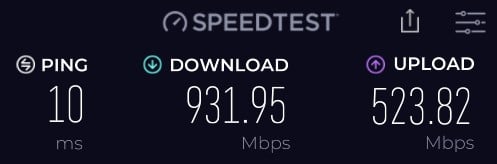
I can reach 930 Mbps via WiFi on my Eero Pro with WiFi 6E. However, if I was buying new equipment today I’d want WiFi 7. I toured the Chorus lab recently where they demoed 2Gbps via WiFi 7 with Hyperfibre 2000. Not sure my 6E set up could manage that. But 6E is absolutely fine for my usage. 


aj6828
177 posts

Master Geek
+1 received by user: 47

ID Verified
Trusted

  #3469872 13-Mar-2026 22:56
Send private message quote this post

When you go for Wi-Fi 7, make sure you go for a 6ghz router as there are cheap 5.8Ghz ones and also 320Mhz .. for a wifi card be200 if your on intel or (be202 low spec card ) or even media tek cards are available on the market ..  and you need a better cpu too if not you cant really get the full speeds from your pc to router.. 


Exclusive for Geekzone Members!
Dynamic IP & Bring Your Own Device Hyperfibre & Fibre plans & NO Contracts with Hyperline.co.nz powered by ASN 9790 Network


Chrous areas only HYPERLINE.co.nz  


noroad
1025 posts

Uber Geek
+1 received by user: 675

Trusted

  #3469880 14-Mar-2026 07:59
Send private message quote this post

ShaneKNZ:


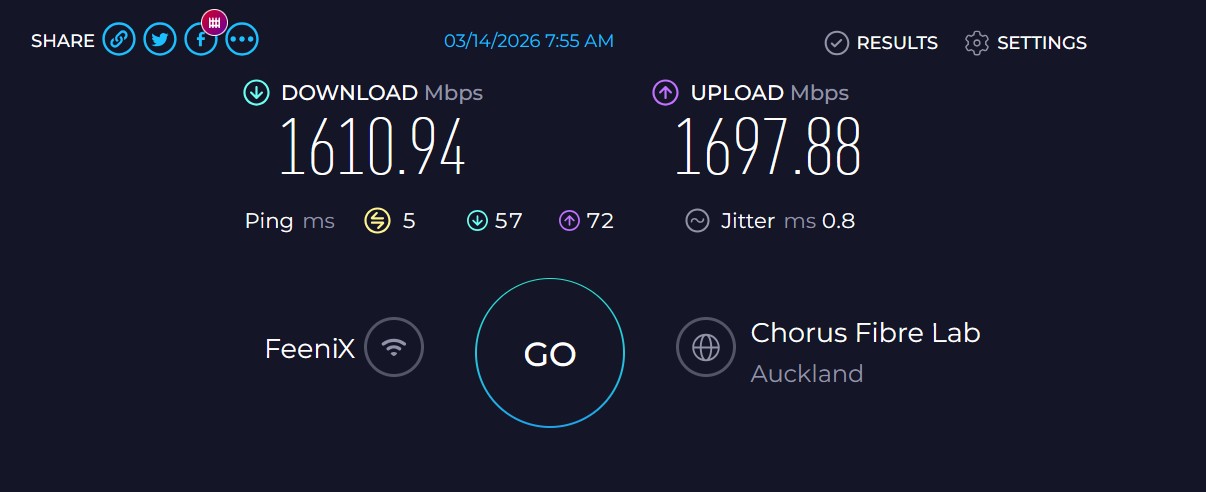
I can reach 930 Mbps via WiFi on my Eero Pro with WiFi 6E. However, if I was buying new equipment today I’d want WiFi 7. I toured the Chorus lab recently where they demoed 2Gbps via WiFi 7 with Hyperfibre 2000. Not sure my 6E set up could manage that. But 6E is absolutely fine for my usage. 


Wifi 7 on 6ghz certainly does work (this is to my S24U from my TP-Link BE65's just now). Sometimes it runs up to about 2.1Gb/s. Does this make any noticeable difference over wifi 6, not really. The thing is the 6Ghz band has pretty low wall penetration so the headline speeds generally only exceed 1Gb/s in the same room as an AP.


HP


Shop now for HP laptops and other devices (affiliate link).
JemS
86 posts

Master Geek
+1 received by user: 46

ID Verified

  #3469897 14-Mar-2026 08:34
Send private message quote this post

I can get my full 950/500 plan over my wifi 6 U6-Pro's.


Join Mercury and I’ll get bonus rewards points. Make sure you use my referral link to explore their wonderful offers. https://www.mercury.co.nz/join?m_copc=FGF50&m_rc=100211888685 


Router: UXG-Lite


AP's: 2x U6-Pro, 1x U6-Lite, 1x UK-Ultra, 1x AC Mesh Pro


Phone: S26 Ultra


Wearable: Garmin Forerunner 955


aj6828
177 posts

Master Geek
+1 received by user: 47

ID Verified
Trusted

  #3469903 14-Mar-2026 08:59
Send private message quote this post

noroad:


Wifi 7 on 6ghz certainly does work (this is to my S24U from my TP-Link BE65's just now). Sometimes it runs up to about 2.1Gb/s. Does this make any noticeable difference over wifi 6, not really. The thing is the 6Ghz band has pretty low wall penetration so the headline speeds generally only exceed 1Gb/s in the same room as an AP.


Try tuning your tcp settings using tcp optimizer tends to increase the speed .. what's your ISP? 


Exclusive for Geekzone Members!
Dynamic IP & Bring Your Own Device Hyperfibre & Fibre plans & NO Contracts with Hyperline.co.nz powered by ASN 9790 Network


Chrous areas only HYPERLINE.co.nz  


noroad
1025 posts

Uber Geek
+1 received by user: 675

Trusted

  #3469959 14-Mar-2026 09:58
Send private message quote this post

aj6828:


Try tuning your tcp settings using tcp optimizer tends to increase the speed .. what's your ISP? 


I am the core network architect at my ISP.... I have no lack of speed that needs adjusting


RunningMan
9184 posts

Uber Geek
+1 received by user: 4834


  #3469960 14-Mar-2026 10:00
Send private message quote this post

aj6828:Try tuning your tcp settings using tcp optimizer tends to increase the speed 


Only if you use Windows OS.


 1 | 2
View this topic in a long page with up to 500 replies per page Create new topic


Geekzone Live »

Try automatic live updates from Geekzone directly in your browser, without refreshing the page, with Geekzone Live now.


Are you subscribed to our RSS feed? You can download the latest headlines and summaries from our stories directly to your computer or smartphone by using a feed reader.