Long Winded Answer - I have this in my HP 6730b and have tried configuring for Telecom's XT APN's either internet.telecom.co.nz or direct.telecom.co.nz it finds the network without a problem and reports excellent signal strength but attempts to connect get a 619 error authentication failure as far as I am aware neither of these apn's require authentication as such have left the username and password fields blank. Unless its checking the SIM card for this but I have pulled the SIM from my Sierra Compass 885 device. Cut a long story short I gave up in frustration and stuck with Telecom supplied device that works flawlessly having it all integrated and not having to remember the extra device would have been nice.
Hmm, from memory this is a pretty retarded device, it loads a firmware at each boot, after the driver is loaded. (idiotic!)
(see http://ubuntuforums.org/showthread.php?t=1008200&highlight=un2400 )
There is apparently a firmware for each different provider, according to http://www.codon.org.uk/~mjg59/gobi_loader/
So if XT don't have a firmware dedicated to them, it may not work.
Looking at the dimensions, one option would be to replace the un2400 module with the older Sierra Wireless internal card HP hs2300. It's the same size, although the aerial cable has the same fitting, the main aerial attachment is where the AUX attachment is on the un2400.
You can get the hs2300 off ebay for around 30GBP: http://cgi.ebay.co.uk/HP-HS2300-SIERRA-MC8775-WWAN-MINI-PCI-E-3-6-UNLOCKED_W0QQitemZ370224069320QQcmdZViewItemQQptZUK_Computing_Networking_SM?hash=item563312fac8&_trksid=p3286.c0.m14&_trkparms=65%3A12%7C66%3A2%7C39%3A1%7C72%3A1683%7C293%3A1%7C294%3A50
Just for "fun" I spent most of the afternoon trying to get a HP Elitebook working. I failed. There's just something not right with the driver.
The comments I write on this forum do not necessarily reflect the views of my employer and as such cannot be taken as official statements of my employer.
Im new here but i have been able to get the un2400 to work with Telecom XT. I managed to get a hold of a HP Document that layout the steps to get it going. word is Telecom and Qualcomm are working on a fix/firmware for the XT Network but this is a work around
Step A – Configure the UN2400 Module to Support correct Traffic Class, and include APN for Telecom Network
- Using HyperTerminal or similar Telnet Utility Create a connection for the UN2400 Module
- Determine the COM port being used by the UN2400 Module using device manager
- Right Click on the ‘UN2400 Mobile BroadBand Module Modem’ and select properties Take note of ComPort Number
- Make sure the connection manager application is closed and WWAN is turned ON
- Launch HyperTerminal
- Create a connection to the UN2400 Module using the following settings
- Go to File->Properties->Setting Tab->ASCII Setup, then tick the Echo typed checkbox
- Select ASCII Setup
- Check ‘echo typed characters locally’
- Type
AT
You should get ‘OK’ back indicating you can communicate with the module
- Type
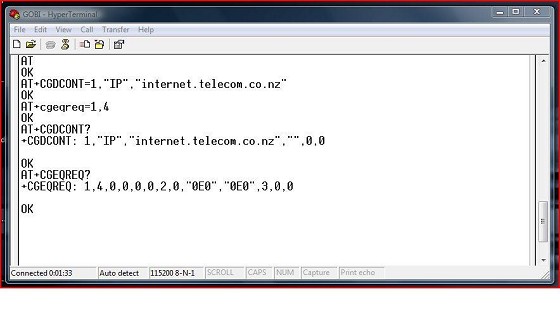
AT+cgeqreq=1,4,0,0
AT+cgdcont=1,”IP”,”internet.telecom.co.nz”
- To confirm that parameters have been updated Tyoe
AT+cgeqreq?
AT+cdgcont? You should get something like below
Close HyperTerminal Step B – Create a Dial-Up Connection to use the UN2400 Module (process may vary by OS – below based on Vista setup)
- Open Network and Sharing Center
- Select ‘setup a connection or network’
- Select ‘set up a dial-up connection’
- When prompted select the UN2400 Mobile Broadband Modem
- Enter “*99#” in the Dial-Up Phone Number field
- Provide a Connection Name
- Leave other field blank
- Select Connect
- Once setup you can re-use this connection
another thing i fould also helped if it does not work first time is go to the below link and follwo instructions and set the number to 10
Are you subscribed to our RSS feed? You can download the latest headlines and summaries from our stories directly
to your computer or smartphone by using a feed reader.