Geekzone: technology news, blogs, forums
Guest
Welcome Guest.
You haven't logged in yet. If you don't have an account you can register now.


lyonrouge

1993 posts

Uber Geek
+1 received by user: 20

Trusted
Lifetime subscriber

#106884 2-Aug-2012 09:55
Send private message

What does Geekzone use to determine dynamic mobile site switching. My Tab 7.7 which has plenty of real estate switches over, which my S2, Ray & Trophy do not.

Note: P500h and N8 switch over.

View this topic in a long page with up to 500 replies per page Create new topic
 1 | 2 | 3
freitasm
BDFL - Memuneh
80646 posts

Uber Geek
+1 received by user: 41029

Administrator
ID Verified
Trusted
Geekzone
Lifetime subscriber

  #665995 2-Aug-2012 11:11
Send private message

It all relies on the user_agent.

The Trophy will switch over automatically - if you ever clicked the "Full version" link then we will put a cookie there to always show the full version until you click the "Mobile version" at the bottom of the pages (or clear cookies).

Do this on your TAB and it will stay on Full version.


Referral links: Quic Broadband (free setup code: R587125ERQ6VE) | Samsung | AliExpress | Wise | Sharesies 


Support Geekzone by subscribing (browse ads-free), or making a one-off or recurring donation through PressPatron.



lyonrouge

1993 posts

Uber Geek
+1 received by user: 20

Trusted
Lifetime subscriber

  #666145 2-Aug-2012 13:06
Send private message

Thanks, that worked for the Tropgy. Is there a way to do it for Ray and S2 to mobile? If I open my email notification it still goes to full site, tried to replace the www. with m. but it didn't like that.

Edit: user error, need to reclick the S2 to get it working, thanks.

freitasm
BDFL - Memuneh
80646 posts

Uber Geek
+1 received by user: 41029

Administrator
ID Verified
Trusted
Geekzone
Lifetime subscriber

  #666165 2-Aug-2012 13:24
Send private message

Click the links at the bottom to switch and make sure it accepts cookies.


Referral links: Quic Broadband (free setup code: R587125ERQ6VE) | Samsung | AliExpress | Wise | Sharesies 


Support Geekzone by subscribing (browse ads-free), or making a one-off or recurring donation through PressPatron.


lyonrouge

1993 posts

Uber Geek
+1 received by user: 20

Trusted
Lifetime subscriber

  #670252 9-Aug-2012 20:11
Send private message

How do I make it go to mobile view on an iPad?

freitasm
BDFL - Memuneh
80646 posts

Uber Geek
+1 received by user: 41029

Administrator
ID Verified
Trusted
Geekzone
Lifetime subscriber

  #670274 9-Aug-2012 21:29
Send private message

You can't... People complained about it so we won't switch on iPad.


Referral links: Quic Broadband (free setup code: R587125ERQ6VE) | Samsung | AliExpress | Wise | Sharesies 


Support Geekzone by subscribing (browse ads-free), or making a one-off or recurring donation through PressPatron.


lyonrouge

1993 posts

Uber Geek
+1 received by user: 20

Trusted
Lifetime subscriber

  #670285 9-Aug-2012 21:37
Send private message

But couldn't they do the trick you told me earlier and click the full site link?


Support Geekzone with one-off or recurring donations Donate via PressPatron.
freitasm
BDFL - Memuneh
80646 posts

Uber Geek
+1 received by user: 41029

Administrator
ID Verified
Trusted
Geekzone
Lifetime subscriber

  #670296 9-Aug-2012 22:14
Send private message

Sure but most people asked to be desktop version. I am with you on this but went with the majority. I will change tomorrow and you can have a go to see...


Referral links: Quic Broadband (free setup code: R587125ERQ6VE) | Samsung | AliExpress | Wise | Sharesies 


Support Geekzone by subscribing (browse ads-free), or making a one-off or recurring donation through PressPatron.


lyonrouge

1993 posts

Uber Geek
+1 received by user: 20

Trusted
Lifetime subscriber

  #670360 10-Aug-2012 07:24
Send private message

Thanks. I guess it's an age thing, but I find it very hard to read at desktop size. If it causes too much angst, can a link be added for "view mobile version"?

lyonrouge

1993 posts

Uber Geek
+1 received by user: 20

Trusted
Lifetime subscriber

  #671135 11-Aug-2012 19:40
Send private message

freitasm: Sure but most people asked to be desktop version. I am with you on this but went with the majority. I will change tomorrow and you can have a go to see...


No change yet.

freitasm
BDFL - Memuneh
80646 posts

Uber Geek
+1 received by user: 41029

Administrator
ID Verified
Trusted
Geekzone
Lifetime subscriber

  #671137 11-Aug-2012 19:43
Send private message

iPad is certainly in the list of mobile browsers. Perhaps you have to tap the "Geekzone Mobile" link at the bottom of the page to switch views?


Referral links: Quic Broadband (free setup code: R587125ERQ6VE) | Samsung | AliExpress | Wise | Sharesies 


Support Geekzone by subscribing (browse ads-free), or making a one-off or recurring donation through PressPatron.


lyonrouge

1993 posts

Uber Geek
+1 received by user: 20

Trusted
Lifetime subscriber

  #671140 11-Aug-2012 19:48
Send private message

Tried that, and restarted the browser, but it does not want to cooperate. Note: iPad is generic, off the shelf and has no hacks.


Move to New Zealand's best fibre broadband service (affiliate link). Free setup code: R587125ERQ6VE. Note that to use Quic Broadband you must be comfortable with configuring your own router.
freitasm
BDFL - Memuneh
80646 posts

Uber Geek
+1 received by user: 41029

Administrator
ID Verified
Trusted
Geekzone
Lifetime subscriber

  #671141 11-Aug-2012 19:48
Send private message

Please visit this page and PM the user-agent please.


Referral links: Quic Broadband (free setup code: R587125ERQ6VE) | Samsung | AliExpress | Wise | Sharesies 


Support Geekzone by subscribing (browse ads-free), or making a one-off or recurring donation through PressPatron.


lyonrouge

1993 posts

Uber Geek
+1 received by user: 20

Trusted
Lifetime subscriber

  #671159 11-Aug-2012 20:26
Send private message

I had to manually clear the cookies on my browser to get it to change over. I can appreciate the user reaction, it is not as nice as the Android (Galaxy Tab in my case) rendering of the mobile view, you have to zoom in each time.

freitasm
BDFL - Memuneh
80646 posts

Uber Geek
+1 received by user: 41029

Administrator
ID Verified
Trusted
Geekzone
Lifetime subscriber

  #671203 11-Aug-2012 21:56
Send private message

I told you ;)


Referral links: Quic Broadband (free setup code: R587125ERQ6VE) | Samsung | AliExpress | Wise | Sharesies 


Support Geekzone by subscribing (browse ads-free), or making a one-off or recurring donation through PressPatron.


lyonrouge

1993 posts

Uber Geek
+1 received by user: 20

Trusted
Lifetime subscriber

  #671292 12-Aug-2012 09:15
Send private message

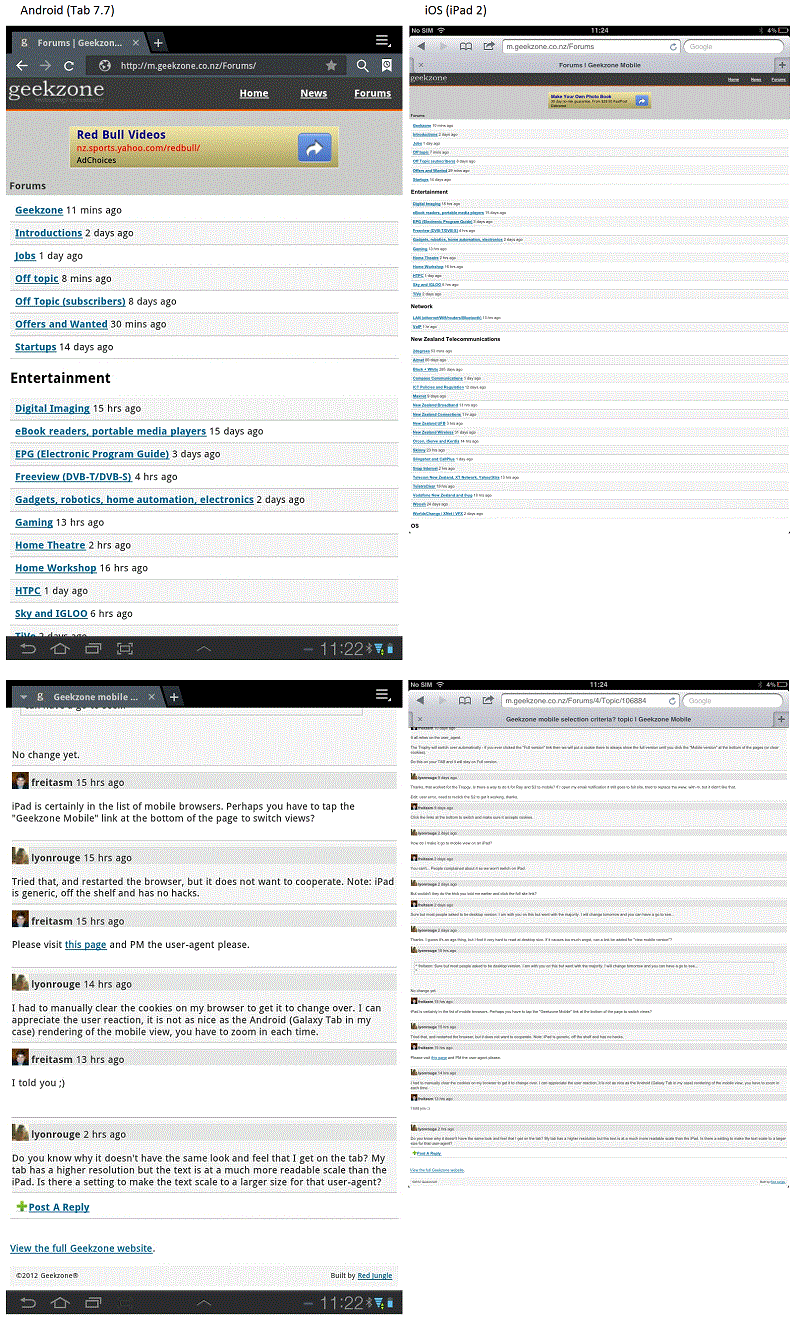
Do you know why it doesn't have the same look and feel that I get on the tab? My tab has a higher resolution but the text is at a much more readable scale than the iPad. Is there a setting to make the text scale to a larger size for that user-agent?

Edit: added a comparative screen shot


 1 | 2 | 3
View this topic in a long page with up to 500 replies per page Create new topic


Geekzone Live »

Try automatic live updates from Geekzone directly in your browser, without refreshing the page, with Geekzone Live now.


Are you subscribed to our RSS feed? You can download the latest headlines and summaries from our stories directly to your computer or smartphone by using a feed reader.