Geekzone: technology news, blogs, forums
Guest
Welcome Guest.
You haven't logged in yet. If you don't have an account you can register now.


Rikkitic

Awrrr
19063 posts

Uber Geek
+1 received by user: 16302

Lifetime subscriber

#252955 18-Jul-2019 17:45
Send private message

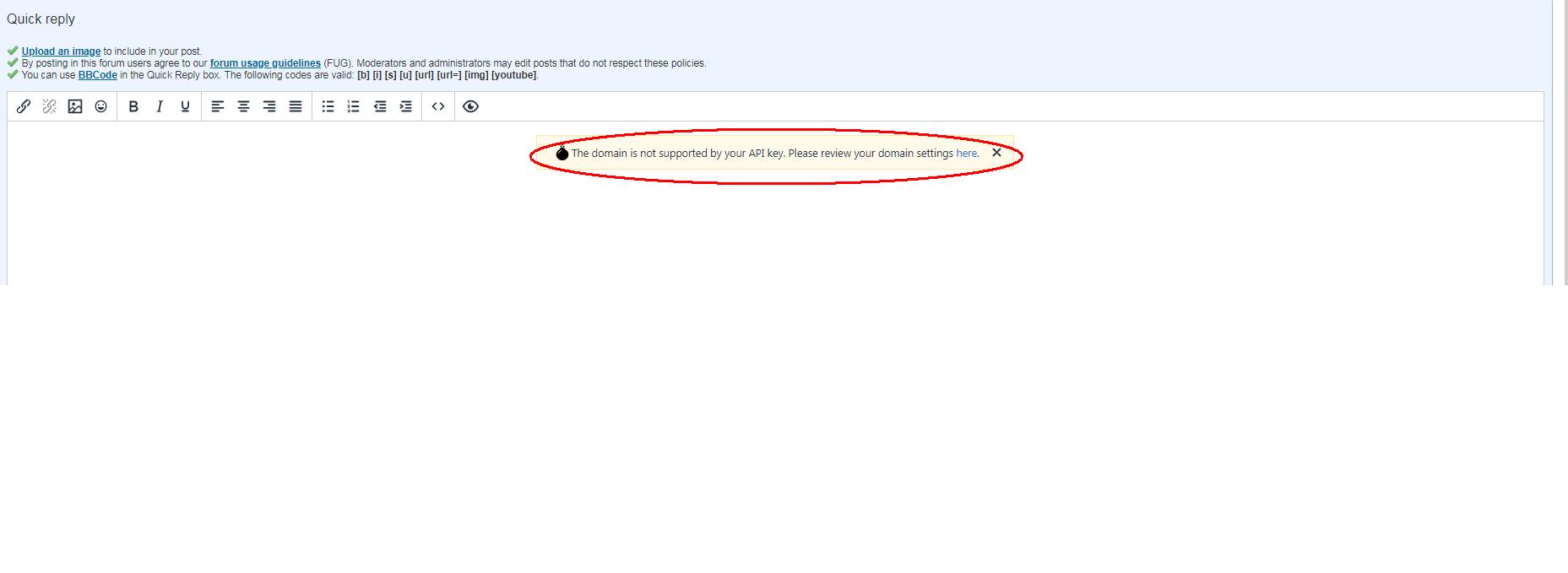
I have suddenly started seeing a TinyMCE error over the quick reply box. Here is a screen grab of what it looks like:


Plesse igmore amd axxept applogies in adbance fir anu typos


View this topic in a long page with up to 500 replies per page Create new topic
 1 | 2
freitasm
BDFL - Memuneh
80652 posts

Uber Geek
+1 received by user: 41036

Administrator
ID Verified
Trusted
Geekzone
Lifetime subscriber

  #2279177 18-Jul-2019 17:48
Send private message

Nothing on mine. Anyone else seeing this?


Referral links: Quic Broadband (free setup code: R587125ERQ6VE) | Samsung | AliExpress | Wise | Sharesies 


Support Geekzone by subscribing (browse ads-free), or making a one-off or recurring donation through PressPatron.


freitasm
BDFL - Memuneh
80652 posts

Uber Geek
+1 received by user: 41036

Administrator
ID Verified
Trusted
Geekzone
Lifetime subscriber

  #2279178 18-Jul-2019 17:50
Send private message

And just checked, the API key is correct. Are you sure not using a proxy, VPN, etc that could be interfering with your SSL settings?


Referral links: Quic Broadband (free setup code: R587125ERQ6VE) | Samsung | AliExpress | Wise | Sharesies 


Support Geekzone by subscribing (browse ads-free), or making a one-off or recurring donation through PressPatron.


Stu

Stu
Hammered
8742 posts

Uber Geek
+1 received by user: 2403

Moderator
ID Verified
Trusted
Lifetime subscriber

  #2279180 18-Jul-2019 17:51
Send private message

Not seeing it here on Chrome/Windows 10


People often mistake me for an adult because of my age.


Keep calm, and carry on posting.


Referral Links: Sharesies


Are you happy with what you get from Geekzone? If so, please consider supporting us by subscribing.


No matter where you go, there you are.


Rikkitic

Awrrr
19063 posts

Uber Geek
+1 received by user: 16302

Lifetime subscriber

  #2279181 18-Jul-2019 17:54
Send private message

I will try rebooting everything to see if it clears up. I just updated my Comodo browser but forgot the VPN was on (because DNS4ME wasn't working). This confused things at first but they settled down. I will give a status update after rebooting.


Plesse igmore amd axxept applogies in adbance fir anu typos



Rikkitic

Awrrr
19063 posts

Uber Geek
+1 received by user: 16302

Lifetime subscriber

  #2279183 18-Jul-2019 17:59
Send private message

I rebooted but am still getting it. This must be related to my browser update.


Plesse igmore amd axxept applogies in adbance fir anu typos


Rikkitic

Awrrr
19063 posts

Uber Geek
+1 received by user: 16302

Lifetime subscriber

  #2279198 18-Jul-2019 18:59
Send private message

Okay, I rolled back to the previous version and the problem has disappeared. Everything seems to be back to normal. This is why I hate updates.


Plesse igmore amd axxept applogies in adbance fir anu typos


Shop now on AliExpress (affiliate link).
michaelmurfy
meow
13579 posts

Uber Geek
+1 received by user: 10910

Moderator
ID Verified
Trusted
Lifetime subscriber

  #2279202 18-Jul-2019 19:24
Send private message

What browser are you using?


Michael Murphy | https://murfy.nz
Referral Links: Quic Broadband (use R122101E7CV7Q for free setup)

Are you happy with what you get from Geekzone? Please consider supporting us by subscribing.
Opinions are my own and not the views of my employer.


freitasm
BDFL - Memuneh
80652 posts

Uber Geek
+1 received by user: 41036

Administrator
ID Verified
Trusted
Geekzone
Lifetime subscriber

  #2279213 18-Jul-2019 19:42
Send private message

Comodo Browser.


Referral links: Quic Broadband (free setup code: R587125ERQ6VE) | Samsung | AliExpress | Wise | Sharesies 


Support Geekzone by subscribing (browse ads-free), or making a one-off or recurring donation through PressPatron.



Rikkitic

Awrrr
19063 posts

Uber Geek
+1 received by user: 16302

Lifetime subscriber

  #2279501 19-Jul-2019 11:01
Send private message

Can anyone help me further with this? It is over my head and I don't know what to try next, or what the source of the problem is. I keep getting this damned TinyMCE error on Comodo Dragon. I rolled back the update which fixed that problem but then I started getting other issues. It looks like some data from the update is being retained in the settings but I don't know what to do further.


I have updated again and am back to the latest version, which fixes the other problems but produces the TinyMCE error. When I click on the TinyMCE link, it says I can fix the problem but I have to insert something into a script that isn't on my computer. I'm just going around in circles.


I don't really want to change browsers because I have a lot of settings, passwords, and bookmarks on this one, and I also prefer this one over Chrome or any other I have tried. If I could just figure out what is causing this TinyMCE pop-up I would be happy. Any ideas? Is this just some weird Comodo bug? It has only happened on Geekzone so far.


Plesse igmore amd axxept applogies in adbance fir anu typos


michaelmurfy
meow
13579 posts

Uber Geek
+1 received by user: 10910

Moderator
ID Verified
Trusted
Lifetime subscriber

  #2279520 19-Jul-2019 11:41
Send private message

Honestly - if you go outside of the normal browsers (Chrome, Firefox, Edge) then you will likely experience issues with sites. The problem here is nobody will fix an issue with a smaller web browser with no market share like Comodo. Really, if you want proper compatibility you have to use Chrome these days (since Firefox is crippled with using anything Google owned).


Chrome should be able to import from Comodo since they're both Chromium based browsers else you can export bookmarks as a HTML file and import back into Chrome.


Michael Murphy | https://murfy.nz
Referral Links: Quic Broadband (use R122101E7CV7Q for free setup)

Are you happy with what you get from Geekzone? Please consider supporting us by subscribing.
Opinions are my own and not the views of my employer.


Rikkitic

Awrrr
19063 posts

Uber Geek
+1 received by user: 16302

Lifetime subscriber

  #2279526 19-Jul-2019 12:01
Send private message

I guess I will have to do that. I also use Chrome when compatibility issues arise but there are things I just don't like about it. I prefer the Comodo browser for a reason (at least I used to) but I no longer have the patience to put up with this BS. Thanks for the reply.


Plesse igmore amd axxept applogies in adbance fir anu typos


Want to support Geekzone and browse the site without the ads? Subscribe to Geekzone now (monthly, annual and lifetime options).
dfnt
1553 posts

Uber Geek
+1 received by user: 1036

Trusted
Lifetime subscriber

  #2279559 19-Jul-2019 13:25
Send private message

If you were using Comodo for privacy reasons, you could try Brave Browser which is also based on the Chromium engine


Rikkitic

Awrrr
19063 posts

Uber Geek
+1 received by user: 16302

Lifetime subscriber

  #2279714 19-Jul-2019 17:18
Send private message

Thanks but I mainly use it because I am used to it and like the way it feels. I do have the Brave browser on my system but I don't use it much.


Plesse igmore amd axxept applogies in adbance fir anu typos


Rikkitic

Awrrr
19063 posts

Uber Geek
+1 received by user: 16302

Lifetime subscriber

  #2280842 21-Jul-2019 16:06
Send private message

Just as a point of information, I finally got this sorted. I went back and forth several times between different versions and overwrote the settings and eventually got the update working correctly without the API popover. Bookmarks came with the settings and I was also able to retrieve the tabs and history with some other finagling so all seems sweet again. But I think I will copy all the settings data over to Chrome Browser just in case something like this happens again. You can't have too many backups.


Plesse igmore amd axxept applogies in adbance fir anu typos


Rikkitic

Awrrr
19063 posts

Uber Geek
+1 received by user: 16302

Lifetime subscriber

  #2318523 16-Sep-2019 14:10
Send private message

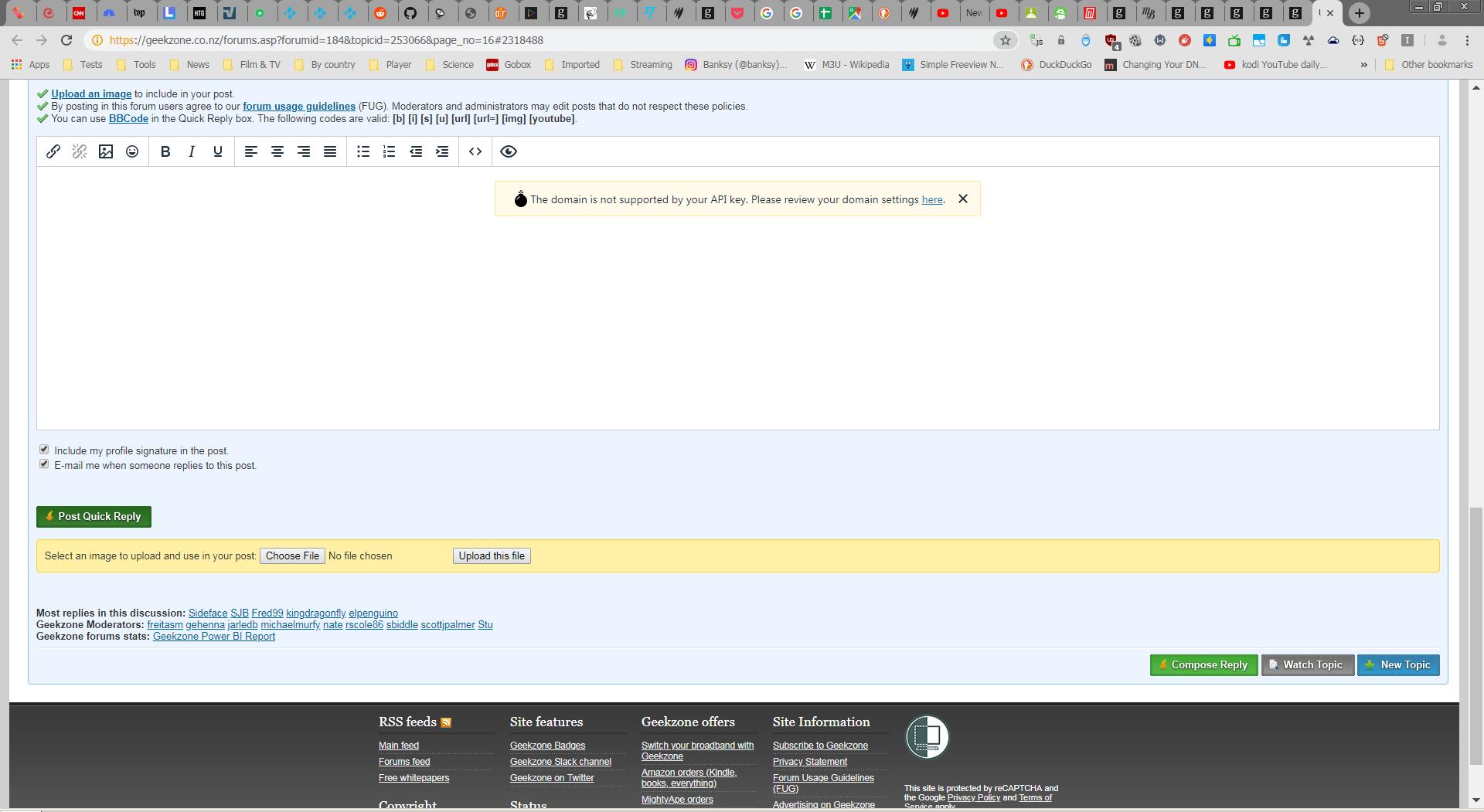
I have suddenly just started getting this TinyMCE error again. It is popping up over the reply box on every thread. I am using pure Google Chrome, not any other browser. Nothing has changed on my system. It was working normally, then started from about 10 minutes ago, it wasn't. I have no idea why this is happening or what is causing it. I just tried removing all extensions from Chrome but it doesn't make any difference. This is really annoying. Can anyone offer any ideas? Here is another picture of it from the Chrome Browser.


Plesse igmore amd axxept applogies in adbance fir anu typos


 1 | 2
View this topic in a long page with up to 500 replies per page Create new topic


Geekzone Live »

Try automatic live updates from Geekzone directly in your browser, without refreshing the page, with Geekzone Live now.


Are you subscribed to our RSS feed? You can download the latest headlines and summaries from our stories directly to your computer or smartphone by using a feed reader.