Geekzone: technology news, blogs, forums
Guest
Welcome Guest.
You haven't logged in yet. If you don't have an account you can register now.


1024kb

1197 posts

Uber Geek
+1 received by user: 519

ID Verified
Lifetime subscriber

#288832 26-Jul-2021 22:33
Send private message

I'm trying to post a small performance-enhancing MacOS hack but it consistently gets caught by the security rules:

Connection not available


Access denied

This website is using a security service to protect itself from online attacks.

Ray ID: 674cea474d6d17cf
Timestamp: 2021-07-26 10:23:53 UTC
Your IP address: 115.189.94.57
Requested URL: www.geekzone.co.nz/forums.asp
Error reference number: 1020
Server ID: FL_47F77
User-Agent: Mozilla/5.0 (Windows NT 10.0; Win64; x64; rv:90.0) Gecko/20100101 Firefox/90.0

I've tried writing the post on desktop & mobile, Chrome & FF.

I'm picking the rule is triggered when I type out a hosts file modification as that's the only half-tricky part of the post.

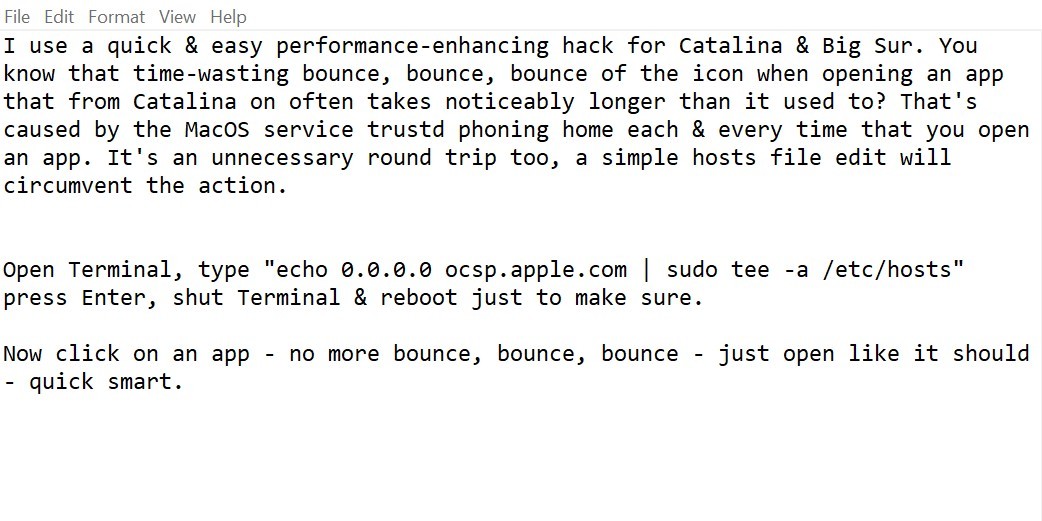
Here's a screenshot of the post in Notepad:

(I've tried with & without the speech marks)



Megabyte - so geek it megahertz

Create new topic
freitasm
BDFL - Memuneh
80646 posts

Uber Geek
+1 received by user: 41029

Administrator
ID Verified
Trusted
Geekzone
Lifetime subscriber

  #2750276 26-Jul-2021 23:00
Send private message

Yes, looks like it. I have changed the rule.


Referral links: Quic Broadband (free setup code: R587125ERQ6VE) | Samsung | AliExpress | Wise | Sharesies 


Support Geekzone by subscribing (browse ads-free), or making a one-off or recurring donation through PressPatron.


jarledb
Webhead
3319 posts

Uber Geek
+1 received by user: 1983

Moderator
ID Verified
Trusted
Lifetime subscriber

  #2750277 26-Jul-2021 23:03
Send private message

Just a note regarding your content (the one in the screenshot):


oscp.apple.com is the Apple certificate validation service, used to validate digital certificates for Apple software and content. I would not block that to save a second here or there. Would much rather have that security in place.


Jarle Dahl Bergersen | Referral Links: Want $50 off when you join Octopus Energy? Use this referral code
Are you happy with what you get from Geekzone? Please consider supporting us by making a donation or subscribing.


1024kb

1197 posts

Uber Geek
+1 received by user: 519

ID Verified
Lifetime subscriber

  #2750286 26-Jul-2021 23:51
Send private message

The OCSP protocol is used to check whether or not a certificate has been revoked. In this context, it is used to give Apple the opportunity to revoke the “blessing” it has given to a specific piece of software. This could happen for example for example if Apple discovers that it contains malware, or when the software developer turns out to be a scammer, or similar situations.

Blocking OCSP does not interrupt normal certificate validation. Your Mac will still be able to tell whether or not the software has at some point received the “blessing” from Apple that makes it pass validation. If you have non-signed software or software signed by someone else than Apple, this will still be picked up by the system.

Disabling OCSP access only means that software that Apple once validated won’t be subject to checks in the future to see if Apple decided to revoke that validation.

If you're using known-good software, & getting annoyed at the slow server response from the known problematic OSCP server - which only serves to check whether the original Apple blessing is still in place & hasn't been withdrawn (I'm looking at you, Epic Games), then this is an effective speed-up hack. The likelihood of a program actually turning malicious post-install is remote.


Megabyte - so geek it megahertz

Create new topic


Geekzone Live »

Try automatic live updates from Geekzone directly in your browser, without refreshing the page, with Geekzone Live now.


Are you subscribed to our RSS feed? You can download the latest headlines and summaries from our stories directly to your computer or smartphone by using a feed reader.
