Geekzone: technology news, blogs, forums
Guest
Welcome Guest.
You haven't logged in yet. If you don't have an account you can register now.


DoggNZ

437 posts

Ultimate Geek
+1 received by user: 9
Inactive user


#9866 19-Oct-2006 12:32
Send private message

As the subject states, I'm having trouble searching Geekzone when using Firefox but it works fine in IE. Can someone please have a look at this please Smile

Create new topic
bradstewart
4338 posts

Uber Geek
+1 received by user: 166

Retired Mod
Trusted
Lifetime subscriber

  #49052 19-Oct-2006 12:34
Send private message

I just tried it in Firefox 2 RC3. Works fine


DoggNZ

437 posts

Ultimate Geek
+1 received by user: 9
Inactive user


  #49053 19-Oct-2006 12:36
Send private message

I'm not using that version but thanks anyway.....

freitasm
BDFL - Memuneh
80653 posts

Uber Geek
+1 received by user: 41045

Administrator
ID Verified
Trusted
Geekzone
Lifetime subscriber

#49054 19-Oct-2006 12:37
Send private message

Just tried with Firefox 1.5 and it worked for me. This is an iframe served by Google with the search results. Your PC is probably blocking this somehow (firewall, antivirus, ad blocker).


Referral links: Quic Broadband (free setup code: R587125ERQ6VE) | Samsung | AliExpress | Wise | Sharesies 


Support Geekzone by subscribing (browse ads-free), or making a one-off or recurring donation through PressPatron.



DoggNZ

437 posts

Ultimate Geek
+1 received by user: 9
Inactive user


  #49055 19-Oct-2006 12:45
Send private message


Yeah, Im using 1.5.0.7...weird. When I type something in and click search, it takes me to another search page that looks like this

Search

If I type something into that box and click search it takes me back to the same page. Not a big deal, just thought I'd mention it.


bradstewart
4338 posts

Uber Geek
+1 received by user: 166

Retired Mod
Trusted
Lifetime subscriber

  #49056 19-Oct-2006 12:51
Send private message

Well thats the search box...

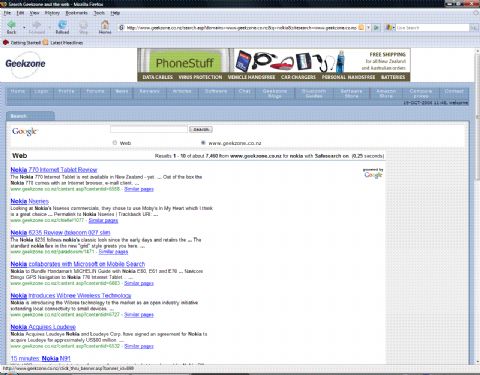
A search for 'Nokia' in FF should result in something like this:


DoggNZ

437 posts

Ultimate Geek
+1 received by user: 9
Inactive user


  #49057 19-Oct-2006 12:53
Send private message

Yep, get that in IE (and used to get in Firefox). Oh well...I'll wait to Firefox 2 gets out of Beta mode Laughing


Shop now at Mighty Ape (affiliate link).
DoggNZ

437 posts

Ultimate Geek
+1 received by user: 9
Inactive user


  #49058 19-Oct-2006 12:54
Send private message

One last thing...how do you make a link into a hyperlink and insert a pic into the body of the post as you've done there?

Edit: Spelling

bradstewart
4338 posts

Uber Geek
+1 received by user: 166

Retired Mod
Trusted
Lifetime subscriber

  #49059 19-Oct-2006 12:56
Send private message

FF2 RC3 is fine for everyday use.. It is a release candidate after all.

Also, make sure you have the rich text editor turned on in your profile and it will autolink as you type. Or there is a button for inserting a link and one for a picture

freitasm
BDFL - Memuneh
80653 posts

Uber Geek
+1 received by user: 41045

Administrator
ID Verified
Trusted
Geekzone
Lifetime subscriber

  #49060 19-Oct-2006 13:02
Send private message

Also you need Javascript enabled otherwise the editor won't start.


Referral links: Quic Broadband (free setup code: R587125ERQ6VE) | Samsung | AliExpress | Wise | Sharesies 


Support Geekzone by subscribing (browse ads-free), or making a one-off or recurring donation through PressPatron.


DoggNZ

437 posts

Ultimate Geek
+1 received by user: 9
Inactive user


  #49061 19-Oct-2006 13:27
Send private message

Ok..that appears to be working correctly. Used to the PHP way of doing things Cool

Create new topic


Geekzone Live »

Try automatic live updates from Geekzone directly in your browser, without refreshing the page, with Geekzone Live now.


Are you subscribed to our RSS feed? You can download the latest headlines and summaries from our stories directly to your computer or smartphone by using a feed reader.