
Geekzone: technology news, blogs, forums
Guest
Welcome Guest.
You haven't logged in yet. If you don't have an account you can register now.


Filter this topic showing only the reply marked as answer View this topic in a long page with up to 500 replies per page Create new topic
1 | ... | 8 | 9 | 10 | 11 | 12 | 13 | 14 | 15 | 16 | 17
Xeon
302 posts

Ultimate Geek
+1 received by user: 43


  #1288874 21-Apr-2015 23:45
Send private message

billgates: I checked the McDonalds receipt and the transaction was being processed under 'Credit' account when it is a Visa Debit card? That could be the culprit?


Visa Debit transactions process with the Credit account for PayWave (meaning extra fees for retailer hence why not all retailers offer PayWave). As far as I know the money actually comes from the default account (usually cheque) or for the likes of BNZ you can choose which account for Paywave/Online transactions.


kemosabe
66 posts

Master Geek
+1 received by user: 10


  #1288878 22-Apr-2015 00:57
Send private message


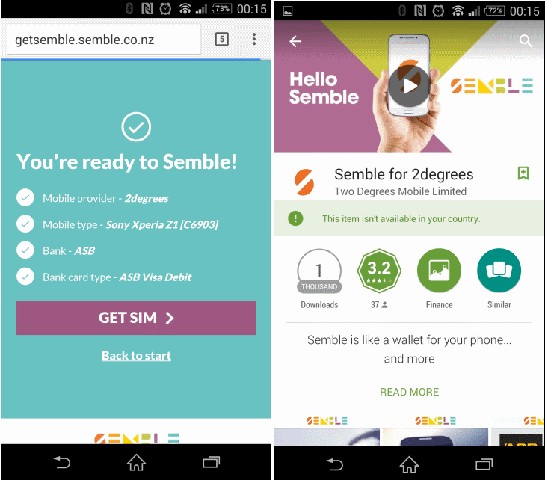
So I thought I was all go on Semble:

Phone supported - check
New SIM - check
Bank & Card supported - check
Download app - FAIL. Not sure which country they allow it in if not NZ? Are we back to this whole south island doesn't count again?


kiwitrc
4123 posts

Uber Geek
+1 received by user: 833
Inactive user


  #1288886 22-Apr-2015 06:26
Send private message

kemosabe:
So I thought I was all go on Semble:

Phone supported - check
New SIM - check
Bank & Card supported - check
Download app - FAIL. Not sure which country they allow it in if not NZ? Are we back to this whole south island doesn't count again?


How are you trying to download, via wifi or mobile data? You dont have any global mode type vpn on your wifi network per chance?


kiwiandy
160 posts

Master Geek
+1 received by user: 12


  #1288904 22-Apr-2015 07:37
Send private message

SpookyAwol:
kiwiandy: So I flashed a VF NZ Kit Kat Rom to my Phone... totally amazed that Lollipop is still not available here yet!... (I have been running stock Developer Edition Roms for the last year, which seem to get updates pretty quickly.)

Then I installed RootCloak

Semble starts ok.. get thru to the Profile setup page.. click finish to submit my details..

"Error,, A communication problem occured.... please contact Vodafone. (status 95)

After 40 minutes on the phone, 25 of which were on hold waiting for them to answer... the VF support guy said he didnt have any reference to a status 95 error message.

I dont know when/if i will ever hear back from them..  but I dont really want to face the VF customer service music on hold test again.


I get a status 95 error on my supported Z3 Compact, so your issue is not specific to your unsupported phone it seems.

<edit>
A couple of reboots later and a couple of re installs seems to have fixed the issue


That fixed my problem also... reinstalled and working fine..
but just got the update to Lollipop, went back to bone stock M8 (ie not rooted, running VF firmware)
Run Semble.. get a message... "Somethings different... semble has detected a different phone" DO you wish to load your semble data to this phone?.... I tap yes.. it says processing then crashes...... I tap No.. it just crashes... restart... same problem everytime..
deleted and reinstalled.. same problem again..


Phone history
Now:
iPhone4 (XT)
HTC Desire HD (Softbank)
Google (HTC) Nexus One (XT)
iPhone3 (spare)
Chinese Kamakuza iPhone4 with Dual Sims & android ( for travelling)

before:
Google (Samsung) Nexus S
HTC Desire (XT) 
Google (HTC) Nexus One (VF)
Blackberry's, Palm Treo 750, several WinMO smartphones from 

dylanp
842 posts

Ultimate Geek
+1 received by user: 392

Trusted

  #1288935 22-Apr-2015 08:55
Send private message

billgates: I have a Nokia Lumia 1520. Borrowed a work mate's Samsung Galaxy Note 3. Created Semble account, activated account and setup default payment card to be 'Always ON'. Insert SIM card into my Nokia Lumia 1520 and enabled 'tap to pay' option. Went to McDonalds and tried to purchase a 80cents soft serve cone and it said 'declined' on their payment screen. Logged into ASB app on phone and say a new tab called 'cards' and I can see the card there as well.

What could be wrong here? Anyone with a Windows Phone successfully purchased anything with a Semble SIM?

Edit - Running Windows 10 TP on phone.

Edit - Might have found the cause. I checked the McDonalds receipt and the transaction was being processed under 'Credit' account when it is a Visa Debit card? That could be the culprit? If so, how the hell do I make the setup point to a cheque account for this card which is what it is.


If you haven't already please go to your ASB Internet banking on desktop and set a pin for your new virtual card. Click on "My Settings" in the top right, then "Card PIN". Set a pin for your new card, you'll see the last four digits match up with the card as displayed in Semble. This will need to be done before you can make payments with the Semble card (even if the purchase amount is below the $80 threshold where you're asked for a pin at time of purchase).

roobarb
705 posts

Ultimate Geek
+1 received by user: 658

Trusted

  #1289009 22-Apr-2015 10:22
Send private message

billgates: What could be wrong here? Anyone with a Windows Phone successfully purchased anything with a Semble SIM?


Yes, with both a Nokia Lumia 820 (WP 8.1), and also a BlackBerry Z10 (BB 10.3.1).

HP


Shop now for HP laptops and other devices (affiliate link).
billgates
4706 posts

Uber Geek
+1 received by user: 672

Trusted

  #1289257 22-Apr-2015 13:01
Send private message

VodafoneDylan:
If you haven't already please go to your ASB Internet banking on desktop and set a pin for your new virtual card. Click on "My Settings" in the top right, then "Card PIN". Set a pin for your new card, you'll see the last four digits match up with the card as displayed in Semble. This will need to be done before you can make payments with the Semble card (even if the purchase amount is below the $80 threshold where you're asked for a pin at time of purchase).


Thanks a lot Dylan. It was the pin number. Set it up on the ASB portal and my transaction went through this time.


Do whatever you want to do man.


billgates
4706 posts

Uber Geek
+1 received by user: 672

Trusted

  #1289267 22-Apr-2015 13:03
Send private message

Xeon:
Visa Debit transactions process with the Credit account for PayWave (meaning extra fees for retailer hence why not all retailers offer PayWave). As far as I know the money actually comes from the default account (usually cheque) or for the likes of BNZ you can choose which account for Paywave/Online transactions.


Thanks. Makes sense as to why retailers are not taking up the paypass/paywave technology.


Do whatever you want to do man.


kemosabe
66 posts

Master Geek
+1 received by user: 10


  #1289281 22-Apr-2015 13:19
Send private message

kiwitrc:
kemosabe:
So I thought I was all go on Semble:

Phone supported - check
New SIM - check
Bank & Card supported - check
Download app - FAIL. Not sure which country they allow it in if not NZ? Are we back to this whole south island doesn't count again?


How are you trying to download, via wifi or mobile data? You dont have any global mode type vpn on your wifi network per chance?


Same via 2degrees 3G Data and via Wifi (via SNAP) No Global modes.

richms
29104 posts

Uber Geek
+1 received by user: 10219

Trusted
Lifetime subscriber

  #1289305 22-Apr-2015 13:43
Send private message

What about the billing address on your google account? I have several accounts with different made up addresses so I can get into the different countries play stores to add stuff.


Richard rich.ms

r2b2
586 posts

Ultimate Geek
+1 received by user: 109


  #1289343 22-Apr-2015 14:13
Send private message

billgates: I have a Nokia Lumia 1520. Borrowed a work mate's Samsung Galaxy Note 3. Created Semble account, activated account and setup default payment card to be 'Always ON'. Insert SIM card into my Nokia Lumia 1520 and enabled 'tap to pay' option. Went to McDonalds and tried to purchase a 80cents soft serve cone and it said 'declined' on their payment screen. Logged into ASB app on phone and say a new tab called 'cards' and I can see the card there as well.

What could be wrong here? Anyone with a Windows Phone successfully purchased anything with a Semble SIM?

Edit - Running Windows 10 TP on phone.

Edit - Might have found the cause. I checked the McDonalds receipt and the transaction was being processed under 'Credit' account when it is a Visa Debit card? That could be the culprit? If so, how the hell do I make the setup point to a cheque account for this card which is what it is.


A Visa Debit card should be using Credit so that's nothing unusual. I don't have a Visa Debit card but does the normal Visa Debit card work @ McDonalds? I know some retailers block the use of contactless payments for Debit cards (e.g. Countdown)


Support Geekzone with one-off or recurring donations Donate via PressPatron.
kemosabe
66 posts

Master Geek
+1 received by user: 10


  #1289369 22-Apr-2015 14:23
Send private message

richms: What about the billing address on your google account? I have several accounts with different made up addresses so I can get into the different countries play stores to add stuff.


Thought about that also. Went and checked, only addresses there are for Google Wallet and my default address is an NZ one - I do have some other addresses in US, but I doubt I would need to delete those to be able to download.

Note that neither the Vodafone or Spark version of the Semble App show any limitation, can download either.

Also, this is a NZ new phone.


ekul
89 posts

Master Geek
+1 received by user: 10


  #1289904 23-Apr-2015 07:56
Send private message

Looks like root cloak is no longer working for me, Semble must've updated something because when trying to launch the app today I got the  'Semble cannot operate on a phone that is rooted'

kiwitrc
4123 posts

Uber Geek
+1 received by user: 833
Inactive user


  #1289921 23-Apr-2015 08:18
Send private message

ekul: Looks like root cloak is no longer working for me, Semble must've updated something because when trying to launch the app today I got the  'Semble cannot operate on a phone that is rooted'


Mine still works

quickreactor
3 posts

Wannabe Geek


  #1290209 23-Apr-2015 15:16
Send private message

So still no compatibility for the Oneplus One? :(

Just read a post with a guy called NikT stating lal the reasons why testing it for Oneplus isnt a priority for them including that as an "enthusiast" phone, people will likely have rooted and thus cannot use the root-protected software.

What about the fact that "enthusiasts" are more likely to want to use this new technology? Why not allow us to download the software and test it? I'm sure you have reasons but at this point it seems like it's never going to happen cause they don't give a s**t.

1 | ... | 8 | 9 | 10 | 11 | 12 | 13 | 14 | 15 | 16 | 17
Filter this topic showing only the reply marked as answer View this topic in a long page with up to 500 replies per page Create new topic


Geekzone Live »

Try automatic live updates from Geekzone directly in your browser, without refreshing the page, with Geekzone Live now.


Are you subscribed to our RSS feed? You can download the latest headlines and summaries from our stories directly to your computer or smartphone by using a feed reader.