Geekzone: technology news, blogs, forums
Guest
Welcome Guest.
You haven't logged in yet. If you don't have an account you can register now.


View this topic in a long page with up to 500 replies per page Create new topic
1 | 2 | 3
stevemat

44 posts

Geek
+1 received by user: 2


  #3124019 6-Sep-2023 06:23
Send private message


Thanks for your patience. 


This is the ethernet speed test result today, the upload speed was too slow get a score!


The Firmware on the Deco's is the latest, all the Windows 10 computers have the latest software / patches etc.


I have tried the Win Network Trouble shooter several times and it doesn't report any issues. 


It MUST be a hardware compatibility issue as if I unplug everything back to the ONT, and just connect the new DN Modem and laptop I get the upload speed issue.


If I swap the DN Modem out for the old Ultra Hub, I instantly get 100Mbps upload....


Apsattv
2452 posts

Uber Geek
+1 received by user: 724


  #3124037 6-Sep-2023 08:24
Send private message

Is this your switch?


https://www.youtube.com/watch?v=IPRtUdJdAn8


If so please poke it with a pin reset it.


Apsattv
2452 posts

Uber Geek
+1 received by user: 724


  #3124039 6-Sep-2023 08:32
Send private message

Some followup questions


Do you have any device plugged into the ethernet port on the back of the Decos? or any other switches anywhere in the setup?


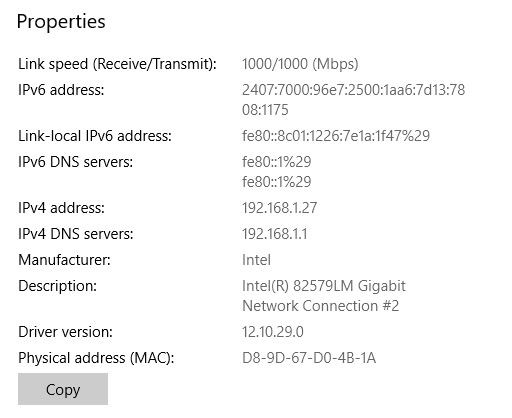
"Go to network status, from search box, click properties then scroll down, that will show the actual link speed which should read 1000/1000 (Mbps) "


What was the result of this?


How many devices are plugged into the 16 port switch? do you have a patch panel feeding into the switch ? 


Bung
6733 posts

Uber Geek
+1 received by user: 2926

Subscriber

  #3124052 6-Sep-2023 09:17
Send private message

stevemat:

It MUST be a hardware compatibility issue as if I unplug everything back to the ONT, and just connect the new DN Modem and laptop I get the upload speed issue.


If I swap the DN Modem out for the old Ultra Hub, I instantly get 100Mbps upload....


Are the switch and Decos involved considering the above?

Apsattv
2452 posts

Uber Geek
+1 received by user: 724


  #3124099 6-Sep-2023 09:32
Send private message

The Ultra modem has all the users ip and mac devices stored in it already..If both the ultra modem and deco were handing out dhcp adresses, then there could be a few clashes going on


Lets collect all the info and then narrow things down more.


stevemat

44 posts

Geek
+1 received by user: 2


  #3124236 6-Sep-2023 18:37
Send private message

Further strange updates.


The One T2 Christchurch based Help Team contacted me after the Noel Lemming Tech visit.


They say they checked with the Modem Supplier and they are not aware of any hardware compatibility issues.


They scanned / probed my system and believe I have 3 DCHP servers enabled and four Deco units.


They even provided a screen shot of the two Deco pairs that they say are installed in my property.


The first pair is correct, the second pair I don’t have / and have never had installed at the property.


This is highly strange, they say the second pair are not connected to the modem but must be to the switch, which is clearly not the case.


I now only have one DCHP server (the modem) but my Deco’s may have been producing them until I followed your advise and set them into Access Point Mode.


I’ll wait until One T2 get back to me about the phantom Deco’s.  


Shop now at Mighty Ape (affiliate link).
stevemat

44 posts

Geek
+1 received by user: 2


  #3124237 6-Sep-2023 18:44
Send private message


stevemat

44 posts

Geek
+1 received by user: 2


  #3124238 6-Sep-2023 18:46
Send private message

All 16 ports are used on the main switch, plus I have 5 other small switches in different rooms connected to many devices.


Nothing is plugged into the Deco's RJ45's except the data in cable for the main unit.


I'll try resetting the main switch, but I have disconnected everything except the ONT, with a short patch cable to the new Modem and short patch to the laptop and I have the Upload problem.


If I swap in the old Ultrahub (which has had a factory reset) everything works as it should.   As soon as a swap back to the DN, I loss all upload speeds...


Morm
87 posts

Master Geek
+1 received by user: 20


  #3124465 7-Sep-2023 10:12
Send private message

stevemat:


All 16 ports are used on the main switch, plus I have 5 other small switches in different rooms connected to many devices.


Nothing is plugged into the Deco's RJ45's except the data in cable for the main unit.


I'll try resetting the main switch, but I have disconnected everything except the ONT, with a short patch cable to the new Modem and short patch to the laptop and I have the Upload problem.


If I swap in the old Ultrahub (which has had a factory reset) everything works as it should.   As soon as a swap back to the DN, I loss all upload speeds...


Have your reset you network adapter or manually changed any settings on the network adapter? It seems like flow control could be messing up.


Does Wifi from the same laptop have good speed? Have you tried a usb ethernet adapter?  If they work then the ethernet port may have old drivers or has some manual configuration that is not happy. 


The Ultra Hub is probably ignoring/handling the issue better which is why it works.


Apsattv
2452 posts

Uber Geek
+1 received by user: 724


  #3124526 7-Sep-2023 12:09
Send private message

The 82579LM on the Laptop is quite old.  That version of the network driver dates back to 2014! 


So in this case, next step, What is the brand and model number of the laptop?  Is it an HP ? if so can you go here and check for the newer release driver. Also see if there is any new bios update.


https://support.hp.com/nz-en/drivers/laptops


If there is no newer network driver available you can try the standard Intel release ones


https://www.intel.com/content/www/us/en/download/18293/intel-network-adapter-driver-for-windows-10.html


Spyware
3818 posts

Uber Geek
+1 received by user: 1366

Lifetime subscriber

  #3124551 7-Sep-2023 13:08
Send private message

Wireshark time.


Spark Max Fibre using Mikrotik CCR1009-8G-1S-1S+, CRS125-24G-1S, Unifi UAP, U6-Pro, UAP-AC-M-Pro, Apple TV 4K (2022), Apple TV 4K (2017), iPad Air 1st gen, iPad Air 4th gen, iPhone 13, SkyNZ3151 (the white box). If it doesn't move then it's data cabled.


Stream your favourite shows now on Apple TV (affiliate link).
Apsattv
2452 posts

Uber Geek
+1 received by user: 724


  #3124619 7-Sep-2023 14:03
Send private message

Theres later network drivers for the nic, and also a fix involving disabling power saving modes..


But lets wait the other person to respond


stevemat

44 posts

Geek
+1 received by user: 2


  #3124698 7-Sep-2023 16:39
Send private message

A FIX HAS BEEN SORT!


Thanks for all your advice.


I have proven, at least to myself, that there is a hardware compatibility issue with the new One NZ DN8245 Modem and older Windows 10 Computer Hardware.


In my case a HP EliteBook 8570P and two Dell OptiPlex 780's 


All three had normal fibre download speeds, buy almost no upload speed when connected to the Ethernet Ports.


They all had "acceptable" speed down & up via Wi-Fi.


Today I brought a cheap TP Link TG-3468 PCIE Gigabit Network adapter and installed it in the Dell 780.


This instantly fixed my upload speed for $25.00


The only issue left to explain, is how One NZ believe through scanning my ONT & Modem, is that there are four Deco units installed in my house with different names when there are only two!


RunningMan
9184 posts

Uber Geek
+1 received by user: 4834


  #3124712 7-Sep-2023 17:03
Send private message

This reeks of a Windows driver issue as myself, @Apsattv and @Morm have said. There are many many threads on here with poor upload speedtest results via ethernet on Windows 10.


The drivers that Windows installs are not always the best, and you need to get the right drivers from the website of the NIC manufacturer.


Apsattv
2452 posts

Uber Geek
+1 received by user: 724


  #3124716 7-Sep-2023 17:05
Send private message

Can you still update the HP Elitebook, to the newest network driver. Or if you have the knowledge make a bootable live linux USB flash drive. 


Also i would try newer network drivers on the Dells as well


https://www.dell.com/support/home/en-nz/product-support/product/optiplex-780/drivers


also it should be mentioned neither of the HP EliteBook 8570P and Dell OptiPlex 780 are listed as windows 10 compatible on their websites.


1 | 2 | 3
View this topic in a long page with up to 500 replies per page Create new topic


Geekzone Live »

Try automatic live updates from Geekzone directly in your browser, without refreshing the page, with Geekzone Live now.


Are you subscribed to our RSS feed? You can download the latest headlines and summaries from our stories directly to your computer or smartphone by using a feed reader.