Geekzone: technology news, blogs, forums
Guest
Welcome Guest.
You haven't logged in yet. If you don't have an account you can register now.


Filter this topic showing only the reply marked as answer View this topic in a long page with up to 500 replies per page Create new topic
1 | 2 | 3 | 4
mentalinc
3384 posts

Uber Geek
+1 received by user: 1023

Trusted

  #2830291 11-Dec-2021 08:43
Send private message

Same problem, parents still on 100/20.


CPU: AMD 5900x | RAM: GSKILL Trident Z Neo RGB F4-3600C16D-32GTZNC-32-GB | MB:  Asus X570-E | GFX: EVGA FTW3 Ultra RTX 3080Ti| Monitor: LG 27GL850-B 2560x1440


Quic: https://account.quic.nz/refer/473833 R473833EQKIBX 


henrytai
92 posts

Master Geek
+1 received by user: 32


  #2830304 11-Dec-2021 09:59
Send private message

invisibleman18:


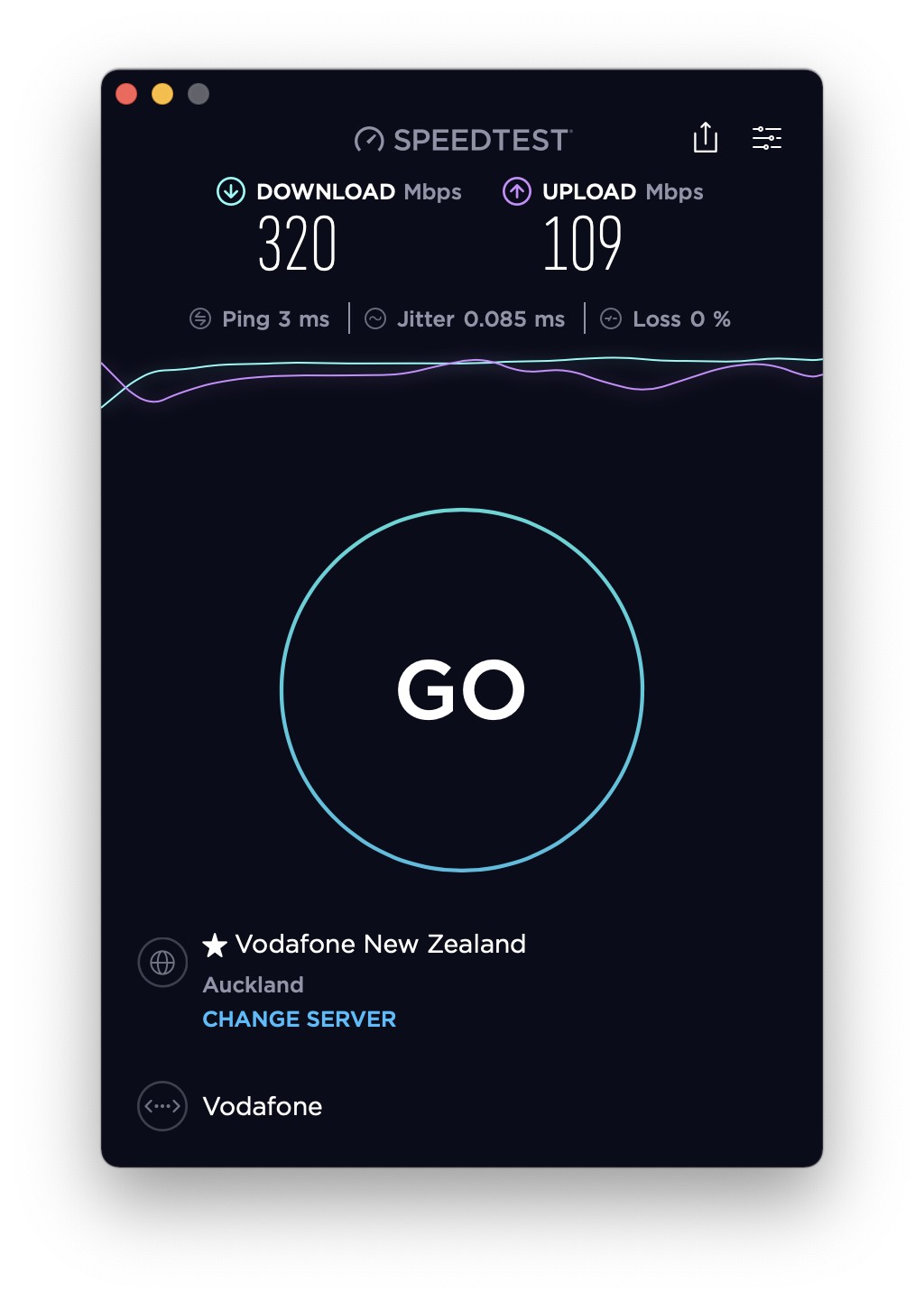
Figured it out. Until now I had the Deco unit connected to the Ultrahub with a new network as that's what the setup instructions said to do - and I still had the original network on the Ultrahub that nothing connected to other than the vodafone wifi extender used to connect to the bundled Vodafone TV. Now I have connected the Deco unit directly to the ONT and get 300 download speed. To make Vodafone TV work I have connected the extender to the second ethernet port on the back of the Deco and in the Deco app I have enabled IPTV in the advanced settings with mode 'New Zealand UFB' and Vodafone TV works. So there's actually now no need for the Vodafone Ultrahub.


Edit: Am working from home and making this change coincided with not being able to get into one of my work apps (which was fine before making the change) as it was saying my connection was not private. Thought I'd have to change back to the prior settings but turned out it's an issue with the particular app today that happened to start at about the same time, not my connection!


That's good news! Good to know that it is possible to use the Deco unit without the Ultrahub, wish I knew this before - https://www.tp-link.com/us/support/faq/2465/


I bought an Orbi RBK353 recently and it has been working great without the Ultrahub. 


Very pleased with the improved speed, it is noticeably faster when downloading apps and iCloud upload/download.


Starlink Referral - One Month Free Service: 


https://www.starlink.com/residential?referral=RC-2896699-26676-91


Tig392
2 posts

Wannabe Geek
+1 received by user: 1


  #2830306 11-Dec-2021 10:06
Send private message

mentalinc: Same problem, parents still on 100/20.


My issue after some digging turned out to be that I was still internally in the Vodafone system on the old Ihug platform. Apparently all old accounts are due to be finally moved off this by March next year and so they're not rolling out the speed upgrade for these customers. The solution is to get them to move your account now internally from IHug or Telstra to the Vodafone system. This was painless and as of today I'm on 300/100.  


Valleyman
8 posts

Wannabe Geek
+1 received by user: 7


  #2830360 11-Dec-2021 12:14
Send private message

Tig392:


mentalinc: Same problem, parents still on 100/20.


My issue after some digging turned out to be that I was still internally in the Vodafone system on the old Ihug platform. Apparently all old accounts are due to be finally moved off this by March next year and so they're not rolling out the speed upgrade for these customers. The solution is to get them to move your account now internally from IHug or Telstra to the Vodafone system. This was painless and as of today I'm on 300/100.  


Just rung vodafone about why my speed hadnt increased & they told me the same about migrating ex telstra customers.


Unfornrtunately when they migrate my account over, my mobile plan from when I was with telstra will be terminated & no longer work. I will wait till account gets migrated & go without a cell phone as there is no cell plan that doesnt include mobile data which I have absolutly no use for mobile data.


mentalinc
3384 posts

Uber Geek
+1 received by user: 1023

Trusted

  #2830496 11-Dec-2021 19:27
Send private message

Yeah was about to post seems vodafone have some granfathered "Unlimited fibre 100 and Voice monthly fee" plans that are not being upgraded!


My parents will be calling in the next few days to sort this out.


Poor form vodafone!


CPU: AMD 5900x | RAM: GSKILL Trident Z Neo RGB F4-3600C16D-32GTZNC-32-GB | MB:  Asus X570-E | GFX: EVGA FTW3 Ultra RTX 3080Ti| Monitor: LG 27GL850-B 2560x1440


Quic: https://account.quic.nz/refer/473833 R473833EQKIBX 


quickymart
14940 posts

Uber Geek
+1 received by user: 13954

ID Verified

  #2830508 11-Dec-2021 20:49
Send private message

mentalinc:


My parents will be calling in the next few days to sort this out.


Good luck with that :/


Shop now for Lego sets and other gifts (affiliate link).
insane
3324 posts

Uber Geek
+1 received by user: 1006

ID Verified
Trusted
2degrees
Subscriber

  #2830510 11-Dec-2021 21:12
Send private message

mentalinc:

Yeah was about to post seems vodafone have some granfathered "Unlimited fibre 100 and Voice monthly fee" plans that are not being upgraded!


My parents will be calling in the next few days to sort this out.


Poor form vodafone!


You're upset that you'll have to wait a bit longer for a free upgrade, because you're still on some plan from 9 years ago.

Tough crowd 🤣

mentalinc
3384 posts

Uber Geek
+1 received by user: 1023

Trusted

  #2830522 11-Dec-2021 21:57
Send private message

The connection was at 100/100 the other day, then it got dialed back down to 100/20. So yeah tough crowd.


Sure it's a free upgrade, but now they're over paying for 100/20 for 4 months or so (billed in advanced) for what should be 300/100 now?


CPU: AMD 5900x | RAM: GSKILL Trident Z Neo RGB F4-3600C16D-32GTZNC-32-GB | MB:  Asus X570-E | GFX: EVGA FTW3 Ultra RTX 3080Ti| Monitor: LG 27GL850-B 2560x1440


Quic: https://account.quic.nz/refer/473833 R473833EQKIBX 


insane
3324 posts

Uber Geek
+1 received by user: 1006

ID Verified
Trusted
2degrees
Subscriber

  #2830526 11-Dec-2021 22:13
Send private message

mentalinc:

The connection was at 100/100 the other day, then it got dialed back down to 100/20. So yeah tough crowd.


Sure it's a free upgrade, but now they're over paying for 100/20 for 4 months or so (billed in advanced) for what should be 300/100 now?


Hmm, right.

I recall being on an old 100/50 trial plan with BigPipe that got grandfathered. Eventually some years later it finally caught up with me and I similarly ended up with one of their newer advertised plan.

Hopefully they get it sorted. If they were on a small business fibre plan then a quick google suggests that'll be upgraded too.

mentalinc
3384 posts

Uber Geek
+1 received by user: 1023

Trusted

  #2830544 12-Dec-2021 09:16
Send private message

Just for clarity, they were on 100/20 in November, then they went to 100/100 on 2 December, then back to 100/20 the following day or so.


I assume someone has changed something somewhere to drop it back down. Which makes you wonder why they didn't just change the download and be done with it?


CPU: AMD 5900x | RAM: GSKILL Trident Z Neo RGB F4-3600C16D-32GTZNC-32-GB | MB:  Asus X570-E | GFX: EVGA FTW3 Ultra RTX 3080Ti| Monitor: LG 27GL850-B 2560x1440


Quic: https://account.quic.nz/refer/473833 R473833EQKIBX 


mentalinc
3384 posts

Uber Geek
+1 received by user: 1023

Trusted

  #2832729 15-Dec-2021 10:07
Send private message

update: My parents called and changed to a new plan (saving $6 per month) and have now have 300/100.


CPU: AMD 5900x | RAM: GSKILL Trident Z Neo RGB F4-3600C16D-32GTZNC-32-GB | MB:  Asus X570-E | GFX: EVGA FTW3 Ultra RTX 3080Ti| Monitor: LG 27GL850-B 2560x1440


Quic: https://account.quic.nz/refer/473833 R473833EQKIBX 


Move to New Zealand's best fibre broadband service (affiliate link). Free setup code: R587125ERQ6VE. Note that to use Quic Broadband you must be comfortable with configuring your own router.
henrytai
92 posts

Master Geek
+1 received by user: 32


  #2833012 15-Dec-2021 18:48
Send private message

mentalinc:


update: My parents called and changed to a new plan (saving $6 per month) and have now have 300/100.


Awesome! Vodafone retention team is the best IMO. 


Starlink Referral - One Month Free Service: 


https://www.starlink.com/residential?referral=RC-2896699-26676-91


johna8
90 posts

Master Geek
+1 received by user: 5

ID Verified

  #2837488 23-Dec-2021 17:56
Send private message

Just wanted to reach out in general everyone on Vodafone up with the planned changes? Have a small business customer seems to be still stuck on his existing plan speeds of 100/100.


Goosey
3016 posts

Uber Geek
+1 received by user: 871

Subscriber

  #2837548 23-Dec-2021 22:13
Send private message

Anyone noticed IPV6 went for a skate after this speed upgrade (or is it just me).


(Enable is the infrastructure provider)


scheduler
264 posts

Ultimate Geek
+1 received by user: 25


  #2838540 26-Dec-2021 11:50
Send private message

Hi,


I am looking for a bit of guidance. I seem to be stuck on receiving Broadband at 100/20 rather than 300/100. I have spoken to Vodafone and they tell me that the line is provisioned for 300/100 so I should be receiving it. They talked me through resetting everything by turning everything off for half an hour. This made no difference,


Before I go back to Vodafone I would like a bit of guidance as to what my issue likely is as I have identified a couple of possibilities,


I am on the Unlimited Fibre 100 plan. There was a mention on this thread that the plan was grandfathered and wouldn't receive the speed increase. The person I spoke to at Vodafone seemed to discount this.


My set up is TP Link Deco M5 units  coupled up to a TP link VR600v modem. This modem has a rated maximum VDSL speed of 100Mbps So I understand if this is the maximum speed I can achieve. Speed tests carried out using the Deco app speed test gave speeds of 100/200. I did however repeat the speed test with my original Vodafone supplied HG659 and received similar results.


I am really just trying to ascertain if my issue is at the Vodafone end or if I need a new modem?


TIA


Laurie


1 | 2 | 3 | 4
Filter this topic showing only the reply marked as answer View this topic in a long page with up to 500 replies per page Create new topic


Geekzone Live »

Try automatic live updates from Geekzone directly in your browser, without refreshing the page, with Geekzone Live now.


Are you subscribed to our RSS feed? You can download the latest headlines and summaries from our stories directly to your computer or smartphone by using a feed reader.