Geekzone: technology news, blogs, forums
Guest
Welcome Guest.
You haven't logged in yet. If you don't have an account you can register now.


View this topic in a long page with up to 500 replies per page Create new topic
1 | 2 | 3 | 4 | 5
dylanp

842 posts

Ultimate Geek
+1 received by user: 392

Trusted

  #1375038 27-Aug-2015 09:38
Send private message

Hi all

We're looking into pushing this firmware update out to HG659 modems that haven't been upgraded yet on consumer plans (not business at this stage).

I would be interested to hear how you've found the new firmware so far. For advanced users who've used the admin login the admin password is different after the upgrade of course and the feedback so far is that we need to make the new admin password more obvious, I'll be working on help content about that with Lon - anything else come to mind?

Cheers

Dylan


shk292
2916 posts

Uber Geek
+1 received by user: 2040

Lifetime subscriber

  #1375049 27-Aug-2015 09:58
Send private message

Has anyone used this on Slingshot fibre?  I have a VF-supplied one that will do everything on Slingshot except provide the voice line

dacraka
771 posts

Ultimate Geek
+1 received by user: 165

ID Verified
Trusted

  #1375110 27-Aug-2015 11:08
Send private message

VodafoneDylan: Hi all

We're looking into pushing this firmware update out to HG659 modems that haven't been upgraded yet on consumer plans (not business at this stage).

I would be interested to hear how you've found the new firmware so far. For advanced users who've used the admin login the admin password is different after the upgrade of course and the feedback so far is that we need to make the new admin password more obvious, I'll be working on help content about that with Lon - anything else come to mind?

Cheers

Dylan


New new password is fine as we can change it afterwards and it's pretty secure.

I can't seem to see any options below the new "Guest Network" turn on button though?


johnvick
18 posts

Geek


  #1375128 27-Aug-2015 11:42
Send private message

All fine here so far. The Admin password I changed to my own. I am hoping the problem with port forwarding being forgotten and needing the router rebooted to fix has gone, this was my main gripe with the previous firmware. I'll need to wait a few days to see if it is.

John

dylanp

842 posts

Ultimate Geek
+1 received by user: 392

Trusted

  #1375136 27-Aug-2015 11:58
Send private message

johnvick: All fine here so far. The Admin password I changed to my own. I am hoping the problem with port forwarding being forgotten and needing the router rebooted to fix has gone, this was my main gripe with the previous firmware. I'll need to wait a few days to see if it is.

John


Cool, thanks. :) Yes, I expect that sort of problem is resolved with the new firmware.

Shagy
97 posts

Master Geek
+1 received by user: 2


  #1375227 27-Aug-2015 14:43
Send private message

Issues I've noticed:
System overview Reports internet disconnected
SSH no shell access


Shop now on AliExpress (affiliate link).
dylanp

842 posts

Ultimate Geek
+1 received by user: 392

Trusted

  #1375254 27-Aug-2015 15:23
Send private message

dacraka:
VodafoneDylan: Hi all

We're looking into pushing this firmware update out to HG659 modems that haven't been upgraded yet on consumer plans (not business at this stage).

I would be interested to hear how you've found the new firmware so far. For advanced users who've used the admin login the admin password is different after the upgrade of course and the feedback so far is that we need to make the new admin password more obvious, I'll be working on help content about that with Lon - anything else come to mind?

Cheers

Dylan


New new password is fine as we can change it afterwards and it's pretty secure.

I can't seem to see any options below the new "Guest Network" turn on button though?


Tick the box and it should show more options


Apsattv
2452 posts

Uber Geek
+1 received by user: 724


  #1375606 28-Aug-2015 11:51
Send private message

New firmware is working fine for me. I've not had power off and restart the router in over a week. Previously some of my Devices kept dropping offline then wouldn't be seen by the router until I powered it on and off.

I've not bothered to look at any of the new options such as the guest network


dacraka
771 posts

Ultimate Geek
+1 received by user: 165

ID Verified
Trusted

  #1375618 28-Aug-2015 12:21
Send private message

VodafoneDylan:
dacraka:
VodafoneDylan: Hi all

We're looking into pushing this firmware update out to HG659 modems that haven't been upgraded yet on consumer plans (not business at this stage).

I would be interested to hear how you've found the new firmware so far. For advanced users who've used the admin login the admin password is different after the upgrade of course and the feedback so far is that we need to make the new admin password more obvious, I'll be working on help content about that with Lon - anything else come to mind?

Cheers

Dylan


New new password is fine as we can change it afterwards and it's pretty secure.

I can't seem to see any options below the new "Guest Network" turn on button though?


Tick the box and it should show more options


Yea, I assumed it would do that, but it didn't some how.
Using the latest version of Chrome.

dylanp

842 posts

Ultimate Geek
+1 received by user: 392

Trusted

  #1375676 28-Aug-2015 13:38
Send private message

dacraka:
VodafoneDylan:
dacraka:
VodafoneDylan: Hi all

We're looking into pushing this firmware update out to HG659 modems that haven't been upgraded yet on consumer plans (not business at this stage).

I would be interested to hear how you've found the new firmware so far. For advanced users who've used the admin login the admin password is different after the upgrade of course and the feedback so far is that we need to make the new admin password more obvious, I'll be working on help content about that with Lon - anything else come to mind?

Cheers

Dylan


New new password is fine as we can change it afterwards and it's pretty secure.

I can't seem to see any options below the new "Guest Network" turn on button though?


Tick the box and it should show more options

[screenshot]


Yea, I assumed it would do that, but it didn't some how.
Using the latest version of Chrome.


Interesting. It worked fine for me in Chrome on Mac at home, and in Firefox on Windows at work.

nzwazza
6 posts

Wannabe Geek


  #1375709 28-Aug-2015 14:36
Send private message

I've upgraded to firmware V100R001C206B019 because of the reported fixes to Wifi.

I probably would've refrained from upgrading had I known that SSH would be removed. Wifi doesn't appear to be any different. Wifi devices still capping themselves around 2MB/sec during testing, LAN still cranks to linespeed(roughly 4MB/sec).

My Line attentuation has gone up. From 9.5dB to 12.2dB which isn't good. Any reason for this?

Guest Wifi access is nice. Thanks


Shop now for Lego sets and other gifts (affiliate link).
Shagy
97 posts

Master Geek
+1 received by user: 2


  #1375730 28-Aug-2015 15:14
Send private message

Been running the new fw for about a two weeks

Today can't access the router over http or https via wifi. Can't connect to 5ghz wifi either. Refuses password.
Nothing has been changed since the fw uodate. internet connection still working. router has been idol all day till now

Port scanning the router port 80 433 ssh all still active

Shagy
97 posts

Master Geek
+1 received by user: 2


  #1375892 28-Aug-2015 19:27
Send private message

Can't access the router over lan either

dacraka
771 posts

Ultimate Geek
+1 received by user: 165

ID Verified
Trusted

  #1376507 30-Aug-2015 18:06
Send private message

VodafoneDylan:
dacraka:
VodafoneDylan:
dacraka:
VodafoneDylan: Hi all

We're looking into pushing this firmware update out to HG659 modems that haven't been upgraded yet on consumer plans (not business at this stage).

I would be interested to hear how you've found the new firmware so far. For advanced users who've used the admin login the admin password is different after the upgrade of course and the feedback so far is that we need to make the new admin password more obvious, I'll be working on help content about that with Lon - anything else come to mind?

Cheers

Dylan


New new password is fine as we can change it afterwards and it's pretty secure.

I can't seem to see any options below the new "Guest Network" turn on button though?


Tick the box and it should show more options

[screenshot]


Yea, I assumed it would do that, but it didn't some how.
Using the latest version of Chrome.


Interesting. It worked fine for me in Chrome on Mac at home, and in Firefox on Windows at work.


Here is the "Flash" error that flashes for a few millseconds, then automatically disappears:
Click to see full size
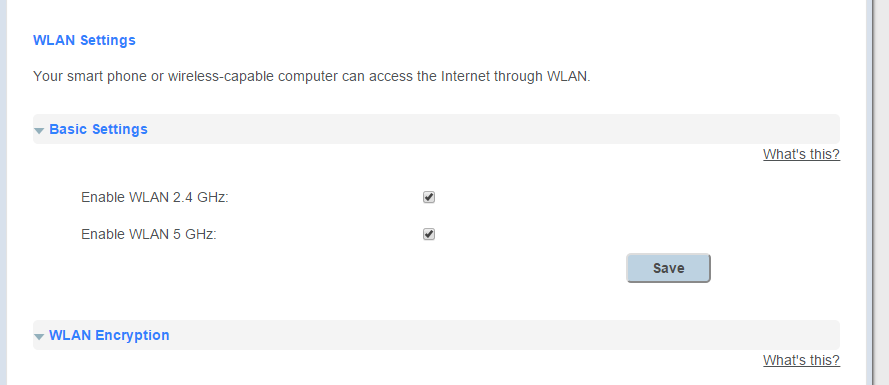
Although I have indeed enabled both 2.4 and 5 GHz:
Click to see full size

Note that I have previously disabled 2.4GHz but long since re-enabled it before the upgrade to the newest firmware.

johnvick
18 posts

Geek


  #1377727 1-Sep-2015 12:52
Send private message

The port forwarding problem is still there with the new firmware - it initially looked as if it hadn't but after three days it has recurred.

To recap - I port forward to a few devices so I can connect to them from outside the house but invariably this fails after a day or two.

1 | 2 | 3 | 4 | 5
View this topic in a long page with up to 500 replies per page Create new topic


Geekzone Live »

Try automatic live updates from Geekzone directly in your browser, without refreshing the page, with Geekzone Live now.


Are you subscribed to our RSS feed? You can download the latest headlines and summaries from our stories directly to your computer or smartphone by using a feed reader.