Geekzone: technology news, blogs, forums
Guest
Welcome Guest.
You haven't logged in yet. If you don't have an account you can register now.


View this topic in a long page with up to 500 replies per page Create new topic
1 | 2 | 3 | 4 | 5 | 6
grant_k
3539 posts

Uber Geek
+1 received by user: 124

Trusted

  #655189 13-Jul-2012 17:30
Send private message

coffeebaron: - Congratulations, you have reached Mav's home! I am proud to be the Ops Manager for NZ's best VoIP service, and would like to tell you about one of our advanced VFX calling features; it's called "selective call acceptance", and guess what - your call has NOT been accepted. But fear not, to reward you for trying, you will now be placed on hold and for your listening pleasure - "Celine Deon - theme song from Titantic" on continuous loop in full G722 HD quality voice!"

LOL!


coffeebaron
6304 posts

Uber Geek
+1 received by user: 3567

Trusted
Lifetime subscriber

  #655224 13-Jul-2012 19:28
Send private message

sbiddle:
maverick: lol .. actually I still have my copper so at one stage I had
ADSL
VDSL
Fibre


All with the same ISP? Smile

So does this mean we are close to seeing VDSL & UFB offered by WxC? :)


Rural IT and Broadband support.


Broadband troubleshooting and master filter installs.
Starlink installer - one month free: https://www.starlink.com/?referral=RC-32845-88860-71 
Wi-Fi and networking
Cel-Fi supply and installer - boost your mobile phone coverage legally


Need help in Auckland, Waikato or BoP? Click my email button, or email me direct: [my user name] at geekzonemail dot com


Skolink
1081 posts

Uber Geek
+1 received by user: 32


  #655285 13-Jul-2012 22:28
Send private message

So each customer has a fibre (or two) joined to a fibre on the blue 'trunk' cable which goes back to the cabinet. Is this GPON with an optical splitter, if so where is it? Is the cabinet passive with optical splitters only, no fibre switches in there?


cisconz
cisconz
1348 posts

Uber Geek
+1 received by user: 179

ID Verified
Trusted
Lifetime subscriber

  #655422 14-Jul-2012 11:45
Send private message

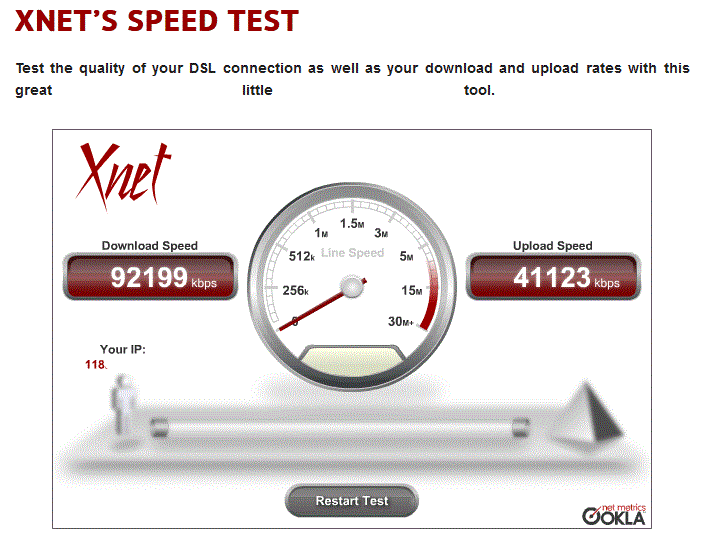
maverick: fyi all, just upgraded the plan to test the 100 / 50


No static IP?


Hmmmm


coffeebaron
6304 posts

Uber Geek
+1 received by user: 3567

Trusted
Lifetime subscriber

  #655452 14-Jul-2012 12:04
Send private message

cisconz:
maverick: fyi all, just upgraded the plan to test the 100 / 50


No static IP?

Very fast "DSL" connetion - "test the quality of your DSL connection" :)


Rural IT and Broadband support.


Broadband troubleshooting and master filter installs.
Starlink installer - one month free: https://www.starlink.com/?referral=RC-32845-88860-71 
Wi-Fi and networking
Cel-Fi supply and installer - boost your mobile phone coverage legally


Need help in Auckland, Waikato or BoP? Click my email button, or email me direct: [my user name] at geekzonemail dot com


MurrayM
2502 posts

Uber Geek
+1 received by user: 742

ID Verified
Trusted
Lifetime subscriber

  #666406 2-Aug-2012 17:29
Send private message

You said that you're in Glenfield, which is where I am too. However when I look at the Chorus Network Upgrade Map at http://www.chorus.co.nz/maps they haven't scheduled a date for when my street will get fibre. On their map if I zoom out I can see that it looks like all of Glenfield isn't getting fibre in Year 1, and only some of Glenfield gets it in Year 2. I'm in James Street, which street are you in?


Shop now for Dell laptops and other devices (affiliate link).
Masada
17 posts

Geek

Trusted

  #673159 16-Aug-2012 09:35
Send private message

The physical path of a GPON install is a fibre pair blown through a re-usable "microduct" conduit.  That bit of pipe shown outside the house is connected to another bit of pipe going across the property.  Fibre is then blown from the cabinet to the home and spliced at an external box on to the internal fibre going to the ONT.  The passive splitters will typically be at the cabinet, but could be at the Exchange for homes very close to an Exchange.  The cabinet runs back to a ISAM port which can serve 32 homes (based on the splitter--there are also 2, 4, 8, and 16 way splitters).  Each PON card in the ISAM has 8 ports.  Each ISAM can house 16 PON cards.  ISAM will be fed via fibre transport back to a Ethernet switch where a service provider has the option to accept the traffic there or pay for backhaul to their handover point(s).


My posts reflect my best attempt at understanding and do not represent the views of my employer.

grant_k
3539 posts

Uber Geek
+1 received by user: 124

Trusted

  #673179 16-Aug-2012 09:53
Send private message

Masada: The physical path of a GPON install is a fibre pair blown through a re-usable "microduct" conduit.  That bit of pipe shown outside the house is connected to another bit of pipe going across the property.  Fibre is then blown from the cabinet to the home and spliced at an external box on to the internal fibre going to the ONT.  The passive splitters will typically be at the cabinet, but could be at the Exchange for homes very close to an Exchange.  The cabinet runs back to a ISAM port which can serve 32 homes (based on the splitter--there are also 2, 4, 8, and 16 way splitters).  Each PON card in the ISAM has 8 ports.  Each ISAM can house 16 PON cards.  ISAM will be fed via fibre transport back to a Ethernet switch where a service provider has the option to accept the traffic there or pay for backhaul to their handover point(s).

Thanks for that very interesting post.  So a quick calculation gives the result that one ISAM can serve 4096 different premises.  Any idea what an ISAM costs when equipped with 16 PON cards?


Skolink
1081 posts

Uber Geek
+1 received by user: 32


  #673866 17-Aug-2012 21:17
Send private message

Masada: The physical path of a GPON install is a fibre pair blown through a re-usable "microduct" conduit.  That bit of pipe shown outside the house is connected to another bit of pipe going across the property.  Fibre is then blown from the cabinet to the home and spliced at an external box on to the internal fibre going to the ONT.


Thanks for answering my question about where the splitters are located.

Maverick's description of his install says/shows that the cable from the house is spliced to a multicore cable at the roadside pit. It isn't blown all the way from the cabinet to the home is it?

Masada
17 posts

Geek

Trusted

  #673874 17-Aug-2012 21:40
Send private message

(Goes back to look more closely at the pictures)

Yes, Mav's install shows a pit with ribbon pulls and not microducting. Chorus is installing microducting now. I can't explain why this install does not. I would guess these access conduits were installed before the microducting method was used or perhaps it was physically built by some other LFC. The blown fibre will be faster to install/replace. But it is is probably going to be more cost effective to use existing facilities where possible.


My posts reflect my best attempt at understanding and do not represent the views of my employer.

grant_k
3539 posts

Uber Geek
+1 received by user: 124

Trusted

  #673877 17-Aug-2012 22:00
Send private message

Masada: (Goes back to look more closely at the pictures)

Yes, Mav's install shows a pit with ribbon pulls and not microducting. Chorus is installing microducting now. I can't explain why this install does not. I would guess these access conduits were installed before the microducting method was used or perhaps it was physically built by some other LFC. The blown fibre will be faster to install/replace. But it is is probably going to be more cost effective to use existing facilities where possible.

What do you mean exactly by "ribbon pulls"?

When you say "microducting" I guess that you are referring to the green plastic pipes that I've seen being installed alongside roads, and in the very narrow trenches that are cut into footpaths and streets?

From what I've read, orange pipes always signify buried power cables, whereas green signify telecommunications.  Is that correct?


Support Geekzone with one-off or recurring donations Donate via PressPatron.
Masada
17 posts

Geek

Trusted

  #673880 17-Aug-2012 22:19
Send private message

Microducting is the name of the conduit system being used by Chorus currently. It is functionally just a plastic pipe like other conduit, but it is designed to seal tightly so you can actually use air pressure to blow fiber through. Without blown fibre you need some other way to thread the cable through a pipe. This install shows a number of blue ribbons which run through the conduit so the installer can literally pull through the fibre with the ribbons.

I don't know what colour these microducts will always be, just that their utility is different from ordinary piping. Properly installed a microduct could allow fibre to be blown in for a couple of kilometers. The range on a ISAM is between 20-30km. Most of that distance will be on a single fibre pair to the cabinet where the split occurs to reach homes.

Strange that in the modern age of high-tech data networking it all comes down to digging better ditches and finding better ways to pull cable.


My posts reflect my best attempt at understanding and do not represent the views of my employer.

grant_k
3539 posts

Uber Geek
+1 received by user: 124

Trusted

  #673889 17-Aug-2012 23:55
Send private message

Thanks for that Masada.  I can see the ribbons you mentioned now, but hadn't realised what their purpose was.  Cheers.


lucky015
746 posts

Ultimate Geek
+1 received by user: 182

ID Verified
Trusted

  #673893 18-Aug-2012 00:41
Send private message

Nvm, Looked it up.

Eitsop
584 posts

Ultimate Geek
+1 received by user: 153

ID Verified

  #674087 18-Aug-2012 21:23
Send private message

 fyi all, just upgraded the plan to test the 100 / 50


So my folks live in ChCh, in a new subdivision with fibre.. and been with xnet on fibre for 2 years..
can they upgrade to 100/50? 

Dean

1 | 2 | 3 | 4 | 5 | 6
View this topic in a long page with up to 500 replies per page Create new topic


Geekzone Live »

Try automatic live updates from Geekzone directly in your browser, without refreshing the page, with Geekzone Live now.


Are you subscribed to our RSS feed? You can download the latest headlines and summaries from our stories directly to your computer or smartphone by using a feed reader.