Geekzone: technology news, blogs, forums
Guest
Welcome Guest.
You haven't logged in yet. If you don't have an account you can register now.


Lias

5655 posts

Uber Geek
+1 received by user: 3978

ID Verified
Trusted
Lifetime subscriber

#101304 28-Apr-2012 08:30
Send private message

Anyone know how to access one of these Cisco DPC3008 cable modems to see connection stats etc?


I'm a geek, a gamer, a dad, a Quic user, and an IT Professional. I have a full rack home lab, size 15 feet, an epic beard and Asperger's. I'm a bit of a Cypherpunk, who believes information wants to be free and the Net interprets censorship as damage and routes around it. If you use my Quic signup you can also use the code R570394EKGIZ8 for free setup. Opinions are my own and not the views of my employer.


Create new topic
cyril7
9075 posts

Uber Geek
+1 received by user: 2499

ID Verified
Trusted
Subscriber

  #616411 28-Apr-2012 08:37
Send private message

Hi, try 192.168.100.1, might work

Cyril


sbiddle
30853 posts

Uber Geek
+1 received by user: 9996

Retired Mod
Trusted
Biddle Corp
Lifetime subscriber

  #616426 28-Apr-2012 09:06
Send private message

You can't.


Skillie
192 posts

Master Geek
+1 received by user: 14


  #616446 28-Apr-2012 09:40
Send private message

Lias: Anyone know how to access one of these Cisco DPC3008 cable modems to see connection stats etc?


I had the same question:

DoomlordVekk: Skillie, sorry, you won't be able to log onto the modem, just the 2 webpages that you hit from 192.168.100.1 giving you info about the downstream channel conditions, signal, MER etc. 


If it's any consolation, it's a really unfriendly, directory level based shorthand commandline, that seems to have zero contextual help and needed a mix of a Cisco/Scientific Atlanta tech and a Broadcom tech to drive it and deliver 'output' of use.


Speedtest FibreX Max (via 5G WiFi)


DoomlordVekk
129 posts

Master Geek
+1 received by user: 16

Trusted

  #616561 28-Apr-2012 14:53
Send private message

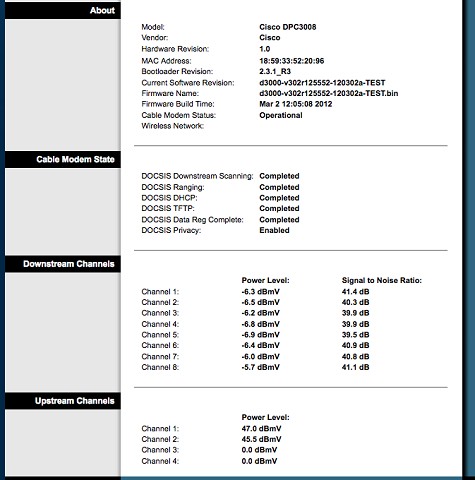
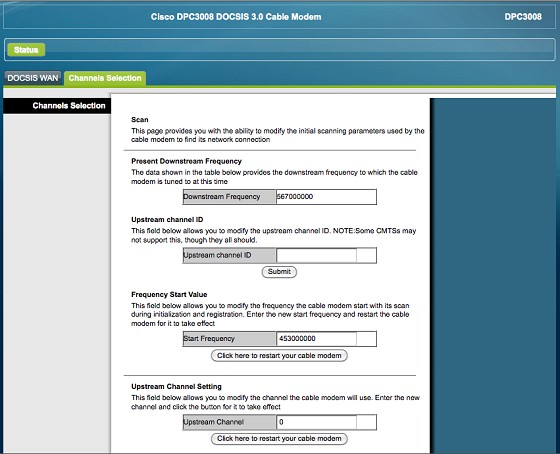
Men, You can access the CM front end by putting a pc back-to-back and navigating to 192.168.1.1 (I incorrectly said 192.168.100.1, my bad, sorry).
That will give you info similar to shown below.

and


I would wholeheartedly NOT recommend changing or submitting anything from the front end.  It will, in all likelihood  be ignored or may require a reboot to recover.
You have been warned.


"Customers don’t expect you to be perfect. They do expect you to fix things when they go wrong." Donald Porter – British Airways

The views expressed here are my own and are not reflective of other organisms or organisations.

Lias

5655 posts

Uber Geek
+1 received by user: 3978

ID Verified
Trusted
Lifetime subscriber

  #616762 28-Apr-2012 20:39
Send private message

Cheers Doomlord!


I'm a geek, a gamer, a dad, a Quic user, and an IT Professional. I have a full rack home lab, size 15 feet, an epic beard and Asperger's. I'm a bit of a Cypherpunk, who believes information wants to be free and the Net interprets censorship as damage and routes around it. If you use my Quic signup you can also use the code R570394EKGIZ8 for free setup. Opinions are my own and not the views of my employer.


Create new topic


Geekzone Live »

Try automatic live updates from Geekzone directly in your browser, without refreshing the page, with Geekzone Live now.


Are you subscribed to our RSS feed? You can download the latest headlines and summaries from our stories directly to your computer or smartphone by using a feed reader.