✨
Quic broadband
|
Apple TV
|
Samsung
|
AliExpress
|
Wise
|
Sharesies
Home
Forums
News
Reviews
Live
Search
Contact
Welcome
Guest
.
You haven't
logged in
yet. If you don't have an account you can
register now
.
Forums
›
One NZ (including Farmside)
›
[WXC/VFX] Open VFX on a DrayTek Vigor2710
dynamik
2
posts
Wannabe Geek
#
108834
6-Sep-2012 15:56
Hi
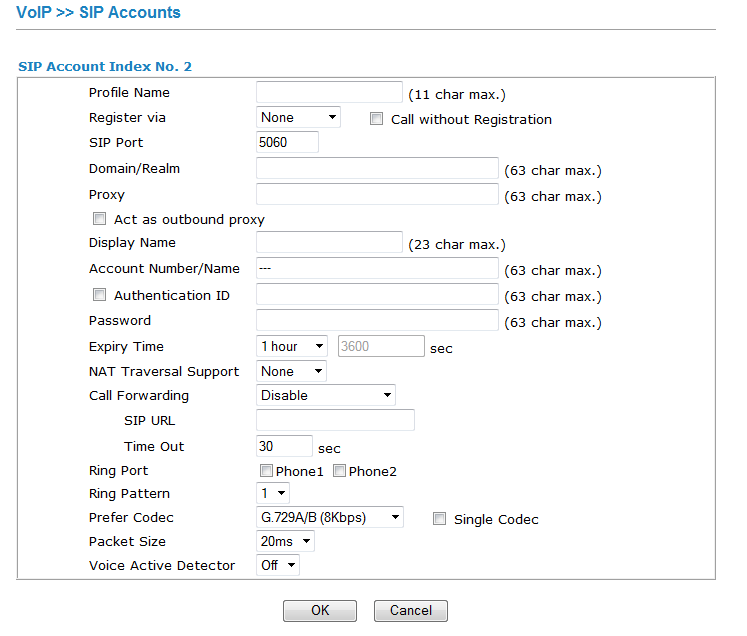
I have had open VFX on this router before, but do you think I can get it setup this time; No.
I have been sent the following settings:
MyVFX Username
MyVFX Password
Proxy: pan.wxnz.net
UserID
AuthUser
AuthPassword
What needs to go where?
joshp
205
posts
Master Geek
+1 received by user: 1
Trusted
WorldxChange
#682861
7-Sep-2012 16:04
Hi Dynamik,
Without having used one of these devices, I would try the following:
Profile Name: VFX
Domain/Realm: xport.co.nz
Proxy: pan.wxnz.net
Display Name: UserID
Account Number/Name: UserID
Tick Authentication ID: AuthUser
Password: AuthPassword
Expiry should be set to 300 seconds.
Prefer Codec is best set to: G711a, G711u, G729
Leave the rest of the settings and see how you get on.
Cheers
Josh
http://wxc.co.nz
News and reviews »
Blink Debuts Its First 2K Video Doorbell
Posted 4-Jun-2026 15:45
Spark Launches Verified Call to Help Combat Rising Impersonation Scams
Posted 4-Jun-2026 06:00
GoPro MISSION 1 Series Cameras and Accessories Now Available on Retail Shelves
Posted 3-Jun-2026 15:56
Samsung Launches Next-Gen Odyssey Gaming and ViewFinity Monitors
Posted 2-Jun-2026 14:00
Samsung 27-inch Odyssey G8 5K Review
Posted 2-Jun-2026 14:00
Acer Expands Gaming Portfolio With Predator Atlas 8
Posted 29-May-2026 17:37
Geekzone Live »
Try automatic live updates from Geekzone directly in your browser, without refreshing the page, with
Geekzone Live
now.
Updates »
Are you subscribed to our
RSS feed
? You can download the latest headlines and summaries from our stories directly to your computer or smartphone by using a feed reader.
Support Geekzone »
You can support Geekzone with a
one-off or recurring donation via PressPatron
.
