Geekzone: technology news, blogs, forums
Guest
Welcome Guest.
You haven't logged in yet. If you don't have an account you can register now.


chakkaradeep

799 posts

Ultimate Geek

Trusted

#19103 5-Feb-2008 15:31
Send private message

Hi,

It would be really nice if Vodafone can implement in VMC Lite in Vodem to update the usage from the online rather than storing in local machine which is really tricky to keep track of. Its not that there isnt any method avaialble now to check online, as, if we register our Vodem phone number, then we would be able to see the usage online, so I think it would be good to pull those when we connect via Vodem and update in system as well online when we disconnect.

I am really surprised that eventhough several versions of VMC Lite being released, why isn't this been incorporated?




Regards,
Chaks

Desktop : Intel Quad Core Q9400 2.66GHz - 8GB RAM - 500 GB + 500 GB HDD - NVidia GeForce 9800GT - LG246WH Flatron Display - Windows Server 2008 R2 Enterprise with Hyper-V
Virtual Machine : Powered by Hyper-V and VMWare Workstation
Laptop: HP dv7-3004TX Entertainment Notebook PC | HP Touchsmart tx2 1119au - Windows 7 Ultimate x64
Mac: iMac 21.5" Snow Leopard
Mobile : iPhone 3GS

Create new topic
weatherman
99 posts

Master Geek


#108733 5-Feb-2008 17:01
Send private message

Hi Chaks,

I too am a Vodem user, though only on GPRS at present. Why, you may ask? Well, its still 2 to 3 times quicker than my crusty crumbling copper connection, and doesn't paralyse the phone line for voice use. 3G is "scheduled" for sometime this year.

I was hoping that if Vodafone EVER put access to voice minutes used and data used, back on to their website - that maybe we'd be able to access our Vodem data usage, too.

I hadn't realised that if I register my Vodem's number, I can read its data usage that way! Have you successfully done this??

Cheers,

GeorgeSmile


www.hbweather.8m.com


chakkaradeep

799 posts

Ultimate Geek

Trusted

  #108735 5-Feb-2008 17:08
Send private message

weatherman:

I hadn't realised that if I register my Vodem's number, I can read its data usage that way! Have you successfully done this??


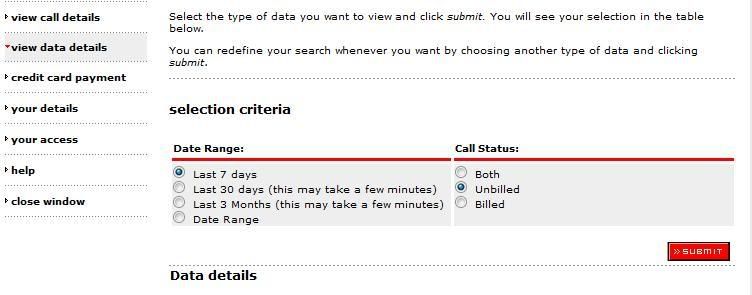
Yes, you can register your Vodem phone number and then go to Manage My Account and from there you can get your details. Below is the screenshot,


View data details is where you have to go.You can search and get your details too. It shows the traffic for each session and the total usage for the days you queried.


Regards,
Chaks

Desktop : Intel Quad Core Q9400 2.66GHz - 8GB RAM - 500 GB + 500 GB HDD - NVidia GeForce 9800GT - LG246WH Flatron Display - Windows Server 2008 R2 Enterprise with Hyper-V
Virtual Machine : Powered by Hyper-V and VMWare Workstation
Laptop: HP dv7-3004TX Entertainment Notebook PC | HP Touchsmart tx2 1119au - Windows 7 Ultimate x64
Mac: iMac 21.5" Snow Leopard
Mobile : iPhone 3GS

weatherman
99 posts

Master Geek


#108769 5-Feb-2008 19:49
Send private message

Thanks Chaks, I'll give that a try. Interestingly, in your screenshot, tou have the "View call details" and "View data details" links on the left of the page. When I call up my MyVF page, those are missing. I've asked VF a couple of times to put them back, but no luck so far.

Maybe if I register the Vodem from scatch, I'll at least get those options on Vodem's My VF page.

I'll let you know how it goes (or not!).

Cheers,

George


www.hbweather.8m.com


weatherman
99 posts

Master Geek


#108779 5-Feb-2008 20:42
Send private message

Doh!!

I went to my My VF page, and suddenly had a thought (rare, but it does happen!). I scrolled down to the bottom of the page, and punched my smartphone number into that "search for other connections" box. and Hey Presto - there was the page with all the "view call details" and "view data details".

Then I did the same with the Vodem's number, and up came my Vodem data details!

So I CAN get these details off the VF website, once I cracked the secret portal to the relevant pages. Now I have to wonder, why on earth didn't VF put a label like "Enter your mobile number to access call and data details" beside that box? The way its worded at the moment is singularly unhelpful and uninformative!

Thanks for your help, Chaks.

Cheers,

GeorgeEmbarassed


www.hbweather.8m.com

chakkaradeep

799 posts

Ultimate Geek

Trusted

  #108780 5-Feb-2008 20:54
Send private message

weatherman: Doh!!

I went to my My VF page, and suddenly had a thought (rare, but it does happen!). I scrolled down to the bottom of the page, and punched my smartphone number into that "search for other connections" box. and Hey Presto - there was the page with all the "view call details" and "view data details".

Then I did the same with the Vodem's number, and up came my Vodem data details!

So I CAN get these details off the VF website, once I cracked the secret portal to the relevant pages. Now I have to wonder, why on earth didn't VF put a label like "Enter your mobile number to access call and data details" beside that box? The way its worded at the moment is singularly unhelpful and uninformative!

Thanks for your help, Chaks.


No probs George, me too came to know about this only recently Laughing


Regards,
Chaks

Desktop : Intel Quad Core Q9400 2.66GHz - 8GB RAM - 500 GB + 500 GB HDD - NVidia GeForce 9800GT - LG246WH Flatron Display - Windows Server 2008 R2 Enterprise with Hyper-V
Virtual Machine : Powered by Hyper-V and VMWare Workstation
Laptop: HP dv7-3004TX Entertainment Notebook PC | HP Touchsmart tx2 1119au - Windows 7 Ultimate x64
Mac: iMac 21.5" Snow Leopard
Mobile : iPhone 3GS

chakkaradeep

799 posts

Ultimate Geek

Trusted

  #108782 5-Feb-2008 20:57
Send private message

weatherman:
So I CAN get these details off the VF website, once I cracked the secret portal to the relevant pages. Now I have to wonder, why on earth didn't VF put a label like "Enter your mobile number to access call and data details" beside that box? The way its worded at the moment is singularly unhelpful and uninformative!


I didnt get anything of that sort. For me, its all there in the Manage My Account which pops up a separate window when clicked.


Regards,
Chaks

Desktop : Intel Quad Core Q9400 2.66GHz - 8GB RAM - 500 GB + 500 GB HDD - NVidia GeForce 9800GT - LG246WH Flatron Display - Windows Server 2008 R2 Enterprise with Hyper-V
Virtual Machine : Powered by Hyper-V and VMWare Workstation
Laptop: HP dv7-3004TX Entertainment Notebook PC | HP Touchsmart tx2 1119au - Windows 7 Ultimate x64
Mac: iMac 21.5" Snow Leopard
Mobile : iPhone 3GS

Create new topic


Geekzone Live »

Try automatic live updates from Geekzone directly in your browser, without refreshing the page, with Geekzone Live now.


Are you subscribed to our RSS feed? You can download the latest headlines and summaries from our stories directly to your computer or smartphone by using a feed reader.