Geekzone: technology news, blogs, forums
Guest
Welcome Guest.
You haven't logged in yet. If you don't have an account you can register now.


woodson

234 posts

Master Geek
+1 received by user: 14


#193525 14-Mar-2016 12:00
Send private message

We're thinking of upgrading to VDSL with Vodfone and wondered what up/down speeds we can expect? What kind of things can affect speeds? Distance from the cabinet?


Any advice would be greatly appreciated.


View this topic in a long page with up to 500 replies per page Create new topic
 1 | 2
PeterReader
6028 posts

Uber Geek
+1 received by user: 461

Trusted
Geekzone
Lifetime subscriber

  #1512913 14-Mar-2016 12:00
Send private message

Hello... Our robot found some keywords in your post, so here is an automated reply with some important things to note regarding broadband speeds.


If you are posting regarding DSL speeds please check that


  • you have reset your modem and router 
  • your PC (or other PCs in your LAN) is not downloading large files when you are testing - you are not being throttled by your ISP due to going over the monthly cap 
  • your tests are always done on an ethernet connection to the router - do not use wireless for testing 
  • you read this topic and follow the instructions there.

Make sure you provide information for other users to help you. If you have not already done it, please EDIT your post and add this now:


  • Your ISP and plan 
  • Type of connection (ADSL, ADSL2, VDSL) 
  • Your modem DSL stats (do not worry about posting Speedtest, we need sync rate, attenuation and noise margin) 
  • Your general location (or street) 
  • If you are rural or urban 
  • If you know your connection is to an exchange, cabinet or conklin 
  • If your connection is to a ULL or wholesale service 
  • If you have done an isolation test as per the link above 

Most of the problems with speed are likely to be related to internal wiring issues. Read this discussion to find out more about this. Your ISP is not intentionally slowing you down today (unless you are on a managed plan). Also if this is the school holidays it's likely you will notice slower than usual speed due to more users online.


A master splitter is required for VDSL2 and in most cases will improve speeds on DSL connections. Regular disconnections can be a monitored alarm or a set top box trying to connect. If there's an alarm connected to your line even if you don't have an alarm contract it may still try to connect so it's worth checking.


I recommend you read these two blog posts:


I am the Geekzone Robot and I am here to help. I am from the Internet. I do not interact. Do not expect other replies from me.


Referral links: Quic Broadband (free setup code: R587125ERQ6VE) | Samsung | AliExpress | Wise | Sharesies 


Support Geekzone by subscribing (browse ads-free), or making a one-off or recurring donation through PressPatron.


Jaxar
383 posts

Ultimate Geek
+1 received by user: 129


  #1512937 14-Mar-2016 12:17
Send private message

First step would be to post your current line sync rate and attenuation from your modem.


Please note: I have a professional bias towards Vodafone.

richrdh18
232 posts

Master Geek
+1 received by user: 102


  #1512948 14-Mar-2016 12:18
Send private message

I'm with WXC and in PN on VDSL I get 50MB down and 10 Up which is rather good.   I am on the fringes of our area as well which make the speeds a bit remarkable.  Thinking of changing to UFB but may hold off.


Sideface
9649 posts

Uber Geek
+1 received by user: 15598

Trusted
DR
Lifetime subscriber

  #1512965 14-Mar-2016 12:29
Send private message

This is a "how long is a piece of string?" question.


Please post your current line sync rate and downstream attenuation figures - then we can give you some meaningful advice.  smile


EDIT: Line length is the main factor effecting xDSL speeds, but the condition of your house wiring is also very important.


Sideface


RunningMan
9186 posts

Uber Geek
+1 received by user: 4839


  #1512967 14-Mar-2016 12:38
Send private message

Check the new chorus site. It will give you an estimate.

woodson

234 posts

Master Geek
+1 received by user: 14


  #1512975 14-Mar-2016 12:46
Send private message

Pardon my ignorance, but how do I find my line sync rate and downstream attenuation?


Shop on-line at New World now for your groceries (affiliate link).
Sideface
9649 posts

Uber Geek
+1 received by user: 15598

Trusted
DR
Lifetime subscriber

  #1512977 14-Mar-2016 12:50
Send private message

woodson:


Pardon my ignorance, but how do I find my line sync rate and downstream attenuation?


Most DSL modems/routers have admin interface that allows for viewing the actual attenuation and sync speed values.

1. Find your router's IP - type ipconfig in command prompt and note the IP address value listed as the "Default Gateway". This is your router's IP address.

2. Connect to your router's admin interface - type your router's IP address into the address field of your web browser. You may have to use the default password to login to your router, we have an extensive list in our routers database.

3. Locate the status page - once you login look through the menus for something named "WAN", "Status", or "Connection". It should contain the values you're looking for:

* Signal Attenuation (Measured in dB) - may indicate the maximum sync speed you can get
* SNR (Signal to Noise Ratio) (Measured in dB) - higher is better
* TX Power Level (Measured in dBm) - current/available transmission power levels, max 20dBm
* Sync Speeds (or ATU-x) (Measured in kbps or bps) - bitrate from the exchange to the modem


Sideface


woodson

234 posts

Master Geek
+1 received by user: 14


  #1512982 14-Mar-2016 13:04
Send private message

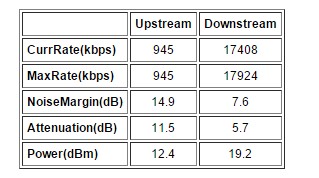
Hmmm, not all those were listed on the router, just the following


Sideface
9649 posts

Uber Geek
+1 received by user: 15598

Trusted
DR
Lifetime subscriber

  #1513000 14-Mar-2016 13:14
Send private message

Good result ! smile


You have a downstream attenuation of 5.7 dB and a max rate downstream of 17924 kbps.

This suggests that your line length is about 400m.

Theoretically you should get a good VDSL connection, up to 70 Mbps.


Get your ISP to do a "prequal" at your address - that should give you a better guide,


I would strongly recommend getting a VDSL master splitter/filter installed - some ISPs do this as part of a standard install, some don't (to save money).


Personally I think that a master filter should be mandatory.


Sideface


dylanp
842 posts

Ultimate Geek
+1 received by user: 392

Trusted

  #1513006 14-Mar-2016 13:21
Send private message

woodson:


We're thinking of upgrading to VDSL with Vodfone and wondered what up/down speeds we can expect? What kind of things can affect speeds? Distance from the cabinet?


Any advice would be greatly appreciated.


If you're in VDSL coverage you should get it. Even for a comparatively slow VDSL connection it makes a big difference, especially when you're uploading e.g. photos to Facebook etc. My VDSL connection at home is 70 down 30 up. Works well. I have no plans to go back to ADSL at 18 down and 1 up. :)


woodson

234 posts

Master Geek
+1 received by user: 14


#1513019 14-Mar-2016 13:31
Send private message

Thanks heaps, guys. Much appreciated! smile


Support Geekzone with one-off or recurring donations Donate via PressPatron.
dejadeadnz
2394 posts

Uber Geek
+1 received by user: 2287
Inactive user


  #1513026 14-Mar-2016 13:44
Send private message

To the OP: if you can get it (and assuming Fibre isn't available where you are or you don't want to go through the longer process/potential neighbours' consent etc), VDSL is a no brainer.


We are with Vodafone and are very lucky to be very close to the local exchange/whatever that results in a very short line length. I get 100 down and 30 up - whilst this is hardly a typical result, I can honestly say that everybody that I have talked to with VDSL has considered the performance increase (especially the upload) to be more than worth it. What's more, notwithstanding some of the negative feedback about the VF-supplied Huawei router, I have been very impressed with its wireless performance and overall stability.


Jase2985
13732 posts

Uber Geek
+1 received by user: 6205

ID Verified
Lifetime subscriber

  #1513035 14-Mar-2016 13:50
Send private message

check there: https://www.chorus.co.nz/broadband-checker 


also check your neighbours house and see if any have VDSL and what they are getting


NonprayingMantis
6434 posts

Uber Geek
+1 received by user: 1528


  #1513052 14-Mar-2016 14:14
Send private message

If you are getting ~17Mbps on ADSL,  that suggests your property wiring is already pretty decent.  You may not actually need a master filter unless you also have a landline (in which case you will definitely need one), or you might find the master filter only makes a very marginal difference (e.g. moves you up from 60Mbps to 62Mbps)


It's also possible you already have a master filter - maybe a previous tenant had one installed or its possible you had one installed if you have a lot of jackpoints or a monitored alarm. (if your broadband only works in one jackpoint, possibly labelled 'adsl', 'modem' or 'broadband' then you already have a master filter. (might not be a VDSL one, but it will likely still give improved performance)


Personally, I think making master filters mandatory on every VDSL connection is a terrible idea - it would just be a sweet money spinner for Chorus as they charge $300+GST to your ISP to get one installed (and then they pass this onto you through higher monthly charges of course), even though a much more reasonable cost would be in the region of $150 (as charged by coffee baron).


Not to mention that there are tens of thousands of households who already have one installed, and many more who will get only a very marginal benefit as they already have decent wiring, so forcing ISPs to re-installing it again for 100% of VDSL orders is just a huge waste of time and money.


woodson

234 posts

Master Geek
+1 received by user: 14


  #1513054 14-Mar-2016 14:15
Send private message

@dejadeadnz  We were going to go with 30/10 fibre but as we rent it was a bit of a pain having to gt everything ok'ed with the landlord. More than likely going to go with VDSL now where we could be getting 46/10 - and for $5 cheaper than our current ADSL bundle. Win win!


 1 | 2
View this topic in a long page with up to 500 replies per page Create new topic


Geekzone Live »

Try automatic live updates from Geekzone directly in your browser, without refreshing the page, with Geekzone Live now.


Are you subscribed to our RSS feed? You can download the latest headlines and summaries from our stories directly to your computer or smartphone by using a feed reader.