Geekzone: technology news, blogs, forums
Guest
Welcome Guest.
You haven't logged in yet. If you don't have an account you can register now.


corksta

2405 posts

Uber Geek
+1 received by user: 382

Trusted
Subscriber

#20022 10-Mar-2008 13:13
Send private message

I use Vodafone's mobile broadband service at home, and I am having all sorts of trouble setting up remote access as part of my Windows Home Server setup. A couple of sites (portdetective.com and shieldsUP) both say that ports 80 and 443 (required for remote access in WHS) are either blocked or stealthed, which people in another forum I'm on for WHS are suggesting is because the ISP is blocking those ports.

So, does anyone know if Vodafone actually are blocking these ports?

Create new topic
freitasm
BDFL - Memuneh
80646 posts

Uber Geek
+1 received by user: 41029

Administrator
ID Verified
Trusted
Geekzone
Lifetime subscriber

  #115709 10-Mar-2008 13:17
Send private message

Most Vodafone APNs NAT the addresses which will cause problems. Try using the "internet" APN.  

Here's a list of Vodafone APNs and characteristics.

Also note that opening this to third party will likely increase the traffic.


Referral links: Quic Broadband (free setup code: R587125ERQ6VE) | Samsung | AliExpress | Wise | Sharesies 


Support Geekzone by subscribing (browse ads-free), or making a one-off or recurring donation through PressPatron.


corksta

2405 posts

Uber Geek
+1 received by user: 382

Trusted
Subscriber

  #115715 10-Mar-2008 13:27
Send private message

Sorry Mauricio my networking knowledge is a bit limited and I'm not sure what all that means or what I'm supposed to do with it!


2024 Mac mini M4 | 2025 iPad Air 13" M3 (Blue) | 2025 iPad Air 11" M3 (Starlight) | iPhone 15 Pro Max (Natural Titanium) | HomePod (Space Grey) | 10x HomePod mini (Space Grey, White, Yellow, Blue, Orange) | 4x Apple TV 4K | Apple Watch Ultra 2


freitasm
BDFL - Memuneh
80646 posts

Uber Geek
+1 received by user: 41029

Administrator
ID Verified
Trusted
Geekzone
Lifetime subscriber

  #115718 10-Mar-2008 13:29
Send private message

NAT (Network Address Translation) means that Vodafone will use an internal address for your connection instead of a public one. It makes things like external networks accessing your server very hard.

Changing the Access Point will give you a public IP address instead of the private one.

You change the APN to "internet" (without the quotes) in the VMC configuration.


Referral links: Quic Broadband (free setup code: R587125ERQ6VE) | Samsung | AliExpress | Wise | Sharesies 


Support Geekzone by subscribing (browse ads-free), or making a one-off or recurring donation through PressPatron.


corksta

2405 posts

Uber Geek
+1 received by user: 382

Trusted
Subscriber

  #115721 10-Mar-2008 13:33
Send private message

OK cool now I see. My 3G card is in the Linksys WRT54G3G router though. Do you know how I'd configure it through this, or if I configure it through the VMC will that then carry over to the router once I plug it back in?

freitasm
BDFL - Memuneh
80646 posts

Uber Geek
+1 received by user: 41029

Administrator
ID Verified
Trusted
Geekzone
Lifetime subscriber

  #115722 10-Mar-2008 13:33
Send private message

Nope, no VMC on this then. Use your browser to configure the router.


Referral links: Quic Broadband (free setup code: R587125ERQ6VE) | Samsung | AliExpress | Wise | Sharesies 


Support Geekzone by subscribing (browse ads-free), or making a one-off or recurring donation through PressPatron.


corksta

2405 posts

Uber Geek
+1 received by user: 382

Trusted
Subscriber

  #115726 10-Mar-2008 13:37
Send private message

Sorry I should have explained it better: I know there's no VMC on the router, but if I take the card from the router, plug it in to my laptop and configure it through the VMC software, then plug it back into the router will the changes carry over to the router.

My problem now is that I'm looking at the APN configuration page on the router through my browser and have no idea what to do or what to change!!


Shop now at Mighty Ape (affiliate link).
freitasm
BDFL - Memuneh
80646 posts

Uber Geek
+1 received by user: 41029

Administrator
ID Verified
Trusted
Geekzone
Lifetime subscriber

  #115728 10-Mar-2008 13:41
Send private message

There is no configuration on the card itself. Whatever you do on VMC is valid for the laptop connection only and does not follow the card. You must change the router.

This also brings anothe problem: you will have a dynamic address. On your Wiindows Home Server make sure you configure the [yourserver].homeserver.com address so people can access your server by name.

As for the router, if it is like this one you have to go to the 3G/UMTS Network page and change there. I can't remember the page though.


Referral links: Quic Broadband (free setup code: R587125ERQ6VE) | Samsung | AliExpress | Wise | Sharesies 


Support Geekzone by subscribing (browse ads-free), or making a one-off or recurring donation through PressPatron.


corksta

2405 posts

Uber Geek
+1 received by user: 382

Trusted
Subscriber

  #115732 10-Mar-2008 13:48
Send private message

Yes that is the same router that I have. I'm on that page now but wouldn't have a clue as to what values I'm meant to change. Do I have anyway of adding a screenshot to my post to show you what I mean?

freitasm
BDFL - Memuneh
80646 posts

Uber Geek
+1 received by user: 41029

Administrator
ID Verified
Trusted
Geekzone
Lifetime subscriber

  #115733 10-Mar-2008 13:51
Send private message

You can upload the picture to any server and click the little Picture button in the rich-text editor to add images.


Referral links: Quic Broadband (free setup code: R587125ERQ6VE) | Samsung | AliExpress | Wise | Sharesies 


Support Geekzone by subscribing (browse ads-free), or making a one-off or recurring donation through PressPatron.


corksta

2405 posts

Uber Geek
+1 received by user: 382

Trusted
Subscriber

  #115737 10-Mar-2008 14:00
Send private message

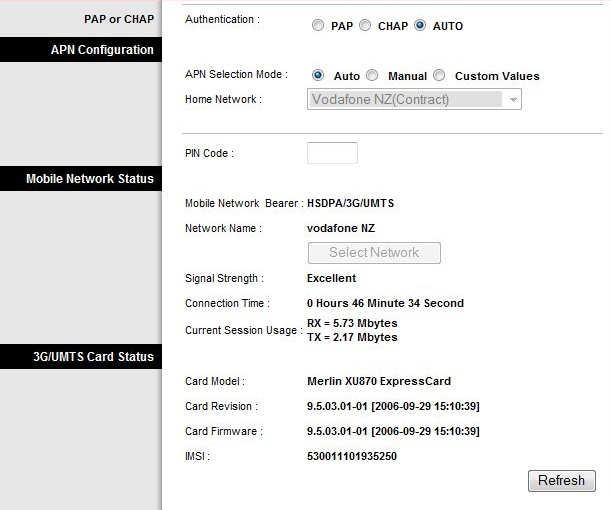
Not sure what I'm doing wrong but here's a screenshot in this photo if you're able to take a look at it and tell me what you think:

http://cid-f338b9ead390f50e.skydrive.live.com/self.aspx/Pictures


freitasm
BDFL - Memuneh
80646 posts

Uber Geek
+1 received by user: 41029

Administrator
ID Verified
Trusted
Geekzone
Lifetime subscriber

  #115738 10-Mar-2008 14:04
Send private message

Just change the APN Selection Mode to Manual and enter the "internet" name there (without the quotes): 


Referral links: Quic Broadband (free setup code: R587125ERQ6VE) | Samsung | AliExpress | Wise | Sharesies 


Support Geekzone by subscribing (browse ads-free), or making a one-off or recurring donation through PressPatron.


Support Geekzone with one-off or recurring donations Donate via PressPatron.
corksta

2405 posts

Uber Geek
+1 received by user: 382

Trusted
Subscriber

  #115741 10-Mar-2008 14:08
Send private message

Changing it to manual just lets me choose one from that drop down box, but changing it to 'Custom Values' brings up three boxes of 'APN Name' (currently www.vodafone.net.nz), 'User Name' and 'Password'.

So should I just change the APN Name to Internet and leave the other fields as is?

There's another box below that which is already ticked called 'DNS supplied by network'. Leave that as well?

freitasm
BDFL - Memuneh
80646 posts

Uber Geek
+1 received by user: 41029

Administrator
ID Verified
Trusted
Geekzone
Lifetime subscriber

  #115743 10-Mar-2008 14:09
Send private message

Yes, leave all as it is, just change the APN name. You will have to disconnect and connect again to get an updated address.


Referral links: Quic Broadband (free setup code: R587125ERQ6VE) | Samsung | AliExpress | Wise | Sharesies 


Support Geekzone by subscribing (browse ads-free), or making a one-off or recurring donation through PressPatron.


corksta

2405 posts

Uber Geek
+1 received by user: 382

Trusted
Subscriber

  #115745 10-Mar-2008 14:18
Send private message

OK changed that successfully will go back into WHS and try and sort that out now.

Thanks very much for your help Mauricio I really appreciate it! I might be back if I can't get remote access in WHS working tho!!

corksta

2405 posts

Uber Geek
+1 received by user: 382

Trusted
Subscriber

  #115751 10-Mar-2008 14:46
Send private message

Actually Mauricio you're a legend!!!! I have spent nearly two weeks trying to get this to work, and after spending a few minutes with you, you get it working for me!! I'd spent time on the official WHS forum trying there, but I guess no one really understood how Vodafone works seeing as they're mostly from the US. I should have tried here sooner but I mistakenly thought it was just a problem with my router rather than with Vodafone.

Thanks again anyway!

Create new topic


Geekzone Live »

Try automatic live updates from Geekzone directly in your browser, without refreshing the page, with Geekzone Live now.


Are you subscribed to our RSS feed? You can download the latest headlines and summaries from our stories directly to your computer or smartphone by using a feed reader.