Geekzone: technology news, blogs, forums
Guest
Welcome Guest.
You haven't logged in yet. If you don't have an account you can register now.


reeksk2018

5 posts

Wannabe Geek


#233656 26-Apr-2018 16:04
Send private message

Heya, i have a Netgear X8 (D8500), which has been working fine on VDSL for the past 15 months. I upgraded the firmware to 1.0.3.39 and now cant connect to VDSL.


I reverted to the original firmware, tried another version also, but still no connection.


Reset to factory defaults and tried to configure it to what settings i found on the web, but still no joy.


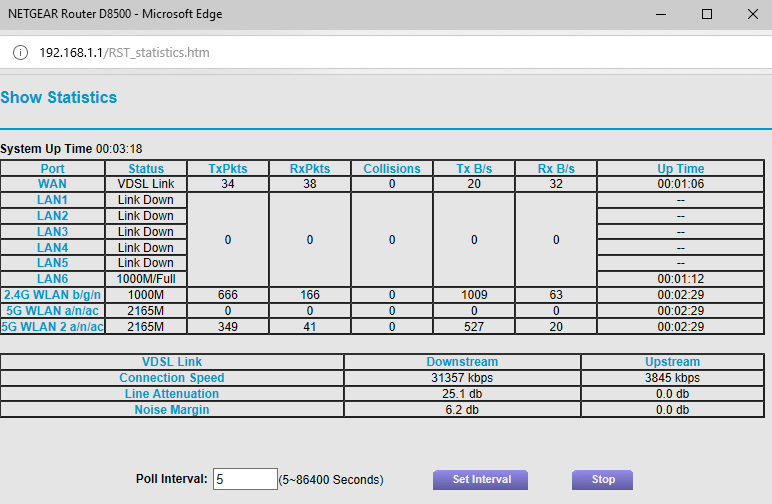
Has anyone got the settings that i can replicate. Attached are screenshots of my settings


thanks


fyi. i have tested with the supplied UltraHub and a Draytek, and can get VDSL fine


Click to see full size


Click to see full size


Click to see full size


Click to see full size


Create new topic
hio77
'That VDSL Cat'
13036 posts

Uber Geek
+1 received by user: 3896

ID Verified
Trusted
Lizard Networks
Subscriber

  #2002894 26-Apr-2018 16:07
Send private message

take a step back before worrying above the above settings.


Do you have a DSL sync.


#include <std_disclaimer>


Any comments made are personal opinion and do not reflect directly on the position my current or past employers may have. 


reeksk2018

5 posts

Wannabe Geek


  #2002896 26-Apr-2018 16:08
Send private message

I think so, if the other two routers work fine on the same line.


Do i check that with Vodafone?


thanks


DarkShadow
1647 posts

Uber Geek
+1 received by user: 656


  #2002899 26-Apr-2018 16:12
Send private message

reeksk2018:


Do i check that with Vodafone?


Look in the modem interface, under DSL stats


reeksk2018

5 posts

Wannabe Geek


  #2002907 26-Apr-2018 16:20
Send private message

Looks like it...


hio77
'That VDSL Cat'
13036 posts

Uber Geek
+1 received by user: 3896

ID Verified
Trusted
Lizard Networks
Subscriber

  #2002908 26-Apr-2018 16:20
Send private message

DarkShadow:


reeksk2018:


Do i check that with Vodafone?


Look in the modem interface, under DSL stats


or even more simple, Check the lights!


#include <std_disclaimer>


Any comments made are personal opinion and do not reflect directly on the position my current or past employers may have. 


reeksk2018

5 posts

Wannabe Geek


  #2002911 26-Apr-2018 16:23
Send private message

yup, all lights are white....thats why i'm confused as to why i haven't got an internet connection


Move to New Zealand's best fibre broadband service (affiliate link). Free setup code: R587125ERQ6VE. Note that to use Quic Broadband you must be comfortable with configuring your own router.
Linux
12173 posts

Uber Geek
+1 received by user: 8469

Trusted
Lifetime subscriber

  #2002974 26-Apr-2018 17:37
Send private message

If other modems work then not a Vodafone issue no need to contact them


Linux


reeksk2018

5 posts

Wannabe Geek


  #2002977 26-Apr-2018 17:50
Send private message

loaded the Kong Mod, VDSL now working


cheers


Create new topic


Geekzone Live »

Try automatic live updates from Geekzone directly in your browser, without refreshing the page, with Geekzone Live now.


Are you subscribed to our RSS feed? You can download the latest headlines and summaries from our stories directly to your computer or smartphone by using a feed reader.