Geekzone: technology news, blogs, forums
Guest
Welcome Guest.
You haven't logged in yet. If you don't have an account you can register now.


allistar

33 posts

Geek
+1 received by user: 1


#270045 20-Apr-2020 22:00
Send private message

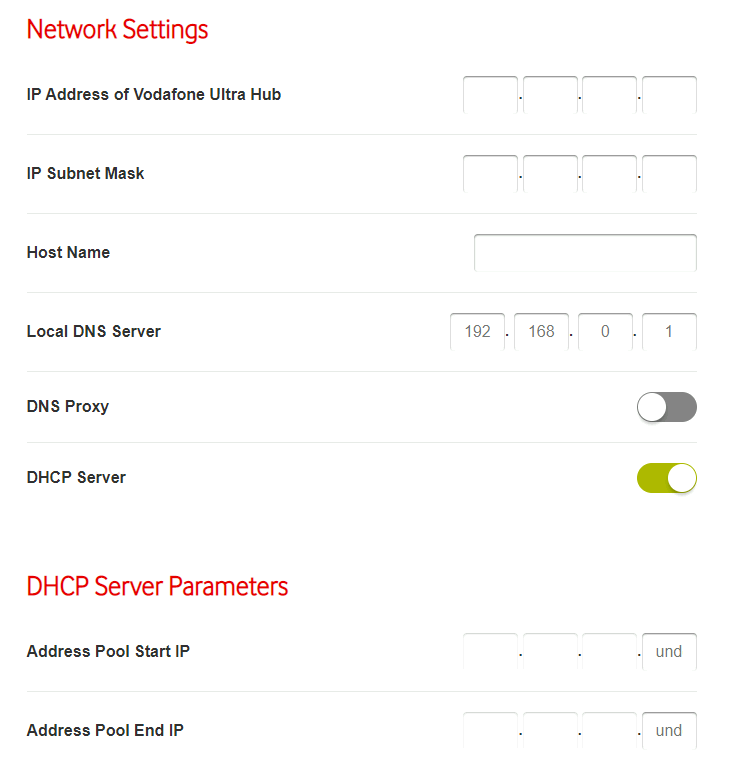
The UltraHub (with the latest firmware at the time of posting) has an issue with the "Settings -> LAN" page when in advanced mode in that it does not populate any of the values. That is, all text fields are empty. The reason for this is that Chrome is giving this error when you click on "LAN" in the left hand menu:


[Deprecation] Synchronous XMLHttpRequest on the main thread is deprecated because of its detrimental effects to the end user's experience. For more help, check https://xhr.spec.whatwg.org/.
send @ jquery-min.js:4


This then causes a cascade of other errors (The specified value "undefined" cannot be parsed, or is out of range.).


This bug makes the LAN page (and probably many others) impossible to use. This can only be fixed with new firmware that updates the version of jquery being used in the Utlrahub webpages built into the router.


Does anyone here experience the same issue and does anyone have a suggested workaround?


Create new topic
bigalow
568 posts

Ultimate Geek
+1 received by user: 112


  #2466669 20-Apr-2020 22:13
Send private message

is this Utlrahub or Utlrahub plus ?? and what version chrome are you using ??


Im using a Utlrahub plus  latest firmware


and have no problem with google chrome Version 81.0.4044.113


Yabanize
2351 posts

Uber Geek
+1 received by user: 583


  #2466716 20-Apr-2020 23:52
Send private message

Works fine for me on both chrome and Safari on macOS.


Standard Ultra Hub (not plus) on firmware 17.1.7988-2461029-CRF897-RC2-4-9


hio77
'That VDSL Cat'
13036 posts

Uber Geek
+1 received by user: 3896

ID Verified
Trusted
Lizard Networks
Subscriber

  #2466719 20-Apr-2020 23:53
Send private message

That's a Deprecation warning, not an error...


#include <std_disclaimer>


Any comments made are personal opinion and do not reflect directly on the position my current or past employers may have. 


allistar

33 posts

Geek
+1 received by user: 1


  #2466757 21-Apr-2020 07:23
Send private message

It's an Ultra Hub, the firmware version is  17.1.7988-2461029-CRF897-RC2-4-9


I get the issue in every browser I try. Firefox 68.7.0, Chrome 81.0.4044.113, Opera, Chrome on Android, Safari on iOS. When I go to the "Settings -> LAN" page the only value that's populated is "Local DNS Server" and that value isn't even correct (I have it set to the OpenDNS servers, not 192.168.0.1). Here's an image of what I see. Note the "und" in the DHCP settings.


Click to see full size


The javascript on this page is getting an error, as seen here:


Click to see full size


Yabanize
2351 posts

Uber Geek
+1 received by user: 583


  #2466967 21-Apr-2020 11:18
Send private message

Click to see full size


This is how mine looks, perhaps try restarting your Ultra Hub?


Issues like this don't surprise me though, The other thing is that a few here on Geekzone have discovered is if you go to the WAN page and try to change anything in the Fibre WAN like the VLAN ID, or from IPoE to PPPoE, the changes won't save.


The Ultra Hub performs great basic wifi , routing and VoIP functionality under the Vodafone environment but as soon as you try to change things it seems that a few bits don't work / haven't been tested


Create new topic


Geekzone Live »

Try automatic live updates from Geekzone directly in your browser, without refreshing the page, with Geekzone Live now.


Are you subscribed to our RSS feed? You can download the latest headlines and summaries from our stories directly to your computer or smartphone by using a feed reader.