Geekzone: technology news, blogs, forums
Guest
Welcome Guest.
You haven't logged in yet. If you don't have an account you can register now.


ronw

1222 posts

Uber Geek
+1 received by user: 85


#271950 3-Jun-2020 09:56
Send private message

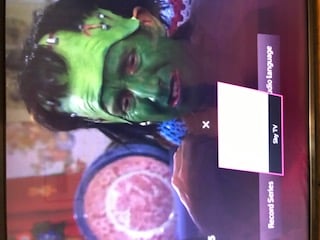
I have a neighbour who has a Vodafone STB who purchased a Soundbar and installed as per instructions with Soundbar which referred to Vodafones STB


All works sound wise but on the screen he gets a popup with the heading of the HDMI port and it wont go away. He can delete it with remote but it pops up again a few minutes later. If he stops using Soundbar all works fine.


Any ideas?


Nokia 7 Plus
Nexus 6P 32Gb
Nexus 6 Phone
Nexus 5 Phone
Nexus 7 2013 Tablet
Samsung TAB A 8"
Samsung TAB A 10"


& many Windows laptops, Desktops etc


Create new topic
ZollyMonsta
3009 posts

Uber Geek
+1 received by user: 379

ID Verified
Trusted

  #2497278 3-Jun-2020 10:37
Send private message

Hi


Can you post a photo?


Also is it VTV -> Soundbar -> TV or VTV -> TV -> Soundbar?


What make/model is the TV?


It sounds like it is the TV popping up the input name as Vodafone TV does not do this.


Cheers,
Grant


Check out my LPFM Radio Station at www.thecheese.co.nz - Now on iHeart Radio, TuneIn and Radio Garden


As per the usual std disclaimer.. "All thoughts typed here are my own."


ronw

1222 posts

Uber Geek
+1 received by user: 85


  #2497548 3-Jun-2020 18:10
Send private message

Thanks for reply. Attached is a photo neighbour supplied. 


The TV is a LG and the Soundbar is JBL 2.1


Not quite sure the way he has it configured but I think he has the SOundbar plugged into TV. I will have to check back with them if it would help solve problem


Hope this helps


ZollyMonsta:


Hi


Can you post a photo?


Also is it VTV -> Soundbar -> TV or VTV -> TV -> Soundbar?


What make/model is the TV?


It sounds like it is the TV popping up the input name as Vodafone TV does not do this.


Cheers,
Grant


Nokia 7 Plus
Nexus 6P 32Gb
Nexus 6 Phone
Nexus 5 Phone
Nexus 7 2013 Tablet
Samsung TAB A 8"
Samsung TAB A 10"


& many Windows laptops, Desktops etc


ZollyMonsta
3009 posts

Uber Geek
+1 received by user: 379

ID Verified
Trusted

  #2497669 3-Jun-2020 20:51
Send private message

Hi. That looks like the TV showing the ‘Sky TV’ input for some reason.


if you could please get the LG model number and sound bar model number and confirm how everything is plugged in?


Cheers,


Grant


Check out my LPFM Radio Station at www.thecheese.co.nz - Now on iHeart Radio, TuneIn and Radio Garden


As per the usual std disclaimer.. "All thoughts typed here are my own."


ronw

1222 posts

Uber Geek
+1 received by user: 85


  #2498013 4-Jun-2020 10:58
Send private message

Problem solved! Neighbour had a brainwave and swapped out the HDMI Cable between TV and SOundbar and the popup went away. Seems like the original cable had a defect. He is all happy and thanks to everyone that offered help


Regards


ZollyMonsta:


Hi. That looks like the TV showing the ‘Sky TV’ input for some reason.


if you could please get the LG model number and sound bar model number and confirm how everything is plugged in?


Cheers,


Grant


Nokia 7 Plus
Nexus 6P 32Gb
Nexus 6 Phone
Nexus 5 Phone
Nexus 7 2013 Tablet
Samsung TAB A 8"
Samsung TAB A 10"


& many Windows laptops, Desktops etc


ZollyMonsta
3009 posts

Uber Geek
+1 received by user: 379

ID Verified
Trusted

  #2498028 4-Jun-2020 11:18
Send private message

ronw:


Problem solved! Neighbour had a brainwave and swapped out the HDMI Cable between TV and SOundbar and the popup went away. Seems like the original cable had a defect. He is all happy and thanks to everyone that offered help


Regards


Great news! :)


Cheers,
Grant


Check out my LPFM Radio Station at www.thecheese.co.nz - Now on iHeart Radio, TuneIn and Radio Garden


As per the usual std disclaimer.. "All thoughts typed here are my own."


Create new topic


Geekzone Live »

Try automatic live updates from Geekzone directly in your browser, without refreshing the page, with Geekzone Live now.


Are you subscribed to our RSS feed? You can download the latest headlines and summaries from our stories directly to your computer or smartphone by using a feed reader.