Geekzone: technology news, blogs, forums
Guest
Welcome Guest.
You haven't logged in yet. If you don't have an account you can register now.


Rickles

3107 posts

Uber Geek
+1 received by user: 445

Trusted

#272243 16-Jun-2020 11:16
Send private message

Got a call from friend trying to sign up for Amazon Prime Video here in NZ.


From the Vodafone TV device it says go to www.primevideo.com/mytv and there use the Code being displayed on-screen.


That URL seems to just offer a page of search results for Prime Video.  He then clicked on one of the sites (don't know which one) that offered to Sign Up to Amazon.  Proceeded to enter Email and Password, got One Time Password Code by email, and then entered required telephone number, BUT no TXT subsequently received.


Can anyone please give simple advice and instructions for a Vodafone TV device user to get Amazon Prime, and take up the 7-day free and $2.99 per month offered to NZers??


Tks.


Filter this topic showing only the reply marked as answer View this topic in a long page with up to 500 replies per page Create new topic
 1 | 2
freitasm
BDFL - Memuneh
80646 posts

Uber Geek
+1 received by user: 41029

Administrator
ID Verified
Trusted
Geekzone
Lifetime subscriber

  #2505672 16-Jun-2020 11:20
Send private message

That URL is to log in to your existing Amazon Prime Video account.


1. First create an Amazon Prime account, setup payment, etc. 


2. Once this is done then go into Vodafone TV and start the process. 


3. Follow to the link you mentioned and enter a code to login your VTV into Amazon.


4. Done.


Referral links: Quic Broadband (free setup code: R587125ERQ6VE) | Samsung | AliExpress | Wise | Sharesies 


Support Geekzone by subscribing (browse ads-free), or making a one-off or recurring donation through PressPatron.


xpd

xpd
Geek of Coastguard
14115 posts

Uber Geek
+1 received by user: 4574

Retired Mod
ID Verified
Trusted
Lifetime subscriber

  #2505673 16-Jun-2020 11:22
Send private message

Link works fine for me, asks me for my Amazon log in, then gives me a registration code etc.


You sure the link is being put into the browser correctly, and not into a search box ?


XPD / Gavin


LinkTree


Rickles

3107 posts

Uber Geek
+1 received by user: 445

Trusted

  #2505682 16-Jun-2020 11:30
Send private message

Thanks all .... I'll try and visit said (elderly) friend and sit with him.


Any ideas why the TXT OTP didn't arrive? ... he did at least try Signing Up.


freitasm
BDFL - Memuneh
80646 posts

Uber Geek
+1 received by user: 41029

Administrator
ID Verified
Trusted
Geekzone
Lifetime subscriber

  #2505689 16-Jun-2020 11:45
Send private message

It will depend on how they've entered the phone number - make sure it's +64 and the number without the zero. 


Referral links: Quic Broadband (free setup code: R587125ERQ6VE) | Samsung | AliExpress | Wise | Sharesies 


Support Geekzone by subscribing (browse ads-free), or making a one-off or recurring donation through PressPatron.


Rickles

3107 posts

Uber Geek
+1 received by user: 445

Trusted

  #2505701 16-Jun-2020 12:17
Send private message

     >It will depend on how they've entered the phone number - make sure it's +64 and the number without the zero. <


I believe he did it correctly.


Juicytree
142 posts

Master Geek
+1 received by user: 42

Subscriber

  #2505704 16-Jun-2020 12:38
Send private message

From what I have read recently the Amazon OTP has had varying issues recently and I have had to install the Android Authenticator to get into my Amazon account. The problem may be because Amazon's text is to an international number and is not working the way it should.  I think Amazon also has a telephone authentication service where an auto voice reads out the OTP number.


Shop now at Mighty Ape (affiliate link).
freitasm
BDFL - Memuneh
80646 posts

Uber Geek
+1 received by user: 41029

Administrator
ID Verified
Trusted
Geekzone
Lifetime subscriber

  #2505705 16-Jun-2020 12:38
Send private message

I would use Authy instead of SMS authentication. 


Referral links: Quic Broadband (free setup code: R587125ERQ6VE) | Samsung | AliExpress | Wise | Sharesies 


Support Geekzone by subscribing (browse ads-free), or making a one-off or recurring donation through PressPatron.


Rickles

3107 posts

Uber Geek
+1 received by user: 445

Trusted

  #2505706 16-Jun-2020 12:41
Send private message

     >I would use Authy instead of SMS authentication. <


What is that?  I had a quick look myself on the Sign Up site and only email and TXt appear to be offered for the OTP process.


freitasm
BDFL - Memuneh
80646 posts

Uber Geek
+1 received by user: 41029

Administrator
ID Verified
Trusted
Geekzone
Lifetime subscriber

  #2505716 16-Jun-2020 13:24
Send private message

Authy is like Google Authenticator - look for "Authenticator" options. 


Referral links: Quic Broadband (free setup code: R587125ERQ6VE) | Samsung | AliExpress | Wise | Sharesies 


Support Geekzone by subscribing (browse ads-free), or making a one-off or recurring donation through PressPatron.


Rickles

3107 posts

Uber Geek
+1 received by user: 445

Trusted

  #2505717 16-Jun-2020 13:27
Send private message

     >Authy is like Google Authenticator - look for "Authenticator" options. <


Look where?   Are you saying that Amazon Sign Up is best done on an Android device, not a PC?


freitasm
BDFL - Memuneh
80646 posts

Uber Geek
+1 received by user: 41029

Administrator
ID Verified
Trusted
Geekzone
Lifetime subscriber

  #2505724 16-Jun-2020 13:36
Send private message

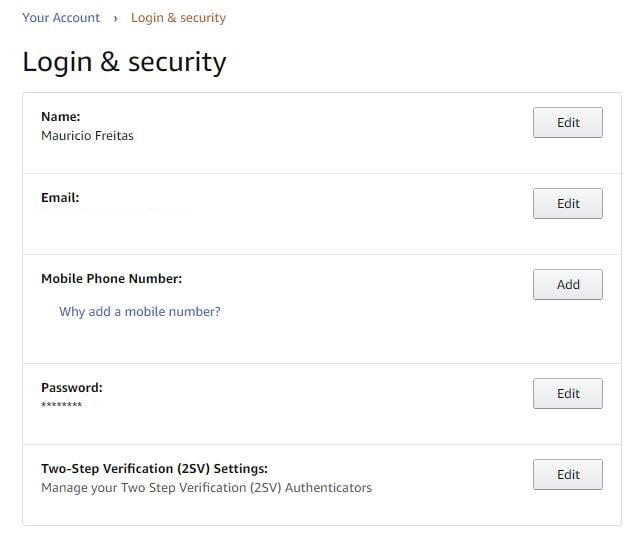
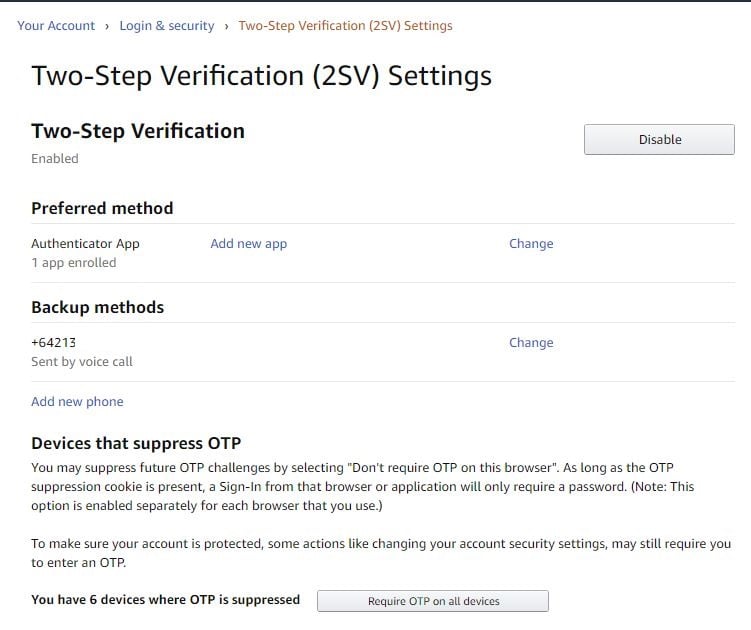
I don't know how your friend is signing up. But the 2FA codes should be inside the Account / Security. 


Create the account (ignore creating 2FA for now) and then enable "Authenticator app". You can use Google Authenticator but I rather use Authy as it's linked to a phone number and can be moved to a new phone and synchronised to the Authy desktop app.


Referral links: Quic Broadband (free setup code: R587125ERQ6VE) | Samsung | AliExpress | Wise | Sharesies 


Support Geekzone by subscribing (browse ads-free), or making a one-off or recurring donation through PressPatron.


Shop now on AliExpress (affiliate link).
Rickles

3107 posts

Uber Geek
+1 received by user: 445

Trusted

  #2505788 16-Jun-2020 15:13
Send private message

     >Create the account (ignore creating 2FA for now)<


Thanks for your time and efforts, but how does one avoid/ignore the 2FA?  I just tried it for myself and after entering Username/Password, clicking Create Account, the system sends me a TXT with the One Time Password Code, and then we go to the telephone number deal.


I could not see any 'ignore' or 'pass' option for TXT or telephone number requirement.


freitasm
BDFL - Memuneh
80646 posts

Uber Geek
+1 received by user: 41029

Administrator
ID Verified
Trusted
Geekzone
Lifetime subscriber

  #2505797 16-Jun-2020 15:17
Send private message

Ok, they seem to want to confirm the phone - in any case if that's a requirement then can't do much but as soon as the account is created I'd switch to an app authenticator because SMS is very unreliable.


Referral links: Quic Broadband (free setup code: R587125ERQ6VE) | Samsung | AliExpress | Wise | Sharesies 


Support Geekzone by subscribing (browse ads-free), or making a one-off or recurring donation through PressPatron.


Rickles

3107 posts

Uber Geek
+1 received by user: 445

Trusted

  #2505802 16-Jun-2020 15:19
Send private message

Shouldn't be this difficult 😋


Rickles

3107 posts

Uber Geek
+1 received by user: 445

Trusted

  #2506763 17-Jun-2020 15:41
Send private message

UPDATE:  Two attempts to Sign Up for Amazon/Prime Video ... balks at the telephoned TXT stage ... even tried 2 different telephones & numbers.


Maybe Amazon doesn't want our custom? 🤪


 1 | 2
Filter this topic showing only the reply marked as answer View this topic in a long page with up to 500 replies per page Create new topic


Geekzone Live »

Try automatic live updates from Geekzone directly in your browser, without refreshing the page, with Geekzone Live now.


Are you subscribed to our RSS feed? You can download the latest headlines and summaries from our stories directly to your computer or smartphone by using a feed reader.