Geekzone: technology news, blogs, forums
Guest
Welcome Guest.
You haven't logged in yet. If you don't have an account you can register now.


Mershroom

17 posts

Geek


#288919 1-Aug-2021 13:55
Send private message

Kia ora everyone 


Recently upgraded from a 2Degrees 100/20 fibre connection to a Vodafone 900/400 fibremax connection. 


Here are some basics: 


  • Running a Netgear Nighthawks R8000 router (latest firmware) 


    • Also tested with a HG659b router (latest firmware)
    • Tried 3 different ethernet cables from router to ONT (Model 300) 
  • Running a Netgear Nighthawk AC7000 wifi network card 


    • Netgear Genie software shows 1170mbps connection to router over my home wifi

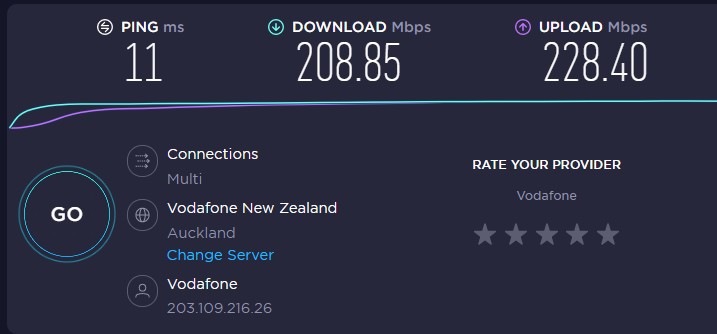
Speedtest shows my best results is around 200/200 whether I am testing morning, noon or night. I have tried running speedtest via LAN 1GB connection and have similar results. 


I totally appreciate that ISP specific router ensures like the Ultra Hub Modem from Vodafone would be the best way to go. But .... surely, running the kind of hardware I am I should expect at least 50% of the speed advertised (450) 


I have logged an issue with a human via Vodafone chat, and a technician will be checking and checked the vodafone bring your own modem settings against mine. 


Filter this topic showing only the reply marked as answer View this topic in a long page with up to 500 replies per page Create new topic
 1 | 2 | 3 | 4
sdavisnz
1017 posts

Uber Geek
+1 received by user: 310

Trusted

  #2753210 1-Aug-2021 14:08
Send private message

You are testing over wifi?


Try test over Lan from pc to router.


Voice gives context


Mershroom

17 posts

Geek


  #2753213 1-Aug-2021 14:10
Send private message

I've updated post, to say that I have tested via LAN 1GB connection and get similar results. 


sbiddle
30853 posts

Uber Geek
+1 received by user: 9996

Retired Mod
Trusted
Biddle Corp
Lifetime subscriber

  #2753216 1-Aug-2021 14:14
Send private message

What about when you test on net to a VF server and not off-net to something which is clearly taking a very long routing path to get there?


Mershroom

17 posts

Geek


  #2753217 1-Aug-2021 14:17
Send private message

How do I do this? 


Linux
12173 posts

Uber Geek
+1 received by user: 8469

Trusted
Lifetime subscriber

  #2753218 1-Aug-2021 14:30
Send private message

Change server and select Vodafone

The option is in your screen shot

chevrolux
4962 posts

Uber Geek
+1 received by user: 2638
Inactive user


  #2753231 1-Aug-2021 15:10
Send private message

The fact you're getting well over 100/20 speeds tells me the provisioning on your connection is probably not the issue. Have you tried a "real world" test like pulling down a well seeded torrent (like a Ubuntu ISO).

And just because the hardware is expensive, doesn't mean its good. An $80 Mikrotik can hit 800Mbps on a PPPoE connection.


Move to New Zealand's best fibre broadband service (affiliate link). Free setup code: R587125ERQ6VE. Note that to use Quic Broadband you must be comfortable with configuring your own router.
Mershroom

17 posts

Geek


  #2753238 1-Aug-2021 15:30
Send private message


Similar results with VF server 


I have tried some well seeded torrents, and seem to get good speeds but cant say how fast exactly. 


@chevrolux appreciate comment about expensive hardware, but surely I should be getting more than this. 


l43a2
1784 posts

Uber Geek
+1 received by user: 591

ID Verified
Trusted

  #2753240 1-Aug-2021 15:37
Send private message

try the windows 10 app instead of the browser.


sdavisnz
1017 posts

Uber Geek
+1 received by user: 310

Trusted

  #2753241 1-Aug-2021 15:39
Send private message

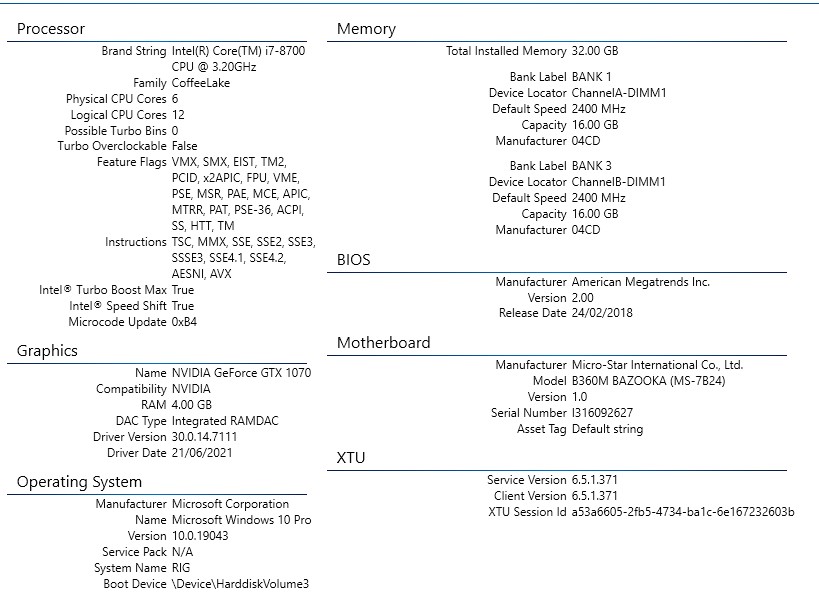
Also, what pc are you using to test?


Voice gives context

Mershroom

17 posts

Geek


  #2753245 1-Aug-2021 15:54
Send private message

My rig's specs ... 


I downloaded and ran Windows 10 speedtest app, with similar results 


l43a2
1784 posts

Uber Geek
+1 received by user: 591

ID Verified
Trusted

  #2753311 1-Aug-2021 17:20
Send private message

is there any updates for your ethernet driver? - looks like there could be, grab the latest LAN driver from here: https://www.msi.com/Motherboard/support/B360M-BAZOOKA#down-driver&Win10%2064


Shop now on Samsung phones, tablets, TVs and more (affiliate link).
chevrolux
4962 posts

Uber Geek
+1 received by user: 2638
Inactive user


  #2753326 1-Aug-2021 18:13
Send private message

Try a torrent! Rip down a Ubuntu torrent and see what you get.

Speedtest has become pretty unreliable with people (*cough* unifi nightmare machines users *cough*) running automated tests against them constantly just so their little dashboard looks cool.

NickR1
92 posts

Master Geek
+1 received by user: 114

One NZ

  #2753339 1-Aug-2021 19:14
Send private message

l43a2:


is there any updates for your ethernet driver? - looks like there could be, grab the latest LAN driver from here: https://www.msi.com/Motherboard/support/B360M-BAZOOKA#down-driver&Win10%2064


This is a great suggestion. Scenarios where upload > download are often related to the NIC.


Mershroom

17 posts

Geek


  #2753340 1-Aug-2021 19:30
Send private message

Thanks I've updated my driver, however I am experiencing roughly the same speeds across multiple devices whether LAN or Wifi which leads me to think it's Router / Fibre related? 


Spyware
3818 posts

Uber Geek
+1 received by user: 1366

Lifetime subscriber

  #2753341 1-Aug-2021 19:31
Send private message

Think again.


Spark Max Fibre using Mikrotik CCR1009-8G-1S-1S+, CRS125-24G-1S, Unifi UAP, U6-Pro, UAP-AC-M-Pro, Apple TV 4K (2022), Apple TV 4K (2017), iPad Air 1st gen, iPad Air 4th gen, iPhone 13, SkyNZ3151 (the white box). If it doesn't move then it's data cabled.


 1 | 2 | 3 | 4
Filter this topic showing only the reply marked as answer View this topic in a long page with up to 500 replies per page Create new topic


Geekzone Live »

Try automatic live updates from Geekzone directly in your browser, without refreshing the page, with Geekzone Live now.


Are you subscribed to our RSS feed? You can download the latest headlines and summaries from our stories directly to your computer or smartphone by using a feed reader.