Geekzone: technology news, blogs, forums
Guest
Welcome Guest.
You haven't logged in yet. If you don't have an account you can register now.


ItsBenNZ

5 posts

Wannabe Geek


#323131 29-Oct-2025 17:24
Send private message

Hello!


I’m using a TP-Link Deco X80-5G router with Farmside on the 4G/5G broadband unlimited plan. The connection works, but I experience dropouts roughly every 24 hours after it has been connected.


When it drops out, the internet seems to time out, for example, on Discord, the call will spike to 5000 ping, then the modem light turns red. The only way to fix it is to wait about 5 minutes until it reconnects on its own, or to go into the Deco app and switch from 5G Preferred to 4G, then back to 5G Preferred, which instantly restores the connection.


When I check the cellular section in the Deco app during the dropout, it still shows strong signal bars and good dBm values, as if it’s still connected to the tower, but there’s no internet.


I really want to use 5G because I get lower (better) RSRP dBm, full bars, and very fast, stable speeds compared to fewer bars and slower speeds on 4G. The internet works perfectly on 5G until it drops out once a day.


Is anyone else experiencing the same issue?


Create new topic
pureinception
37 posts

Geek
+1 received by user: 10


  #3428929 29-Oct-2025 17:46
Send private message

Check what version of firmware you have. I used to have an issue where the deco would drop the connection. I found that it would not have an IP address and that by manually setting the dns servers, it would obtain one. This was on fibre not 4G/5G as you describe but the symptoms sounds similar. When I was looking into the issue, I came across this thread: 


https://www.reddit.com/r/TpLink/comments/1ae8jwe/deco_x805g_issues/


r0bbie
259 posts

Ultimate Geek
+1 received by user: 24


  #3428981 29-Oct-2025 18:32
Send private message

There’s definitely something off with this model—it drives me nuts too. I’m on fibre (not cellular) and it randomly cuts out with a red light. My troubleshooting points to the VLAN settings: it sometimes gets into a state where it stops sending the VLAN. Toggling the VLAN off and back on fixes it temporarily and then it will do it again. I’ve basically relegated it to a satellite node because it’s too unreliable as a main router.


My only advice: go to Advanced → IPTV/VLAN and make sure it’s off. I know you’re on cellular so it shouldn’t matter, but it might help.


ItsBenNZ

5 posts

Wannabe Geek


  #3428985 29-Oct-2025 18:55
Send private message

Hello!


Thanks for your reply, i'll definitely check that out because this issue has been happening since getting the modem keeping me to stick on 4G only.


My version is: X80-5G(1.0) 1.0.6 Build 20241212 Rel. 39475


RunningMan
9184 posts

Uber Geek
+1 received by user: 4833


  #3428988 29-Oct-2025 19:02
Send private message

Don't cellular connections drop intentionally every 24 hrs? Perhaps reboot or reconnect at a time where it's more convenient for a disconnect and see if that moves it to that time slot.


ItsBenNZ

5 posts

Wannabe Geek


  #3428989 29-Oct-2025 19:06
Send private message

RunningMan:


Don't cellular connections drop intentionally every 24 hrs? Perhaps reboot or reconnect at a time where it's more convenient for a disconnect and see if that moves it to that time slot.


Hmm I don't think they do. It doesn't drop out on 4G maybe that's for 5G I'm not entirely sure. I used the scheduled reboot feature on the modem at 3AM daily but it still dropped out but seemed to delay it but a little bit. 


MaxineN
Max
2049 posts

Uber Geek
+1 received by user: 1662

ID Verified
Trusted
Subscriber

  #3428990 29-Oct-2025 19:11
Send private message

Okay so Farmside doing a 5G plan is very much news to me and I cannot find a single thing about this on their website.


So I hope we're not confusing One NZ's 5G FWA offering(although Farmside is One NZ's sister company, same network, different support, same gear, same towers etc etc).


Considering Farmside only offer 4G FWA and not 5G... and we are using a 5G CPE over a 4G FWA plan, I would expect at some point you might get nudged and told off.


Anyway this doesn't solve the reason for this thread.


I have seen this issue once before when I wore the green hat on Waiheke Island and in Wellington where the CPEs (so Deco FWA modems and even the venerable Huawei B818) stayed connected on the air interface, the data session would stay up (and you wouldn't go into idle mode) but nothing would transmit from the device, through the tower, through the ran and into the network.


Now I know we tried a lot of different solutions, including throwing the affected customers on a completely different APN and that fixed it, but for another customer we adjusted their B818 to steer to another tower and that just fixed it as well. Never fully solved this before my departure.


Whilst I do not work for One NZ anymore. If OP wants to DM me their rough location, I will check gis geek and see where OP should point their modem.


RunningMan:


Don't cellular connections drop intentionally every 24 hrs? Perhaps reboot or reconnect at a time where it's more convenient for a disconnect and see if that moves it to that time slot.


PSWM would cause the modem to drop and reattach on a lower layer once the modem makes a reattach request.


Ramblings from a mysterious lady who's into tech. Warning I may often create zingers.


Want to support Geekzone and browse the site without the ads? Subscribe to Geekzone now (monthly, annual and lifetime options).
RunningMan
9184 posts

Uber Geek
+1 received by user: 4833


  #3428992 29-Oct-2025 19:22
Send private message

ItsBenNZ: this issue has been happening since getting the modem keeping me to stick on 4G only.


ItsBenNZ:  It doesn't drop out on 4G 


Which is it? Does or doesn't drop out on 4G?


ItsBenNZ

5 posts

Wannabe Geek


  #3428993 29-Oct-2025 19:24
Send private message

MaxineN:


Okay so Farmside doing a 5G plan is very much news to me and I cannot find a single thing about this on their website.


So I hope we're not confusing One NZ's 5G FWA offering(although Farmside is One NZ's sister company, same network, different support, same gear, same towers etc etc).


Considering Farmside only offer 4G FWA and not 5G... and we are using a 5G CPE over a 4G FWA plan, I would expect at some point you might get nudged and told off.


Anyway this doesn't solve the reason for this thread.


I have seen this issue once before when I wore the green hat on Waiheke Island and in Wellington where the CPEs (so Deco FWA modems and even the venerable Huawei B818) stayed connected on the air interface, the data session would stay up (and you wouldn't go into idle mode) but nothing would transmit from the device, through the tower, through the ran and into the network.


Now I know we tried a lot of different solutions, including throwing the affected customers on a completely different APN and that fixed it, but for another customer we adjusted their B818 to steer to another tower and that just fixed it as well. Never fully solved this before my departure.


Whilst I do not work for One NZ anymore. If OP wants to DM me their rough location, I will check gis geek and see where OP should point their modem.


RunningMan:


Don't cellular connections drop intentionally every 24 hrs? Perhaps reboot or reconnect at a time where it's more convenient for a disconnect and see if that moves it to that time slot.


PSWM would cause the modem to drop and reattach on a lower layer once the modem makes a reattach request.


Hello!


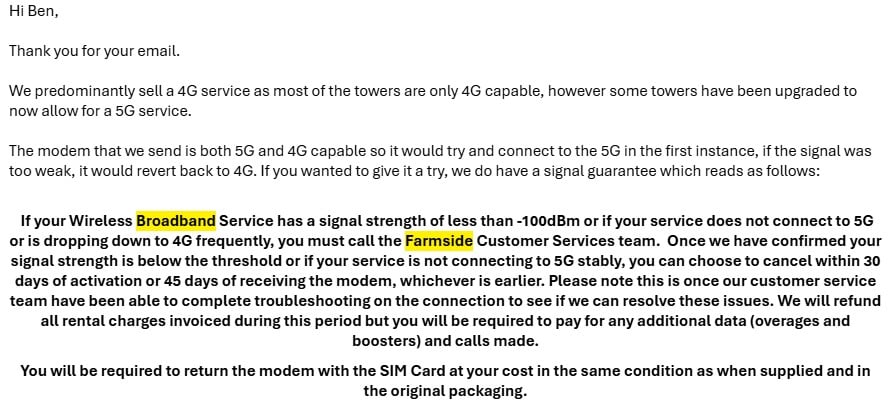
At first when considering Farmside Rural Unlimited Wireless Broadband I contacted them to ask if its 5G and they said they sell the service as 4G and send a 4G/5G modem and it will connect to what ever your area provided as seen in the screenshot.


Ahh I see! because its been happening ever since getting the modem and am thinking to get some outdoor antennas that will force the modem to 5G only as external antenna mode only supports 5G instead of it connecting to 4G and 5G but not sure if it will be the fix.


ItsBenNZ

5 posts

Wannabe Geek


  #3428995 29-Oct-2025 19:26
Send private message


Which is it? Does or doesn't drop out on 4G?


It works perfectly on 4G only mode, but as soon as I use 5G preferred it shows 4G and 5G and has solid signal but drops out.


MaxineN
Max
2049 posts

Uber Geek
+1 received by user: 1662

ID Verified
Trusted
Subscriber

  #3428998 29-Oct-2025 19:33
Send private message

ItsBenNZ:


Hello!


At first when considering Farmside Rural Unlimited Wireless Broadband I contacted them to ask if its 5G and they said they sell the service as 4G and send a 4G/5G modem and it will connect to what ever your area provided as seen in the screenshot.


Ahh I see! because its been happening ever since getting the modem and am thinking to get some outdoor antennas that will force the modem to 5G only as external antenna mode only supports 5G instead of it connecting to 4G and 5G but not sure if it will be the fix.


Interesting decision... Also checking One NZ's website... it seems 5G FWA is now the same price as is 4G FWA.


Oh and they brought back the $10 discounts 😉


Anyway my offer still stands, DM me your rough location and I might be able to see if there's another tower nearby as a troubleshooting step to see if it's as simple as moving you to a different tower.


Ramblings from a mysterious lady who's into tech. Warning I may often create zingers.


Morm
87 posts

Master Geek
+1 received by user: 20


  #3429107 30-Oct-2025 08:41
Send private message

check your address at https://one.nz/broadband/internet-plans/ to see if you actually can have 5G service there. 


It may be that you cannot officially, but you are getting some 5G signal and its bouncing around. Ensuring the X80 is placed in the best possible location for signal strength may help with this, otherwise it might have to be locked to 4G only for stability.


An external antenna may help, but know that antennas don't boost signal, they can just get signal from a better spot (eg outside the window, elevated etc). But if the cable is too long any signal gain can be lost. 


  1.0.6 Build 20241212 Rel. 39475 is the final X80 firmware release (One NZ is onto a newer model now)


Stream your favourite shows now on Apple TV (affiliate link).
MaxineN
Max
2049 posts

Uber Geek
+1 received by user: 1662

ID Verified
Trusted
Subscriber

  #3429111 30-Oct-2025 08:53
Send private message

Morm:


check your address at https://one.nz/broadband/internet-plans/ to see if you actually can have 5G service there. 


It may be that you cannot officially, but you are getting some 5G signal and its bouncing around. Ensuring the X80 is placed in the best possible location for signal strength may help with this, otherwise it might have to be locked to 4G only for stability.


An external antenna may help, but know that antennas don't boost signal, they can just get signal from a better spot (eg outside the window, elevated etc). But if the cable is too long any signal gain can be lost. 


  1.0.6 Build 20241212 Rel. 39475 is the final X80 firmware release (One NZ is onto a newer model now)


I can with confidence and without the tools I used to have confirm they are 100% getting 5G NR on the downlink.


An antenna is not going to help, they're too close to a 5G tower and a directional antenna will only get picked up by the same sector that is already serving them.


Ramblings from a mysterious lady who's into tech. Warning I may often create zingers.


Create new topic


Geekzone Live »

Try automatic live updates from Geekzone directly in your browser, without refreshing the page, with Geekzone Live now.


Are you subscribed to our RSS feed? You can download the latest headlines and summaries from our stories directly to your computer or smartphone by using a feed reader.