Geekzone: technology news, blogs, forums
Guest
Welcome Guest.
You haven't logged in yet. If you don't have an account you can register now.


View this topic in a long page with up to 500 replies per page Create new topic
1 | 2 | 3 | 4
sbiddle
30853 posts

Uber Geek
+1 received by user: 9996

Retired Mod
Trusted
Biddle Corp
Lifetime subscriber

  #1092509 20-Jul-2014 15:04
Send private message quote this post

I recall reading stories earlier in the year (and a quick google search shows quite a number) about US models of the M8 and S5 supporting carrier aggregation. Do the models sold in NZ support this?


johnr
19282 posts

Uber Geek
+1 received by user: 2526
Inactive user


  #1092512 20-Jul-2014 15:10
Send private message quote this post

Quite sure they are not CA

michaelmurfy
meow
13580 posts

Uber Geek
+1 received by user: 10911

Moderator
ID Verified
Trusted
Lifetime subscriber

  #3129760 20-Sep-2023 13:44
Send private message quote this post

I just updated the OP as it was incredibly out of date (thanks @KiwiSurfer) - https://cellsites.nz/frequencies.html 


Michael Murphy | https://murfy.nz
Referral Links: Quic Broadband (use R122101E7CV7Q for free setup)

Are you happy with what you get from Geekzone? Please consider supporting us by subscribing.
Opinions are my own and not the views of my employer.


KiwiSurfer
1722 posts

Uber Geek
+1 received by user: 993

ID Verified
Lifetime subscriber

  #3129762 20-Sep-2023 13:50
Send private message quote this post

Hi everyone, I have maintained for a while now a page detailing the frequencies used by mobile carriers here in Aotearoa.


https://cellsites.nz/frequencies.html


For most people just interested to know what bands they need the 'Band Summary' table at the top gives a good overview.


For people wanting more information, there is also info for each band explaining deployment strategies and tables with specific frequencies/carriers deployed.


The information is generally based on actual observations in Auckland so is rather biased to Auckland and may differ elsewhere.


I am aware of a few regional differences which are noted e.g., Vodafone's L900 deployment in Wellington.


I intend to keep this updated. If you are aware of any changes or regional differences feel free to email me at james@pole.net.nz and I will update the page.


Where possible please provide screen shots showing evidence along with any info on sites/location that have deployed the carriers/frequencies/etc you are reporting on.


grantius
88 posts

Master Geek
+1 received by user: 53


  #3409033 31-Aug-2025 17:58
Send private message quote this post

As per the bottom of https://one.nz/network/coverage/


One NZ now use the following:

4G Band 1 (LTE 2100MHz).
4G Band 3 (LTE 1800MHz).
4G Band 7 (LTE 2600MHz).
4G Band 8 (LTE 900MHz).
4G Band 28 (LTE 700MHz).
5g n8 (900 MHz),
5g n7 (2600 MHz),
5g n78 (3500 MHz).

Spark now use according to this:

https://www.spark.co.nz/shop/mobile/network/


Band 28 (700 MHz)
Band 3 (1800 MHz)
Band 1 (2100 MHz)
Band 7 (2600 MHz)
Band 40 (2300 MHz)

5G
n5 (850 MHz)
n1 (2100 MHz)
n40 (2300 MHz)
n78 (3500 MHz)


I haven't found any public list of any 5G bands for 2degrees except for n78 - I'd suspect n8 and n1 would be used at some point after 3g shutdown.


KiwiSurfer
1722 posts

Uber Geek
+1 received by user: 993

ID Verified
Lifetime subscriber

  #3409036 31-Aug-2025 18:32
Send private message quote this post

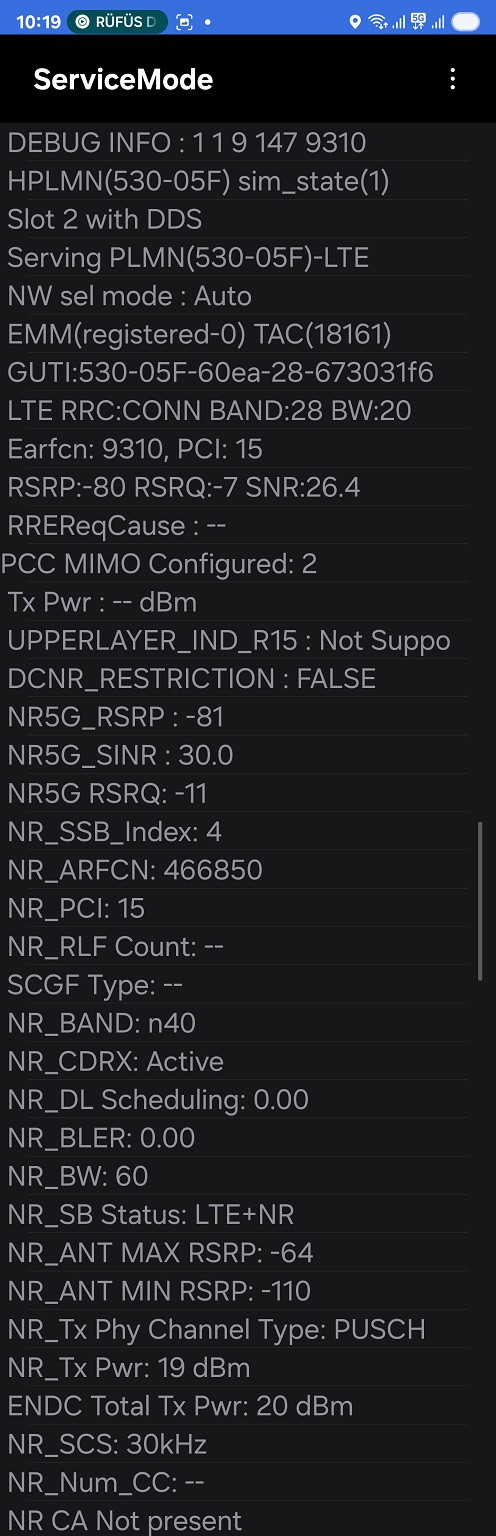
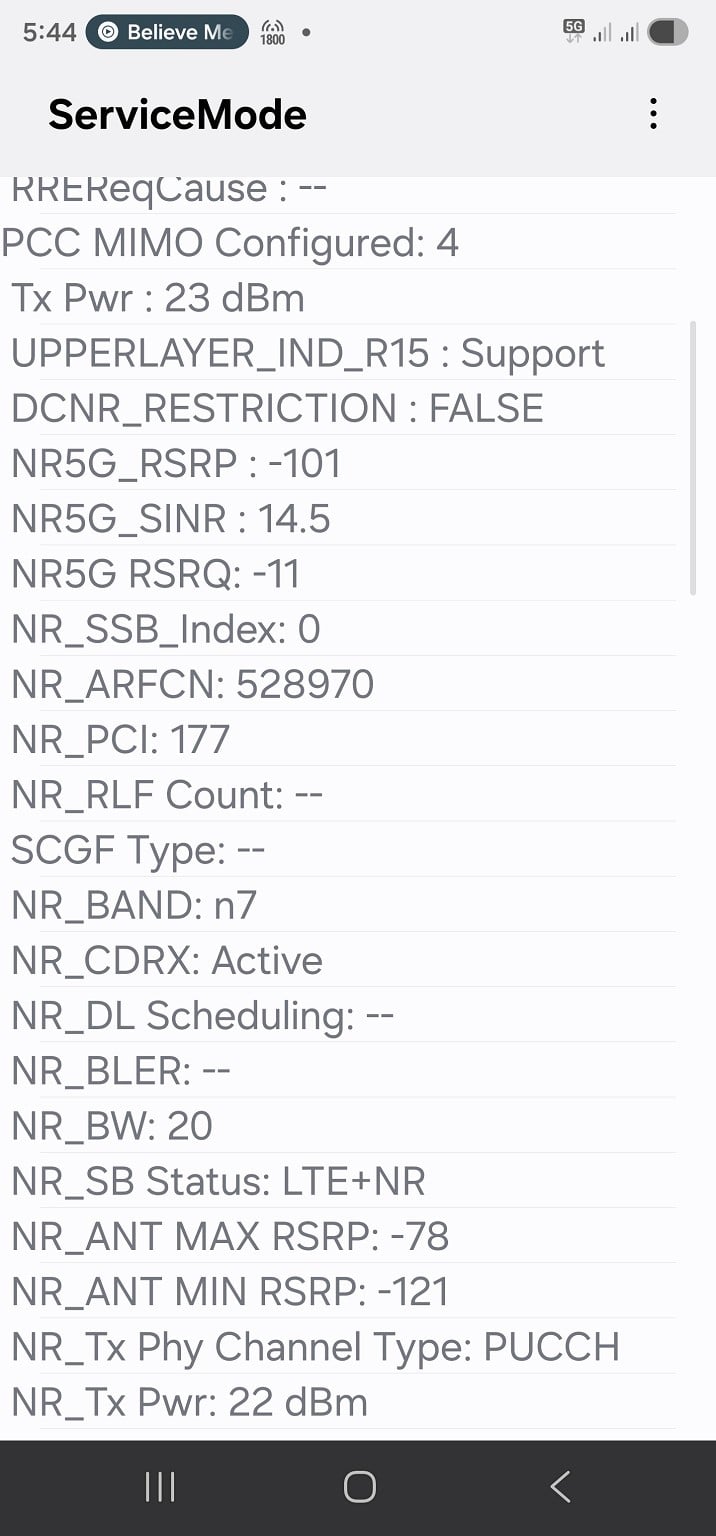
If anyone can provide any real life examples of locations any of the following it'd be appreciated. I could update my website with speculation, but I generally prefer to see confirmed proof of actual deployment.


  • One NZ 5g n8 (900 MHz)
  • One NZ 5g n7 (2600 MHz)
  • Spark n5 (850 MHz)
  • Spark n1 (2100 MHz)
  • Spark n40 (2300 MHz)

Either post here, PM me or email james@pole.net.nz.


Shop now for Lenovo laptops and other devices (affiliate link).
grantius
88 posts

Master Geek
+1 received by user: 53


  #3409042 31-Aug-2025 19:12
Send private message quote this post

I've sent you an email :)


There is also some updates on the website needed for some of the bandwidths - for example, all 3 have 80mhz n78 now which I can also provide screenshots of (or even better, link to some towers on gisgeek which show the bandwidths licensed) 


KiwiSurfer
1722 posts

Uber Geek
+1 received by user: 993

ID Verified
Lifetime subscriber

  #3409048 31-Aug-2025 19:52
Send private message quote this post

Cool I've done a big update to the page so hopefully the information is much more current now. Let me know if any more corrections need to be done.


If anyone can give me the actual ARFCN for NR 3500 for all 3 networks that would be much appreciated. I suspect the one I have for One NZ is correct, but Spark/2degrees is likely out of date as that was based on when they were doing 60 MHz.


MaxineN
Max
2049 posts

Uber Geek
+1 received by user: 1663

ID Verified
Trusted
Subscriber

  #3409051 31-Aug-2025 20:44
Send private message quote this post

KiwiSurfer:


Cool I've done a big update to the page so hopefully the information is much more current now. Let me know if any more corrections need to be done.


If anyone can give me the actual ARFCN for NR 3500 for all 3 networks that would be much appreciated. I suspect the one I have for One NZ is correct, but Spark/2degrees is likely out of date as that was based on when they were doing 60 MHz.


One NZ: 633312 according to my UE as I sit 20m away from a One NZ site.


Ramblings from a mysterious lady who's into tech. Warning I may often create zingers.


KiwiSurfer
1722 posts

Uber Geek
+1 received by user: 993

ID Verified
Lifetime subscriber

  #3411914 6-Sep-2025 16:57
Send private message quote this post

https://cellsites.nz/frequencies.html updated again:-


  • Confirmed n78 ARFCN for 2degrees. Still needing the ARFCN for Spark however but I suspect what I have may be correct as it puts Spark's 80 MHz block immediately after 2degrees's block.
  • Added a note regarding Spark deployment of 50MHz NR2600. Out of their 70 MHz rights I assume they are doing 50 MHz NR and 20 MHz LTE.
  • Updated 2degrees Band 1 (2100 MHz) details as 2degrees seem to have gained some spectrum allowing them to operate 5 MHz U2100 and 20 MHz L2100 (previously L2100 was 10MHz only -- and still is at some sites for some reason however they've changed the centre frequency at all sites that I can see). I am curious what the plan is post 2degrees 3G shutdown as I note they swapped order of the LTE and UMTS channels around. The UMTS channel is now adjacent to Spark -- paving the way for a 5 MHz swap to Spark allowing them to run a full 20 MHz LTE channel?

MaxineN
Max
2049 posts

Uber Geek
+1 received by user: 1663

ID Verified
Trusted
Subscriber

  #3412055 6-Sep-2025 19:26
Send private message quote this post

KiwiSurfer:


https://cellsites.nz/frequencies.html updated again:-


  • Confirmed n78 ARFCN for 2degrees. Still needing the ARFCN for Spark however but I suspect what I have may be correct as it puts Spark's 80 MHz block immediately after 2degrees's block.
  • Added a note regarding Spark deployment of 50MHz NR2600. Out of their 70 MHz rights I assume they are doing 50 MHz NR and 20 MHz LTE.
  • Updated 2degrees Band 1 (2100 MHz) details as 2degrees seem to have gained some spectrum allowing them to operate 5 MHz U2100 and 20 MHz L2100 (previously L2100 was 10MHz only -- and still is at some sites for some reason however they've changed the centre frequency at all sites that I can see). I am curious what the plan is post 2degrees 3G shutdown as I note they swapped order of the LTE and UMTS channels around. The UMTS channel is now adjacent to Spark -- paving the way for a 5 MHz swap to Spark allowing them to run a full 20 MHz LTE channel?


IMO... and this comes with a genuine work story.


L2100 One NZ should be marked as essential as if you have a 5G UE from somewhere else (Verizon specific issue with certain Samsung handsets), the network WILL push you to 2100 as an uplink over 1800... and then you'll lose service because the network was expecting you on 2100.


In the capability check (as part of the spec)... this shouldn't happen... but it does. Unsure if this same issue exists on other networks.


Just something to think about... again don't know if this is a One NZ specific issue or if Spark and 2degrees have seen the same.


edit:


Just for you, I turned on my Spark eSIM.
5G ARFCN from a site 150 meters away,
643968 so you're not out of date.
I did see both 3 separate channel widths from my Pixel 9 Pro XL. 60, 75 and 80.


Oh and Spark is pushing my handset to 2100 as an uplink... so the above issue could possibly happen.


Ramblings from a mysterious lady who's into tech. Warning I may often create zingers.


HP


Shop now for HP laptops and other devices (affiliate link).
KiwiSurfer
1722 posts

Uber Geek
+1 received by user: 993

ID Verified
Lifetime subscriber

  #3412621 8-Sep-2025 15:41
Send private message quote this post

MaxineN:


L2100 One NZ should be marked as essential as if you have a 5G UE from somewhere else (Verizon specific issue with certain Samsung handsets), the network WILL push you to 2100 as an uplink over 1800... and then you'll lose service because the network was expecting you on 2100.


I may revisit the whole Essential/Recommended. When I set up that page some years ago, the idea was to help people choosing phones with the best compatiability with their network (or NZ networks generally). But these days for 99.9% of people it's best to just get a phone direct from a NZ telco (with the exception of Apple and to some extent Samsung phones sold with NZ firmware) so that it's guaranteened to work. Generally the telcos are pretty good at only selling phones they which meets their current requirements and also will support their future network requirements. I wouldn't recommend parallel imported phones etc these days for anyone as it's a complex mess what with Vo(LTE,NR), NR support, NR/LTE bands, roaming complications, etc to consider.


Maybe I'll just change to something along the lines of showing which bands has the most extenstive deployment and which is less deployed to make it clear it's more a informative thing than a recommendation.


MaxineN:


Just for you, I turned on my Spark eSIM.
5G ARFCN from a site 150 meters away,
643968 so you're not out of date.


Thanks so much. I currently have an unregistered Spark SIM in a old non-5G phone so all I get is 4G/3G on that one.


grantius
88 posts

Master Geek
+1 received by user: 53


  #3413501 10-Sep-2025 19:16
Send private message quote this post
grantius
88 posts

Master Geek
+1 received by user: 53


  #3417183 21-Sep-2025 17:13
Send private message quote this post

I have now seen Spark n40 in Ruakaka (Northland). First time ive seen it in the wild! Now only to find n1 for Spark.


It'd be great if they could add 5g low bands and 5g c-band as seperate layers on their coverage map like they did with "4g extended"


grantius
88 posts

Master Geek
+1 received by user: 53


  #3423734 10-Oct-2025 17:47
Send private message quote this post

My local tower in Pokeno for One I now have n7:


1 | 2 | 3 | 4
View this topic in a long page with up to 500 replies per page Create new topic


Geekzone Live »

Try automatic live updates from Geekzone directly in your browser, without refreshing the page, with Geekzone Live now.


Are you subscribed to our RSS feed? You can download the latest headlines and summaries from our stories directly to your computer or smartphone by using a feed reader.