Geekzone: technology news, blogs, forums
Guest
Welcome Guest.
You haven't logged in yet. If you don't have an account you can register now.


Gozer

185 posts

Master Geek
+1 received by user: 32


#278506 20-Oct-2020 11:25
Send private message

 I am having an issue with multiple Yealink W60B and W53H on 2talk.
After a period of time (looks to be about an our) the handsets stop receiving calls but can still make them. If I call from a T46S I get "busy". The handset is still within range etc. restarting the phone does not change anything, restarting the W60B  base fixes the issue, but temporarily.


Filter this topic showing only the reply marked as answer Create new topic
cisconz
cisconz
1348 posts

Uber Geek
+1 received by user: 179

ID Verified
Trusted
Lifetime subscriber

  #2588232 20-Oct-2020 11:32
Send private message

Sounds like a timeout issue - change the registration time to 600 from 3600.


Hmmmm


Gozer

185 posts

Master Geek
+1 received by user: 32


  #2588236 20-Oct-2020 11:47
Send private message

Registration is already 3600, and 2talk still shows the line as registered.


Not sure how I can tell if it is an issue between 2talk and base or base and handset.


cisconz
cisconz
1348 posts

Uber Geek
+1 received by user: 179

ID Verified
Trusted
Lifetime subscriber

  #2588237 20-Oct-2020 11:50
Send private message

Re read it again - I said to 600 from 3600.


Hmmmm


speed
296 posts

Ultimate Geek
+1 received by user: 101


  #2588243 20-Oct-2020 11:57
Send private message

The symptoms you describe certainly reflect those of a registration becoming unreachable. Not due to the registration expiring however, but due to the NAT firewall not keeping the return UDP path open to the phone from the SIP server for long enough. There are various strategies that can be employed to address this, each with their own merits. For example:


- increasing the firewall UDP connection-state tracking timeout (eg to greater than the registration period or keep-alive period if keep-alives are used)


- using keep-alives (eg enabling OPTIONS polling from the 2talk side)


- changing to TCP based signalling


speed
296 posts

Ultimate Geek
+1 received by user: 101


  #2588244 20-Oct-2020 12:00
Send private message

Ps, if you want to confirm that the base & handset themselves are still working OK and have just become unreachable from the SIP server's perspective then the test to try is to wait until the cordlesses fail then direct-IP dial them from the T46 instead of ringing the 2talk number.


(I'm assuming the T46 and cordlesses are on the same network)


Eg if the cordless base has IP 10.1.1.2 then you can dial it from the T46 by dialing "10*1*1*2#". Test it out when they're still working first to make sure it works before the test when they're offline.


Gozer

185 posts

Master Geek
+1 received by user: 32


  #2588248 20-Oct-2020 12:06
Send private message

Doh thanks, will wait and see if that helps.


Move to New Zealand's best fibre broadband service (affiliate link). Free setup code: R587125ERQ6VE. Note that to use Quic Broadband you must be comfortable with configuring your own router.
Gozer

185 posts

Master Geek
+1 received by user: 32


  #2588250 20-Oct-2020 12:10
Send private message

speed:


The symptoms you describe certainly reflect those of a registration becoming unreachable. Not due to the registration expiring however, but due to the NAT firewall not keeping the return UDP path open to the phone from the SIP server for long enough. There are various strategies that can be employed to address this, each with their own merits. For example:


- increasing the firewall UDP connection-state tracking timeout (eg to greater than the registration period or keep-alive period if keep-alives are used)


- using keep-alives (eg enabling OPTIONS polling from the 2talk side)


- changing to TCP based signalling


For reference this is running through a Ubiquiti edge router, so sounds like it could be a SIP ALG issue?


speed
296 posts

Ultimate Geek
+1 received by user: 101


  #2588264 20-Oct-2020 12:15
Send private message

> For reference this is running through a Ubiquiti edge router, so sounds like it could be a SIP ALG issue?


No I think more likely just a connection state tracking timeout like I described earlier.


From memory, on an EdgeRouter in the webUI you'd be looking under config tree -> system -> conntrack -> timeout -> udp


I'd try setting that to 180 and also make sure qualify (options) polling events from 2talk are not disabled. Ie make sure the checkbox called "Disable Qualify (OPTIONS) polling events for this line (This is used to track the registration status)" is NOT ticked - this is under 'Voice Quality & Networking' in their web portal.


nztim
4012 posts

Uber Geek
+1 received by user: 2710

ID Verified
Trusted
TEAMnetwork
Subscriber

  #2590010 21-Oct-2020 19:57
Send private message

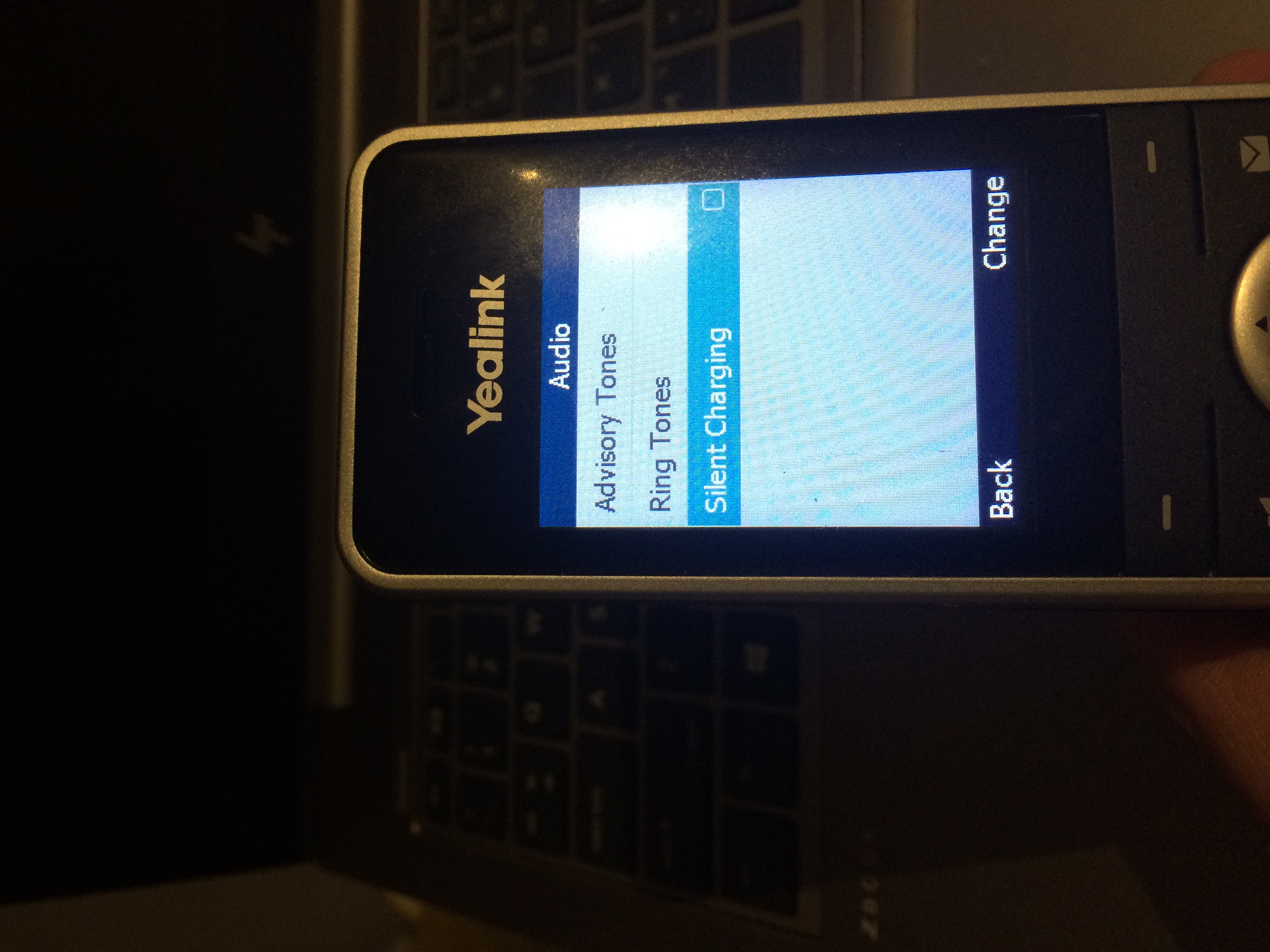
Here is another possibility - if it is a W60P+W56H handset there is an option under Settings > Audio > Silent Charging


And its on by default so when the handset is on the base station it doesn't ring or accept calls


see my photo below below 


Click to see full size


also disable Sip ALG 


Any views expressed on these forums are my own and don't necessarily reflect those of my employer. 


Gozer

185 posts

Master Geek
+1 received by user: 32


  #2591490 24-Oct-2020 18:42
Send private message

speed:


> For reference this is running through a Ubiquiti edge router, so sounds like it could be a SIP ALG issue?


No I think more likely just a connection state tracking timeout like I described earlier.


From memory, on an EdgeRouter in the webUI you'd be looking under config tree -> system -> conntrack -> timeout -> udp


I'd try setting that to 180 and also make sure qualify (options) polling events from 2talk are not disabled. Ie make sure the checkbox called "Disable Qualify (OPTIONS) polling events for this line (This is used to track the registration status)" is NOT ticked - this is under 'Voice Quality & Networking' in their web portal.


This was it, thankyou.


Filter this topic showing only the reply marked as answer Create new topic


Geekzone Live »

Try automatic live updates from Geekzone directly in your browser, without refreshing the page, with Geekzone Live now.


Are you subscribed to our RSS feed? You can download the latest headlines and summaries from our stories directly to your computer or smartphone by using a feed reader.