Geekzone: technology news, blogs, forums
Guest
Welcome Guest.
You haven't logged in yet. If you don't have an account you can register now.


spacedog

496 posts

Ultimate Geek
+1 received by user: 62


#281393 15-Feb-2021 18:15
Send private message

Wondering if there is anything new on this frontier here in NZ?


I'm looking for a way to get a virtual phone number that can receive calls and SMS messages but do some intelligent routing (i.e. SMS to email, hunt group, etc...)


The issue largely stems from wanting to have a single mobile style number that can be given to customers for sales queries, but then if it's called it forwards to an individual team members mobile phone as well as handling inbound texts.  We are trying to avoid paying for a dedicated mobile phone that is assigned to our sales rep and prevents them from having to carry a work phone and personal phone (which is what we have been doing).


Google Voice in the USA works great for this as you can forward the google voice number to another number and it allows inbound SMS messaging.  If only that were an option here, it would be a perfect solution!


Create new topic
cisconz
cisconz
1348 posts

Uber Geek
+1 received by user: 179

ID Verified
Trusted
Lifetime subscriber

  #2657280 16-Feb-2021 08:38
Send private message

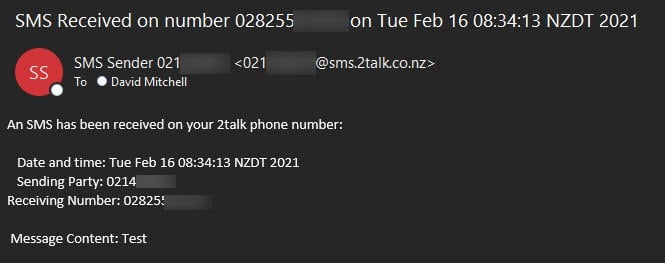
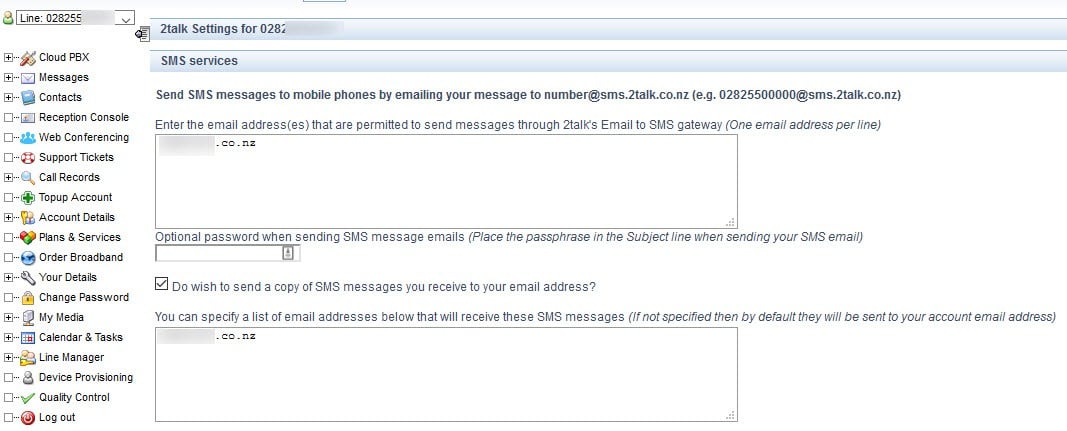
2Talk let you do this.


Click to see full size


Hmmmm


spacedog

496 posts

Ultimate Geek
+1 received by user: 62


  #2657409 16-Feb-2021 11:43
Send private message

Which service are you using and how much is it?


cisconz
cisconz
1348 posts

Uber Geek
+1 received by user: 179

ID Verified
Trusted
Lifetime subscriber

  #2657534 16-Feb-2021 14:43
Send private message

It is a standard service on their plans.


Hmmmm


spacedog

496 posts

Ultimate Geek
+1 received by user: 62


  #2657797 16-Feb-2021 20:40
Send private message

ok managed to get signed-up and get an 028 number, but I can't see any interface that looks like your screen shot? I have logged into their web portal and it has some similar options, but it doesn't look like yours and I can't seem to locate anything about SMS features.


Have tried texting my 028 number and nothing seems to have come in either?


Any suggestions @cisconz?


Stu

Stu
Hammered
8740 posts

Uber Geek
+1 received by user: 2391

Moderator
ID Verified
Trusted
Lifetime subscriber

  #2657799 16-Feb-2021 20:47
Send private message

When you log in, are there four columns displayed as - Inbound calls, Outbound calls, Advanced and Preferences? If so, SMS services should be at the bottom of the Advanced column.


People often mistake me for an adult because of my age.


Keep calm, and carry on posting.


Referral Links: Sharesies


Are you happy with what you get from Geekzone? If so, please consider supporting us by subscribing.


No matter where you go, there you are.


spacedog

496 posts

Ultimate Geek
+1 received by user: 62


  #2657800 16-Feb-2021 20:52
Send private message

This is what my interface looks like via the web.  What the other poster showed looked an awful lot like some other kind of application? Is there desktop app or something else that I should be using?


Shop now for Dyson appliances (affiliate link).
speed
296 posts

Ultimate Geek
+1 received by user: 101


  #2657803 16-Feb-2021 20:57
Send private message

Can you see the word 'Advanced' in your screenshot?

Click on that.


spacedog

496 posts

Ultimate Geek
+1 received by user: 62


  #2657846 16-Feb-2021 21:01
Send private message

Yup, I did, and don't see anything SMS related in there?


speed
296 posts

Ultimate Geek
+1 received by user: 101


  #2657889 16-Feb-2021 21:08
Send private message

Right you are! I've got it on my account but I'm still on the old interface (it's at the bottom under Advanced like Stu said).


It looks like they haven't brought that functionality across into their new portal. Or at least nowhere I can see it.


You might like to try lodging a ticket asking to be converted across to the old interface. It definitely works in there.


Create new topic


Geekzone Live »

Try automatic live updates from Geekzone directly in your browser, without refreshing the page, with Geekzone Live now.


Are you subscribed to our RSS feed? You can download the latest headlines and summaries from our stories directly to your computer or smartphone by using a feed reader.