Geekzone: technology news, blogs, forums
Guest
Welcome Guest.
You haven't logged in yet. If you don't have an account you can register now.


Laurence

44 posts

Geek
+1 received by user: 84


#68343 19-Sep-2010 20:43
Send private message

Evening,

We have a Linksys SPA9000 with a single remote extision on a SPA2102.
All outbound calls work and inbound and sent to a AA where 1 goes to the SPA9000 FXS ports and 2 goes to the SPA2102 FXS ports.

Pressing 1 and everything will work as expected.
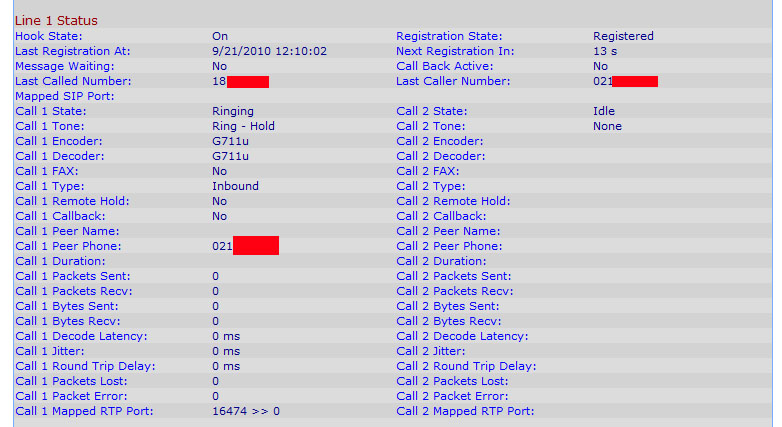
Pressing 2 will put you though to the remote extsions as expected but the inbound caller will not hear a ringing tone. The phone will still ring as expected off the spa though and when they pick it up the call is connected correctly.

Any ideas?

Thanks.


Have you tried turning it off and on again?


Create new topic
sbiddle
30853 posts

Uber Geek
+1 received by user: 9996

Retired Mod
Trusted
Biddle Corp
Lifetime subscriber

  #382010 19-Sep-2010 20:52
Send private message

First thing would be to use Wireshark and see if a SIP180 ringing is being sent from the SPA9000, and secondly whether it's being received by the 2102.

SPA9000's are horrrible things. One of the few things that Cisco/Linksys just got horribly, horribly wrong.


maverick
3594 posts

Uber Geek
+1 received by user: 80

Trusted
WorldxChange

  #382099 20-Sep-2010 06:38
Send private message

This generally will be a codec issue, i.e it will be answered by the AA at G711 and handed off to the 2102 at G729 or vise versa, try setting the preferred codecs to all to G711 for AA, MOH as well as speeech,


Yes I am a employee of WxC (My Profile) ... but I do have my own opinions as well Wink


https://www.facebook.com/wxccommunications

Laurence

44 posts

Geek
+1 received by user: 84


  #382743 21-Sep-2010 15:51
Send private message

I have checked the codec issue and they all seem fine. (using 711u). I think what is happening is the SPA2102 is sending the wrong dial tone. I have attached a screenshot of the spa2102 call in progress.


Have you tried turning it off and on again?


Create new topic


Geekzone Live »

Try automatic live updates from Geekzone directly in your browser, without refreshing the page, with Geekzone Live now.


Are you subscribed to our RSS feed? You can download the latest headlines and summaries from our stories directly to your computer or smartphone by using a feed reader.