Geekzone: technology news, blogs, forums
Guest
Welcome Guest.
You haven't logged in yet. If you don't have an account you can register now.


alisam

878 posts

Ultimate Geek
+1 received by user: 83


#280421 14-Dec-2020 05:42
Send private message

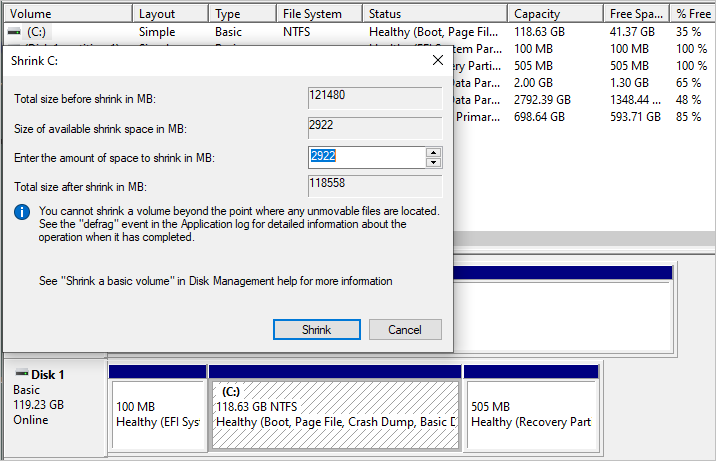
I want to create a 10GB partition on C: (Intel NUC).


I haven't used Disk Management for a long time.


I thought I would have sufficient free space, but Disk Management has other ideas.


Why?


PC: Dell Inspiron 16 5640 (Windows 11 Home), Dell Inspiron 7591 2n1 (Windows 11 Pro), HP ProBook 470G1 (Windows 10 Pro), Intel NUC7I5BNH (Zorin)
Net: Grandstream 1 x GWN7062 Router, 1 x GWN7665 Access Point
Storage: Synology DS216play NAS, 2 x 6TB
Media: 3 x Amazon FireTV. Echo, Dot, Spot
TV: 2 x Samsung H6400 55" LED TV, Panasonic TH-P50G10Z 50" Plasma TV
Mobile: Samsung Galaxy A52 5G
Wearable: Gear S3 Frontier


Filter this topic showing only the reply marked as answer Create new topic
gcorgnet
1096 posts

Uber Geek
+1 received by user: 273

ID Verified

  #2621147 14-Dec-2020 06:44
Send private message

Shrinking a partition is not as easy as it sounds. There might be data scattered in various places on the disk and regardless of how much free space you have on paper, you can't always shrink your partition.


As far as I know, you may have to clear your existing partition (make a backup first) before being able to resize it.


alisam

878 posts

Ultimate Geek
+1 received by user: 83


  #2621148 14-Dec-2020 06:52
Send private message

gcorgnet:


Shrinking a partition is not as easy as it sounds. There might be data scattered in various places on the disk and regardless of how much free space you have on paper, you can't always shrink your partition.


As far as I know, you may have to clear your existing partition (make a backup first) before being able to resize it.


Hmm


C contains the Operating System. How do I 'clear' it?


PC: Dell Inspiron 16 5640 (Windows 11 Home), Dell Inspiron 7591 2n1 (Windows 11 Pro), HP ProBook 470G1 (Windows 10 Pro), Intel NUC7I5BNH (Zorin)
Net: Grandstream 1 x GWN7062 Router, 1 x GWN7665 Access Point
Storage: Synology DS216play NAS, 2 x 6TB
Media: 3 x Amazon FireTV. Echo, Dot, Spot
TV: 2 x Samsung H6400 55" LED TV, Panasonic TH-P50G10Z 50" Plasma TV
Mobile: Samsung Galaxy A52 5G
Wearable: Gear S3 Frontier


timmmay
20858 posts

Uber Geek
+1 received by user: 5350

Trusted
Lifetime subscriber

  #2621150 14-Dec-2020 06:57
Send private message

You could try a defragmentation, which tends to put all the data at the start of the disk. You might need a boot time defrag. I'm just guessing here, I don't give it a really high chance of working.


You could also look at third party tools that might be able to move the data while doing the repartition. I think Acronis has a partition manager you could look at.


Definitely do a backup first. Macrium Reflect for example.


alisam

878 posts

Ultimate Geek
+1 received by user: 83


  #2621153 14-Dec-2020 07:23
Send private message

timmmay:


You could try a defragmentation, which tends to put all the data at the start of the disk. You might need a boot time defrag. I'm just guessing here, I don't give it a really high chance of working.


You could also look at third party tools that might be able to move the data while doing the repartition. I think Acronis has a partition manager you could look at.


Definitely do a backup first. Macrium Reflect for example.


It's a 128GB SSD, so I think Disk Defrag will only do a TRIM


HDDINT2100 Intel SSD 600P 128GB M.2 2280 NVMe PCIe Gen 3 X 4 SSD


I have Acronis 2020 and I cannot see a partition manager within it.


PC: Dell Inspiron 16 5640 (Windows 11 Home), Dell Inspiron 7591 2n1 (Windows 11 Pro), HP ProBook 470G1 (Windows 10 Pro), Intel NUC7I5BNH (Zorin)
Net: Grandstream 1 x GWN7062 Router, 1 x GWN7665 Access Point
Storage: Synology DS216play NAS, 2 x 6TB
Media: 3 x Amazon FireTV. Echo, Dot, Spot
TV: 2 x Samsung H6400 55" LED TV, Panasonic TH-P50G10Z 50" Plasma TV
Mobile: Samsung Galaxy A52 5G
Wearable: Gear S3 Frontier


Hammerer
2480 posts

Uber Geek
+1 received by user: 802

Lifetime subscriber

  #2621154 14-Dec-2020 07:26
Send private message

I prefer to use third-party products to make partition changes when Windows is off-line so there is less risk of failure.


I'd say defragging the drive is generally easier than deleting and restoring the system drive but it depends which software you are more familiar with.


If the reason you can't shrink the partition is that Windows has some unmovable files at addresses higher than the size of the smaller partition you want. Then you might be able to turn of the relevant features in the settings. e.g.:
Virtual memory paging file - but perhaps not if the system has only the minimum required Windows memory.
Hibernation file


Then you can recreate these files after you successfully shrink the drive.


Hammerer
2480 posts

Uber Geek
+1 received by user: 802

Lifetime subscriber

  #2621156 14-Dec-2020 07:29
Send private message

alisam:


I have Acronis 2020 and I cannot see a partition manager within it.


That is probably True Image, the backup software. They also had a Partition Manager which is now called Disk Director.


Shop on-line at New World now for your groceries (affiliate link).
timmmay
20858 posts

Uber Geek
+1 received by user: 5350

Trusted
Lifetime subscriber

  #2621167 14-Dec-2020 08:23
Send private message

alisam:


It's a 128GB SSD, so I think Disk Defrag will only do a TRIM


Use Defraggler or another third party defrag tool. SSDs can be defragmented, and I think should be occasionally only because otherwise the file system index (probably the wrong name) can get really big with hundreds or thousands of entries for a single file. Info here.


alisam

878 posts

Ultimate Geek
+1 received by user: 83


  #2621353 14-Dec-2020 15:01
Send private message

IM-Magic Partition Resizer Free worked


PC: Dell Inspiron 16 5640 (Windows 11 Home), Dell Inspiron 7591 2n1 (Windows 11 Pro), HP ProBook 470G1 (Windows 10 Pro), Intel NUC7I5BNH (Zorin)
Net: Grandstream 1 x GWN7062 Router, 1 x GWN7665 Access Point
Storage: Synology DS216play NAS, 2 x 6TB
Media: 3 x Amazon FireTV. Echo, Dot, Spot
TV: 2 x Samsung H6400 55" LED TV, Panasonic TH-P50G10Z 50" Plasma TV
Mobile: Samsung Galaxy A52 5G
Wearable: Gear S3 Frontier


Filter this topic showing only the reply marked as answer Create new topic


Geekzone Live »

Try automatic live updates from Geekzone directly in your browser, without refreshing the page, with Geekzone Live now.


Are you subscribed to our RSS feed? You can download the latest headlines and summaries from our stories directly to your computer or smartphone by using a feed reader.