Geekzone: technology news, blogs, forums
Guest
Welcome Guest.
You haven't logged in yet. If you don't have an account you can register now.


View this topic in a long page with up to 500 replies per page Create new topic
1 | 2 | 3 | 4 | 5
lyonrouge

1993 posts

Uber Geek
+1 received by user: 20

Trusted
Lifetime subscriber

  #960008 1-Jan-2014 17:37
Send private message

Gilco2: it was still on the one I built for friends using windows 8 Pro then upgrading to Windows 8.1.  I know I was able to set it up so you didnt have to type password to login.  I cant to my tablet to check right now.  But have you right clicked on the taskbar and checked in there as there are many options there as well with Windows 8.1


I suspect that the linking off account to hotmail disabled the auto-log on, i.e. if you set auto-login, then upgrade but don't link, the setting is preserved?


Gilco2
1556 posts

Uber Geek
+1 received by user: 134


  #960023 1-Jan-2014 18:17
Send private message

just checked my windows 8.1 tablet and typed netplwiz and it is there.


HTPC Intel Pentium G3258 cpu, Gigabyte H97n-wifi motherboard, , 8GB DDR3 ram, onboard  graphics. Hauppuage HVR 5500 tuner,  Silverstone LC16M case, Windows 10 pro 64 bit using Nextpvr and Kodi


lyonrouge

1993 posts

Uber Geek
+1 received by user: 20

Trusted
Lifetime subscriber

  #960046 1-Jan-2014 18:29
Send private message

I wonder why the check box would be disabled on my laptop? Is there a laptop / tablet variation in the software?


freitasm
BDFL - Memuneh
80652 posts

Uber Geek
+1 received by user: 41045

Administrator
ID Verified
Trusted
Geekzone
Lifetime subscriber

  #960057 1-Jan-2014 18:45
Send private message

No, there isn't.


Referral links: Quic Broadband (free setup code: R587125ERQ6VE) | Samsung | AliExpress | Wise | Sharesies 


Support Geekzone by subscribing (browse ads-free), or making a one-off or recurring donation through PressPatron.


MaxLV
656 posts

Ultimate Geek
+1 received by user: 161


  #960205 2-Jan-2014 10:20
Send private message

lyonrouge:
Gilco2:
lyonrouge: Does anyone know how to decouple or disable the startup password. I had a local account in 8, but during 8.1 update, I inadvertently connected to mt hotmail account and now i have to log on at startup.
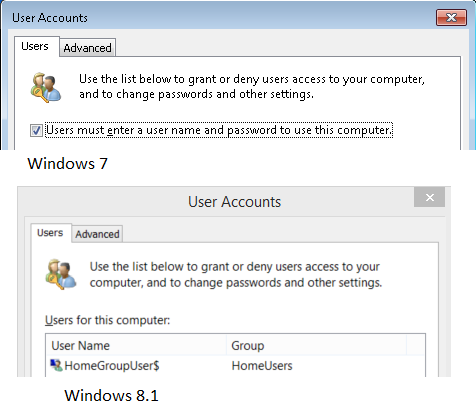
on your tile screen type "netplwiz" without the quotes. it will show it. click on it and untick users must login with password, or to that effect. you will see it anyway


This has been removed in 8.1.

Win 7 vs Win 8.1


That option IS available on Windows 8.1 Pro on my computers, and Acer Iconia tablet. Running 64 bit and 32bit versions. 

freitasm
BDFL - Memuneh
80652 posts

Uber Geek
+1 received by user: 41045

Administrator
ID Verified
Trusted
Geekzone
Lifetime subscriber

  #960207 2-Jan-2014 10:21
Send private message

Perhaps you aren't running this from an Administrator account? Are you?


Referral links: Quic Broadband (free setup code: R587125ERQ6VE) | Samsung | AliExpress | Wise | Sharesies 


Support Geekzone by subscribing (browse ads-free), or making a one-off or recurring donation through PressPatron.


Shop now for Dell laptops and other devices (affiliate link).
gazbo
89 posts

Master Geek
+1 received by user: 14


  #960210 2-Jan-2014 10:30
Send private message

Win 8 became far easier to navigate using a t620 wireless touch mouse from logitech that I scored 2 of for $35 each from DSE Christmas Eve before they corrected the discount. The OS actually makes sense to me now. I'd tried the t400 previously and that was ok, this is better.

I am slowly struggling to learn touch pad gestures but I hate them as I have hands like feet. Laptops are the worst for me as I constantly graze the touchpad while typing and move the cursor to a random part of the working document. I generally disable laptop touch pads in favour of an external mouse.

Thanks for the auto login tips people. Handy.

MackinNZ
450 posts

Ultimate Geek
+1 received by user: 119

Lifetime subscriber

  #960220 2-Jan-2014 10:44
Send private message

lyonrouge:
Gilco2:
lyonrouge: Does anyone know how to decouple or disable the startup password. I had a local account in 8, but during 8.1 update, I inadvertently connected to mt hotmail account and now i have to log on at startup.
on your tile screen type "netplwiz" without the quotes. it will show it. click on it and untick users must login with password, or to that effect. you will see it anyway


This has been removed in 8.1.

Win 7 vs Win 8.1


You will not see the Users must enter a user name and password to use this computer checkbox if password security policies have been set.

To remove the policies try the following:
Go to the Control Panel


  • Change for View by Icons
  • Click User Accounts
  • Click link Reset Security Policies at the left of the windows.
  • Go to netplwiz where the checkbox should be back.

Regards, Chris

lyonrouge

1993 posts

Uber Geek
+1 received by user: 20

Trusted
Lifetime subscriber

  #960426 2-Jan-2014 21:09
Send private message

Excellent, thanks, that did the trick. Now just one more to solve, the touch pad left and right edge issue. Found quite few different forums discussing it but I don't think there's a fix for it.

lyonrouge

1993 posts

Uber Geek
+1 received by user: 20

Trusted
Lifetime subscriber

  #961263 4-Jan-2014 20:08
Send private message

Does anyone know a web browser that supports Silverlight (apart from IE). The IE in Win8 is incompatible with WHS, so I need an alternate. I've been using a VM but this is impractical for video rendering.

freitasm
BDFL - Memuneh
80652 posts

Uber Geek
+1 received by user: 41045

Administrator
ID Verified
Trusted
Geekzone
Lifetime subscriber

  #961269 4-Jan-2014 20:19
Send private message

Chrome?


Referral links: Quic Broadband (free setup code: R587125ERQ6VE) | Samsung | AliExpress | Wise | Sharesies 


Support Geekzone by subscribing (browse ads-free), or making a one-off or recurring donation through PressPatron.


Shop now for Lenovo laptops and other devices (affiliate link).
lyonrouge

1993 posts

Uber Geek
+1 received by user: 20

Trusted
Lifetime subscriber

  #961277 4-Jan-2014 20:40
Send private message

Looks like it. I normally only use Chrome in Ubuntu and never considered it in Windows.

JWR

JWR
821 posts

Ultimate Geek
+1 received by user: 272


  #961279 4-Jan-2014 20:43

lyonrouge: Does anyone know a web browser that supports Silverlight (apart from IE). The IE in Win8 is incompatible with WHS, so I need an alternate. I've been using a VM but this is impractical for video rendering.


The latest versions of IE, Firefox, Safari and Chrome all support Silverlight.

lyonrouge

1993 posts

Uber Geek
+1 received by user: 20

Trusted
Lifetime subscriber

  #961281 4-Jan-2014 21:04
Send private message

Thanks, I normally don't use anything apart from IE in windows so ironically browser ignorant. Are there any warnings about browsers with Windows8

JWR

JWR
821 posts

Ultimate Geek
+1 received by user: 272


  #961282 4-Jan-2014 21:07

lyonrouge: Thanks, I normally don't use anything apart from IE in windows so ironically browser ignorant. Are there any warnings about browsers with Windows8


Yes. There are supported versions.

Here is the chart...   http://www.microsoft.com/getsilverlight/get-started/install/default.aspx#sysreq

1 | 2 | 3 | 4 | 5
View this topic in a long page with up to 500 replies per page Create new topic


Geekzone Live »

Try automatic live updates from Geekzone directly in your browser, without refreshing the page, with Geekzone Live now.


Are you subscribed to our RSS feed? You can download the latest headlines and summaries from our stories directly to your computer or smartphone by using a feed reader.