Geekzone: technology news, blogs, forums
Guest
Welcome Guest.
You haven't logged in yet. If you don't have an account you can register now.


lyonrouge

1993 posts

Uber Geek
+1 received by user: 20

Trusted
Lifetime subscriber

#138371 1-Jan-2014 12:23
Send private message

I've got a factory installed Win 8 (now updated to 8.1). Sony will not provide an upgrade to Win 7 so I'm stuck with this for the foreseeable future. Normally I try to work with tech as an OOtB approach but this is such a hateful operating system I'm going to have to do something to fix it, if there are some quick wins that people have used I would appreciate it before I inevitably brick the thing.

View this topic in a long page with up to 500 replies per page Create new topic
 1 | 2 | 3 | 4 | 5
nitrotech
1285 posts

Uber Geek
+1 received by user: 168


  #959857 1-Jan-2014 12:27
Send private message

Maybe you can be more specific as to exactly the issues you have.

You can boot the OS straight to desktop mode in 8.1

Another helpful hint is that by right clicking on the start button you can access command prompt, control panel and other useful features.


Klipspringer
2385 posts

Uber Geek
+1 received by user: 286
Inactive user


  #959858 1-Jan-2014 12:27
Send private message

- Install Classic start menu
- Uninstall as many of the Metro apps as possible
- Boot to Desktop


sbiddle
30853 posts

Uber Geek
+1 received by user: 9996

Retired Mod
Trusted
Biddle Corp
Lifetime subscriber

  #959859 1-Jan-2014 12:27
Send private message

What do you find so annoying?

Once you've installed a start menu replacement it's basically just Windows 7.1 - with plenty of bug fixes and better performance.


lyonrouge

1993 posts

Uber Geek
+1 received by user: 20

Trusted
Lifetime subscriber

  #959861 1-Jan-2014 12:38
Send private message

Note: have implemented the following to run XP and 7 under Hyper-V. I had to use a couple of my licenses for this, but at least I have a work around to some aspects of Win 8.

http://4sysops.com/archives/windows-8-xp-mode-part-1-hyper-v/

sbiddle
30853 posts

Uber Geek
+1 received by user: 9996

Retired Mod
Trusted
Biddle Corp
Lifetime subscriber

  #959868 1-Jan-2014 13:01
Send private message

Maybe you could actually explain what you find so annoying or limiting about Windows8.

Like you I hated it when I first started playing with it. I had no option with my new laptop in August because HP Win7 Haswell drivers were a month behind the new Probooks which launched in NZ first.

Within days I actually found Windows 8 a far superior operating system to Windows 7 in many ways and with a start menu replacement for all intent purposes pretty much everything functions exactly the same way.

I actually find the Metro mode the cumbersome solution - Metro apps work great on a touchpad device, but there are so many things on touchpad devices that still require desktop mode to function.

lyonrouge

1993 posts

Uber Geek
+1 received by user: 20

Trusted
Lifetime subscriber

  #959870 1-Jan-2014 13:13
Send private message

Key problems:

• Touchpad opening sidebars from left and right, I can find no way to stop this
• Keyboard shortcuts and quick access features, i.e. start menu and bars (addressed by http://classicshell.net/), this is a real win, thanks team
• No XP mode (addressed by link above)
• I can't go back to IE9 (some SharePoint functions do not work in 10 and above, somewhat ironic) workaround using "Win7 Mode", to open IE 8

Note: I have no animosity to the metro world. When I'm not working I switch to this mode and it's a fine enough tablet.


Shop now at Mighty Ape (affiliate link).
freitasm
BDFL - Memuneh
80646 posts

Uber Geek
+1 received by user: 41029

Administrator
ID Verified
Trusted
Geekzone
Lifetime subscriber

  #959874 1-Jan-2014 13:18
Send private message

I use Windows 8.1 on my HP laptop. It's faster than Windows 7 on the same hardware (SSD and plenty of RAM available).

On this laptop I simply installed Start8, removed all Modern UI apps and use it like I would use Windows 7.

On my tablet I am taking a different approach. Since touch is available I am trying to use ONLY Modern UI apps (a bit of a pain because somethings are only available in classical applications).


Referral links: Quic Broadband (free setup code: R587125ERQ6VE) | Samsung | AliExpress | Wise | Sharesies 


Support Geekzone by subscribing (browse ads-free), or making a one-off or recurring donation through PressPatron.



sbiddle
30853 posts

Uber Geek
+1 received by user: 9996

Retired Mod
Trusted
Biddle Corp
Lifetime subscriber

  #959877 1-Jan-2014 13:32
Send private message

lyonrouge: Key problems:

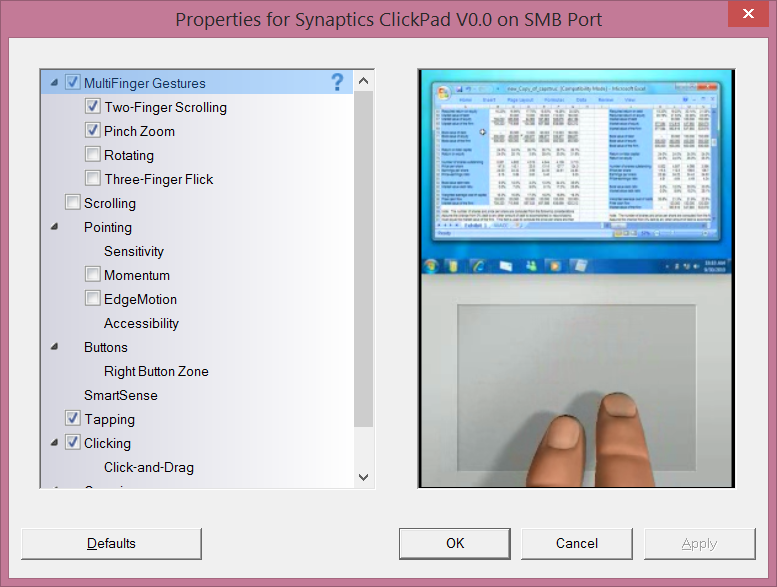
• Touchpad opening sidebars from left and right, I can find no way to stop this


If you have a touchpad that supports multitouch then gestures will be enabled by default. You can disable these in the Synaptics touchpad settings.


lyonrouge

1993 posts

Uber Geek
+1 received by user: 20

Trusted
Lifetime subscriber

  #959886 1-Jan-2014 13:46
Send private message

sbiddle:
lyonrouge: Key problems:

• Touchpad opening sidebars from left and right, I can find no way to stop this


If you have a touchpad that supports multitouch then gestures will be enabled by default. You can disable these in the Synaptics touchpad settings.


This does not appear to be a Synaptics feature.


timmmay
20858 posts

Uber Geek
+1 received by user: 5350

Trusted
Lifetime subscriber

  #959910 1-Jan-2014 14:57
Send private message

I installed W8.1 trial this morning on a spare disk to see how it is. I really didn't like metro, but using one of those start menu replacement programs it basically works like W7. I'll upgrade if and when I need to, mostly for ReFS and storage spaces.

How do you tell W8.1 to boot directly to the desktop?

lyonrouge

1993 posts

Uber Geek
+1 received by user: 20

Trusted
Lifetime subscriber

  #959926 1-Jan-2014 15:27
Send private message

Does anyone know how to decouple or disable the startup password. I had a local account in 8, but during 8.1 update, I inadvertently connected to mt hotmail account and now i have to log on at startup.


Shop now for Dell laptops and other devices (affiliate link).

JWR

JWR
821 posts

Ultimate Geek
+1 received by user: 272


  #959975 1-Jan-2014 16:49

timmmay: I installed W8.1 trial this morning on a spare disk to see how it is. I really didn't like metro, but using one of those start menu replacement programs it basically works like W7. I'll upgrade if and when I need to, mostly for ReFS and storage spaces.

How do you tell W8.1 to boot directly to the desktop?


Probably the easiest way is to right-click on the Taskbar in classic Widows Desktop Mode. Select Properties --> Navigation (Tab) --> Select "When I sign in or close all apps on screen, go to desktop instead of start".

Gilco2
1556 posts

Uber Geek
+1 received by user: 134


#959984 1-Jan-2014 16:59
Send private message

lyonrouge: Does anyone know how to decouple or disable the startup password. I had a local account in 8, but during 8.1 update, I inadvertently connected to mt hotmail account and now i have to log on at startup.
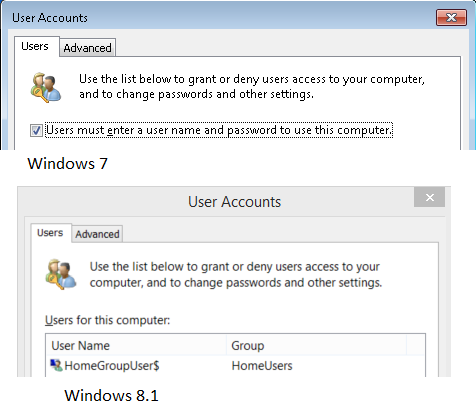
on your tile screen type "netplwiz" without the quotes. it will show it. click on it and untick users must login with password, or to that effect. you will see it anyway


HTPC Intel Pentium G3258 cpu, Gigabyte H97n-wifi motherboard, , 8GB DDR3 ram, onboard  graphics. Hauppuage HVR 5500 tuner,  Silverstone LC16M case, Windows 10 pro 64 bit using Nextpvr and Kodi


lyonrouge

1993 posts

Uber Geek
+1 received by user: 20

Trusted
Lifetime subscriber

  #959990 1-Jan-2014 17:18
Send private message

Gilco2:
lyonrouge: Does anyone know how to decouple or disable the startup password. I had a local account in 8, but during 8.1 update, I inadvertently connected to mt hotmail account and now i have to log on at startup.
on your tile screen type "netplwiz" without the quotes. it will show it. click on it and untick users must login with password, or to that effect. you will see it anyway


This has been removed in 8.1.

Win 7 vs Win 8.1

Gilco2
1556 posts

Uber Geek
+1 received by user: 134


  #960006 1-Jan-2014 17:27
Send private message

it was still on the one I built for friends using windows 8 Pro then upgrading to Windows 8.1.  I know I was able to set it up so you didnt have to type password to login.  I cant to my tablet to check right now.  But have you right clicked on the taskbar and checked in there as there are many options there as well with Windows 8.1


HTPC Intel Pentium G3258 cpu, Gigabyte H97n-wifi motherboard, , 8GB DDR3 ram, onboard  graphics. Hauppuage HVR 5500 tuner,  Silverstone LC16M case, Windows 10 pro 64 bit using Nextpvr and Kodi


 1 | 2 | 3 | 4 | 5
View this topic in a long page with up to 500 replies per page Create new topic


Geekzone Live »

Try automatic live updates from Geekzone directly in your browser, without refreshing the page, with Geekzone Live now.


Are you subscribed to our RSS feed? You can download the latest headlines and summaries from our stories directly to your computer or smartphone by using a feed reader.