Geekzone: technology news, blogs, forums
Guest
Welcome Guest.
You haven't logged in yet. If you don't have an account you can register now.


View this topic in a long page with up to 500 replies per page Create new topic
1 | 2 | 3
timmmay
20858 posts

Uber Geek
+1 received by user: 5350

Trusted
Lifetime subscriber

  #2759814 13-Aug-2021 20:35
Send private message

quickymart:


I'm guessing yours hasn't updated yet. Mine looked fine on Wednesday, God-awful craptacular today.


Dunno how Mozilla thinks this is an "improvement" when it's anything but. How is this making it better?


I updated to v91 before I made the post. I don't really see much difference. I use Chrome mostly, but I often have 2 or 3 web browsers open at work and Firefox is my #2. v91 doesn't seem much different to me.


quickymart

14940 posts

Uber Geek
+1 received by user: 13953

ID Verified

  #2759883 13-Aug-2021 22:44
Send private message

toejam316:


https://github.com/black7375/Firefox-UI-Fix might be of interest to those of you who abhor the new UI.


Hopefully at some point this will be included as an option in a future version.


That's an improvement, thanks. I've installed that now and it's looking a lot better. Cheers.


MikeB4
MikeB4
18775 posts

Uber Geek
+1 received by user: 12765

ID Verified
Trusted
Subscriber

  #2759888 14-Aug-2021 08:00
Send private message

I dumped Firefox some time back and use Edge on my Mac and Windows machines. I use Safari time to time to keep up with updates and use Safari on my iPad Pro and iPhone. To me Firefox the one time goto browser that time left behind.


Here is a crazy notion, lets give peace a chance.


SpartanVXL
1498 posts

Uber Geek
+1 received by user: 666


  #2760009 14-Aug-2021 16:07
Send private message

Seems like everyone is after some specific ‘thing’ that isn’t quite ‘right’ in latest.

But for anyone just using it stock for straightforward browsing, theres nothing wrong with FF (unless something actually is broke and it hasn’t been pointed out yet).

There are mods out there, as posted on this thread, if you need to change something. As for Chrome or Edge or Safari design being better, thats always going to be a subjective topic when discussed.

I used to mod FF to my liking but as time went on and updates came out it just caused more hassle when things broke due to some old config or change I did ages ago.

Practically though, I stick with FF because it’s the only browser with actual NoScript support. I only use Chrome if specific sites only support ‘Chrome’ standards which for whatever reason break on other browsers.

All in all, it’s a modern browser. I can do tabs, multi windows, find my downloads, browse content etc. No significant reason to call it outdated when it really isn’t. Like someone else said, aside from FF and others working on web standards everyone would be going by Google’s playbook.

old3eyes
9158 posts

Uber Geek
+1 received by user: 1364

Subscriber

  #2760016 14-Aug-2021 17:03
Send private message

I don't use FF very much  but on my Win 11 system I use Firefox Developer currently version 92.0b3   Seems to run OK. 


Regards,

Old3eyes


KiwiSurfer
1722 posts

Uber Geek
+1 received by user: 993

ID Verified
Lifetime subscriber

  #2760105 14-Aug-2021 22:34
Send private message

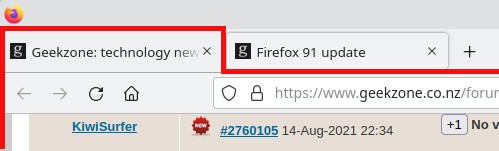
Too me a while to get used to the new stuff but I don't mind it too much now. Might be the theme I'm using but the current tab is pretty obvious (lighter shade and the only tab with that particular shade).


Shop now at Mighty Ape (affiliate link).
SirHumphreyAppleby
2938 posts

Uber Geek
+1 received by user: 1860


  #2760133 15-Aug-2021 07:23
Send private message

KiwiSurfer:


Might be the theme I'm using but the current tab is pretty obvious (lighter shade and the only tab with that particular shade).


There isn't much contrast with the default theme, at least not on my poorly calibrated business-range monitor. There are two issues I see. First, the tabs are a little bigger than they need to be, wasting screen space that would be better used for displaying Webpages. The second issue probably depends on how you use the browser. If you have lots of tabs open, one is obviously different and therefore the active tab. If you only have two open, the inactive tab is the one that appears flush with rest of the interface. This is the opposite of how tabs have traditionally appeared and gives the impression that the inactive tab is actually the active one.


quickymart

14940 posts

Uber Geek
+1 received by user: 13953

ID Verified

  #2851106 15-Jan-2022 11:55
Send private message

Another update overnight, oh yay. Hello again, floating tabs. Not that I missed you when you left, but it looks like you've made your unwelcome presence known again, sigh.


https://github.com/black7375/Firefox-UI-Fix >> I went here again but there's a lot of files here and I'm not 100% sure what I should be downloading/installing. Can someone please point me in the right direction?


Having said that, everything else mostly looks okay, but that floating tabs bs is horrible. I dunno why they keep forcing it on people.


KiwiSurfer
1722 posts

Uber Geek
+1 received by user: 993

ID Verified
Lifetime subscriber

  #2851108 15-Jan-2022 12:08
Send private message

quickymart:


Another update overnight, oh yay. Hello again, floating tabs. Not that I missed you when you left, but it looks like you've made your unwelcome presence known again, sigh.


https://github.com/black7375/Firefox-UI-Fix >> I went here again but there's a lot of files here and I'm not 100% sure what I should be downloading/installing. Can someone please point me in the right direction?


Having said that, everything else mostly looks okay, but that floating tabs bs is horrible. I dunno why they keep forcing it on people.


There seems to be some other options here you may want to look into:


https://superuser.com/questions/1653533/how-to-switch-back-to-firefox-old-style-of-tabs


quickymart

14940 posts

Uber Geek
+1 received by user: 13953

ID Verified

  #2851116 15-Jan-2022 12:38
Send private message

KiwiSurfer:


quickymart:


Another update overnight, oh yay. Hello again, floating tabs. Not that I missed you when you left, but it looks like you've made your unwelcome presence known again, sigh.


https://github.com/black7375/Firefox-UI-Fix >> I went here again but there's a lot of files here and I'm not 100% sure what I should be downloading/installing. Can someone please point me in the right direction?


Having said that, everything else mostly looks okay, but that floating tabs bs is horrible. I dunno why they keep forcing it on people.


There seems to be some other options here you may want to look into:


https://superuser.com/questions/1653533/how-to-switch-back-to-firefox-old-style-of-tabs


Thanks so much, I think that's probably sorted it. The colouring isn't quite the same as before, but it definitely is clear it's a separate tab etc, so I think this will do for now.


Pain in the neck when they add more "features"...if it ain't broke...!


MadEngineer
4591 posts

Uber Geek
+1 received by user: 2570

Trusted

  #2851125 15-Jan-2022 13:18
Send private message

SirHumphreyAppleby:


KiwiSurfer:


Might be the theme I'm using but the current tab is pretty obvious (lighter shade and the only tab with that particular shade).


There isn't much contrast with the default theme, at least not on my poorly calibrated business-range monitor. There are two issues I see. First, the tabs are a little bigger than they need to be, wasting screen space that would be better used for displaying Webpages. The second issue probably depends on how you use the browser. If you have lots of tabs open, one is obviously different and therefore the active tab. If you only have two open, the inactive tab is the one that appears flush with rest of the interface. This is the opposite of how tabs have traditionally appeared and gives the impression that the inactive tab is actually the active one.


Out of interest what do the two-tone grey products look like as you browse through the pages on these websites?  You should be able to see them in their entirety and not with sections faded out


Award-Winning LED Lighting | Switch Lighting NZ (switch-lighting.co.nz)


Indoor Luminaires | Philips lighting


Interior Lighting Specialists NZ | Indoor LED Lights | Halcyon Lights | Halcyon Lights


Does it make any difference if you view the screen from an angle with the monitor tilted back or viewed from below?


You're not on Atlantis anymore, Duncan Idaho.


Support Geekzone with one-off or recurring donations Donate via PressPatron.
SirHumphreyAppleby
2938 posts

Uber Geek
+1 received by user: 1860


  #2851141 15-Jan-2022 14:10
Send private message

MadEngineer:


Out of interest what do the two-tone grey products look like as you browse through the pages on these websites?  You should be able to see them in their entirety and not with sections faded out


Does it make any difference if you view the screen from an angle with the monitor tilted back or viewed from below?


I'm not sure exactly what you're referring to. The products on the Halcyon page have a dark shade applied when hovering over them that makes the text almost unreadable with open blinds behind the monitor. It's readable in a darker environment, but still darker than I would personally choose. The other pages appear perfectly readable everywhere I looked. IPS panel, so horizontally the image doesn't change much. IPS has poor vertical viewing angles, so no surprise it's unreadable if I look down on the monitor.


Behodar
11094 posts

Uber Geek
+1 received by user: 6071

Trusted
Lifetime subscriber

  #2851142 15-Jan-2022 14:12
Send private message

SirHumphreyAppleby:


The products on the Halcyon page have a dark shade applied when hovering over them that makes the text almost unreadable with open blinds behind the monitor.


Same here on my (roughly) calibrated display.


MadEngineer
4591 posts

Uber Geek
+1 received by user: 2570

Trusted

  #2851163 15-Jan-2022 16:00
Send private message

That's intentional to highlight the category button for each section I guess.  Try drilling down into the pages that show specific products.


You're not on Atlantis anymore, Duncan Idaho.

FineWine
3111 posts

Uber Geek
+1 received by user: 2440

Trusted
Nurse (R)
Lifetime subscriber

  #2851167 15-Jan-2022 16:21
Send private message

For those of you who really like getting your hands dirty in customising FireFox to your own satisfaction and revert to "classic" features, there is another github resource:


https://github.com/Aris-t2/CustomCSSforFx


main page here:


https://github.com/Aris-t2


I have been using Aris-t2 Firefox custom add-ons and now the above for years. They are VERY customisable.


EDIT: "Classic Theme Restorer" was Aris-t2 famous add-on. Thanks quickymart for reminding me of the name


Whilst the difficult we can do immediately, the impossible takes a bit longer. However, miracles you will have to wait for.


1 | 2 | 3
View this topic in a long page with up to 500 replies per page Create new topic


Geekzone Live »

Try automatic live updates from Geekzone directly in your browser, without refreshing the page, with Geekzone Live now.


Are you subscribed to our RSS feed? You can download the latest headlines and summaries from our stories directly to your computer or smartphone by using a feed reader.